
Screenshots
The real app, screen by screen.
Captured and rendered from the app with fictional people, each marked Free or Pro.Fictional demo household, real market prices. Bank, card and store names are sample labels; no affiliation implied.
The Today door
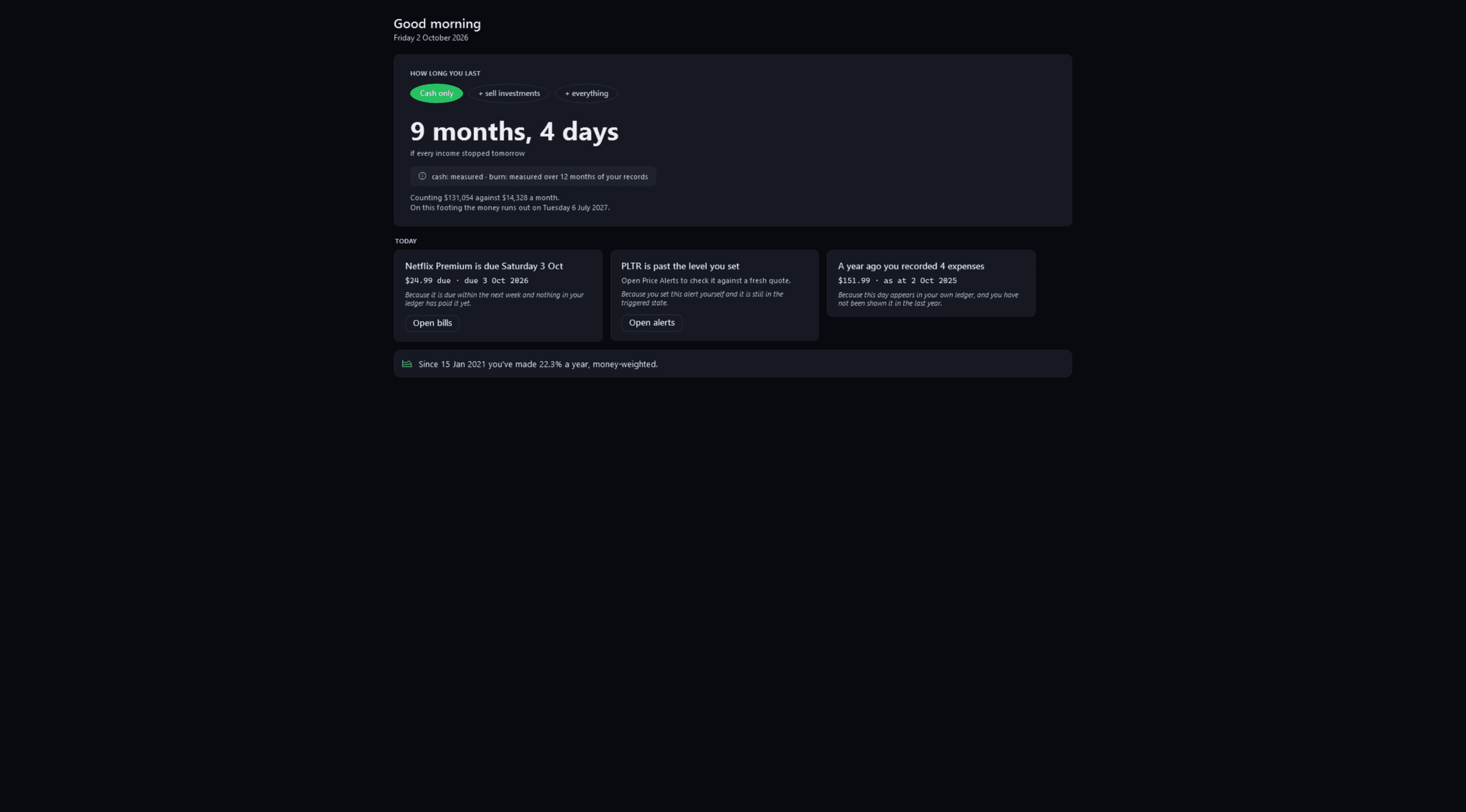
5 screenshotsToday. How long your money would last, and what needs you today.
TodayFree
Pulse Neuron 1.5.9 · Free · the demo household, captured 2 Oct 2026. Runway first, with every input labelled measured or your estimate; then today's cards and your money-weighted return. Screens show a fictional demo household — the people, accounts, balances and trades are made up; share prices, dividends and splits are real market history. Bank, card and store names are sample labels; no affiliation is implied. Since 1.6.4 the demo's accounts, cards and lenders carry generic names; pictures captured before then may show the real names it used as sample labels.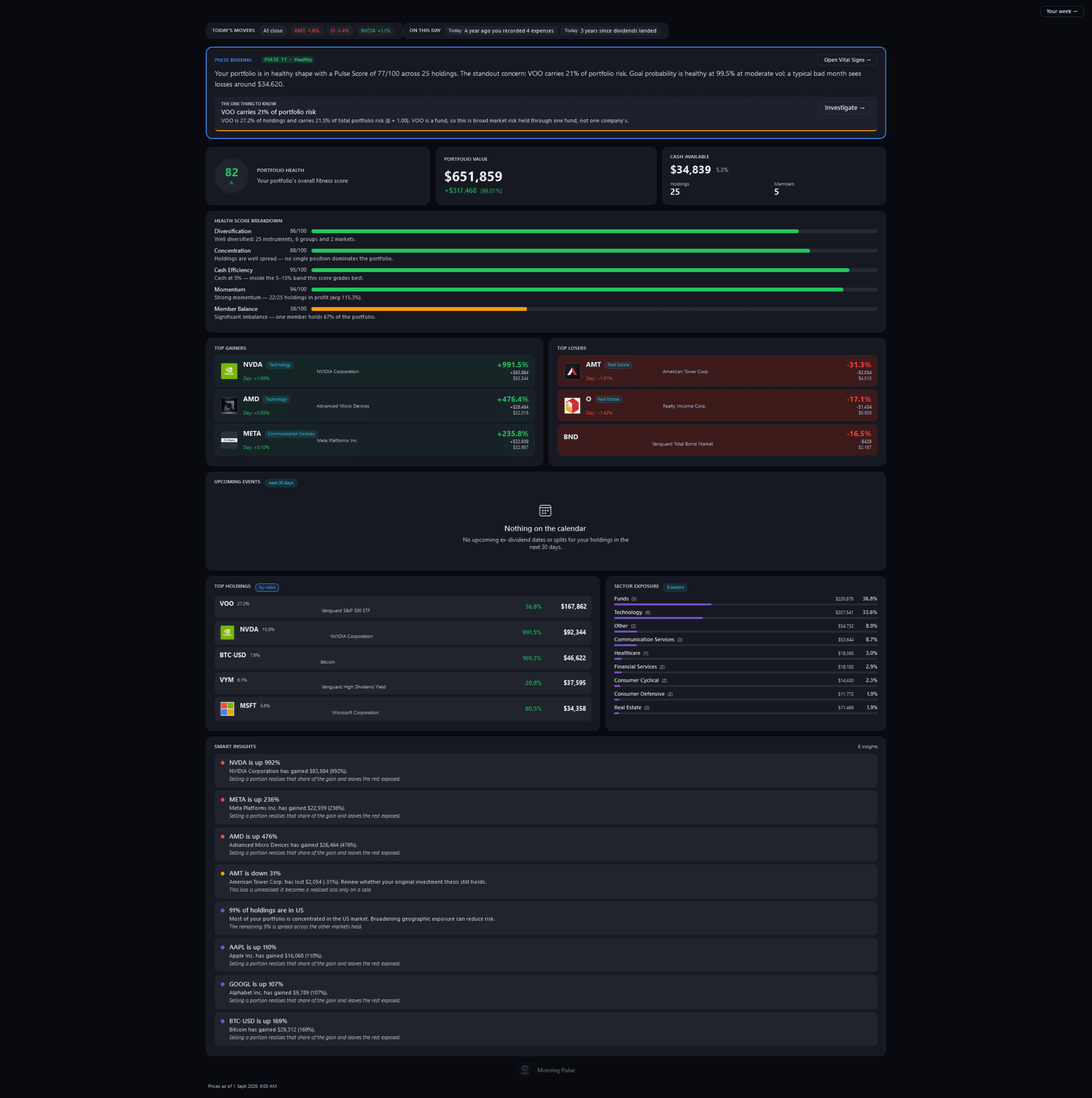
Morning PulseFree
Pulse Neuron 1.5.9 · Free · the demo household, captured 2 Oct 2026. A daily brief: the movers at the last stored close, a plain-English briefing, a health breakdown and observations from fixed rules that run on your PC. Screens show a fictional demo household — the people, accounts, balances and trades are made up; share prices, dividends and splits are real market history. Bank, card and store names are sample labels; no affiliation is implied. Since 1.6.4 the demo's accounts, cards and lenders carry generic names; pictures captured before then may show the real names it used as sample labels.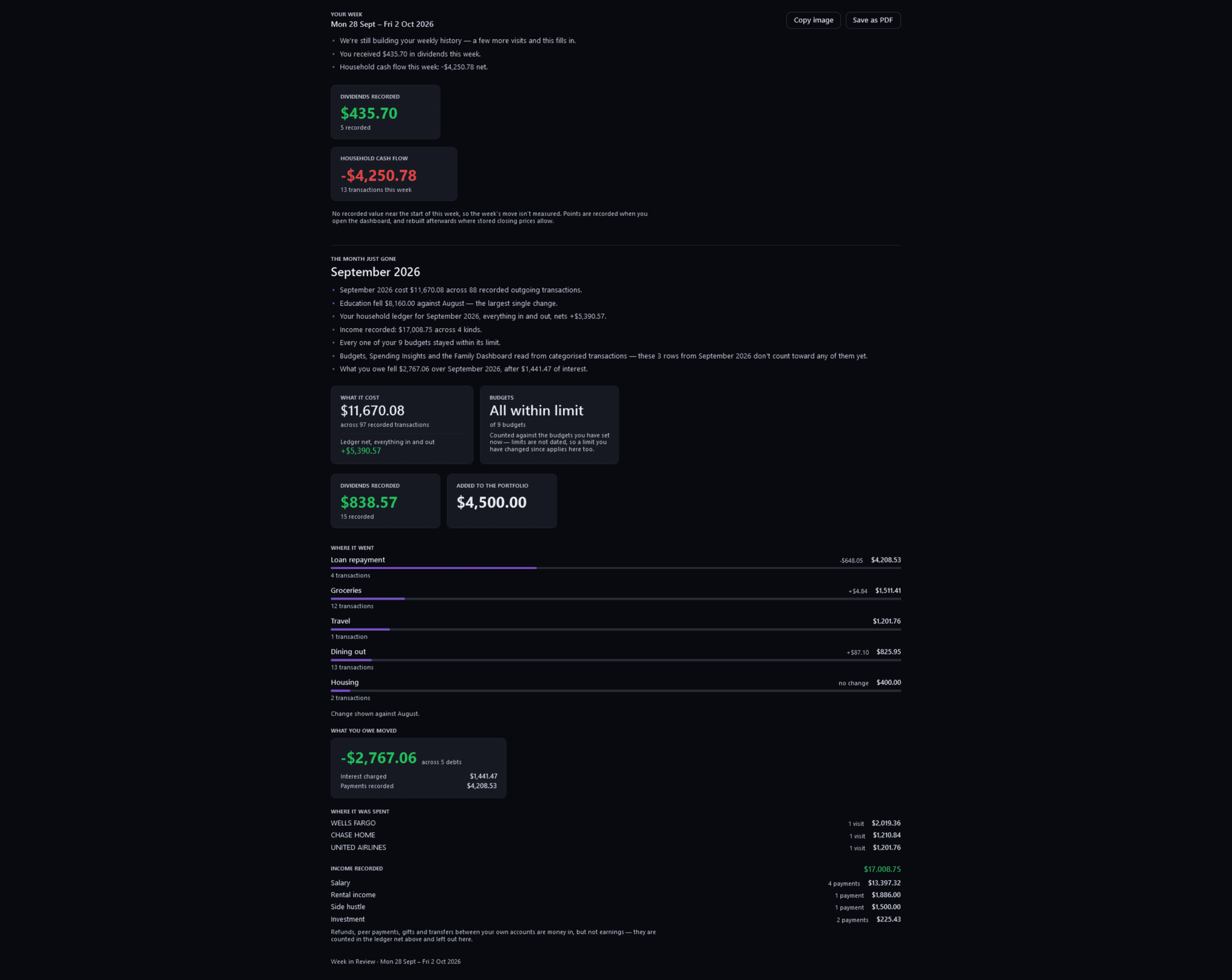
Week in ReviewFree
Pulse Neuron 1.5.9 · Free · the demo household, captured 2 Oct 2026. Your week and the month just gone, every figure real and dated; anything your records cannot support is left out. Screens show a fictional demo household — the people, accounts, balances and trades are made up; share prices, dividends and splits are real market history. Bank, card and store names are sample labels; no affiliation is implied. Since 1.6.4 the demo's accounts, cards and lenders carry generic names; pictures captured before then may show the real names it used as sample labels.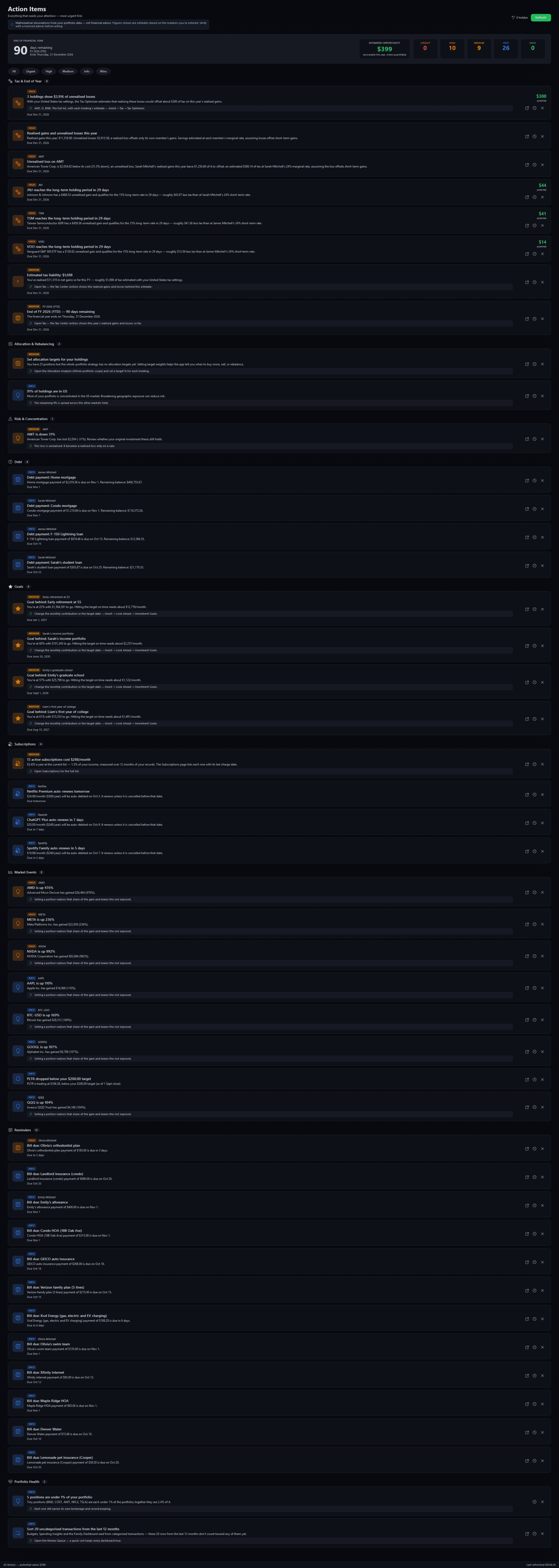
Action ItemsFree
Pulse Neuron 1.5.9 · Free · the demo household, captured 2 Oct 2026. Every item that needs attention in one list, grouped from tax and debts to goals, subscriptions, market events and reminders, and counted from Urgent to Wins. Since 1.6.3, “Set allocation targets for your holdings” says the Allocation and Rebalance pages compare each holding with the target you set, instead of saying when to trade. Screens show a fictional demo household — the people, accounts, balances and trades are made up; share prices, dividends and splits are real market history. Bank, card and store names are sample labels; no affiliation is implied. Since 1.6.4 the demo's accounts, cards and lenders carry generic names; pictures captured before then may show the real names it used as sample labels.Since 1.6.3, “Set allocation targets for your holdings” says the Allocation and Rebalance pages compare each holding with the target you set, instead of saying when to trade.
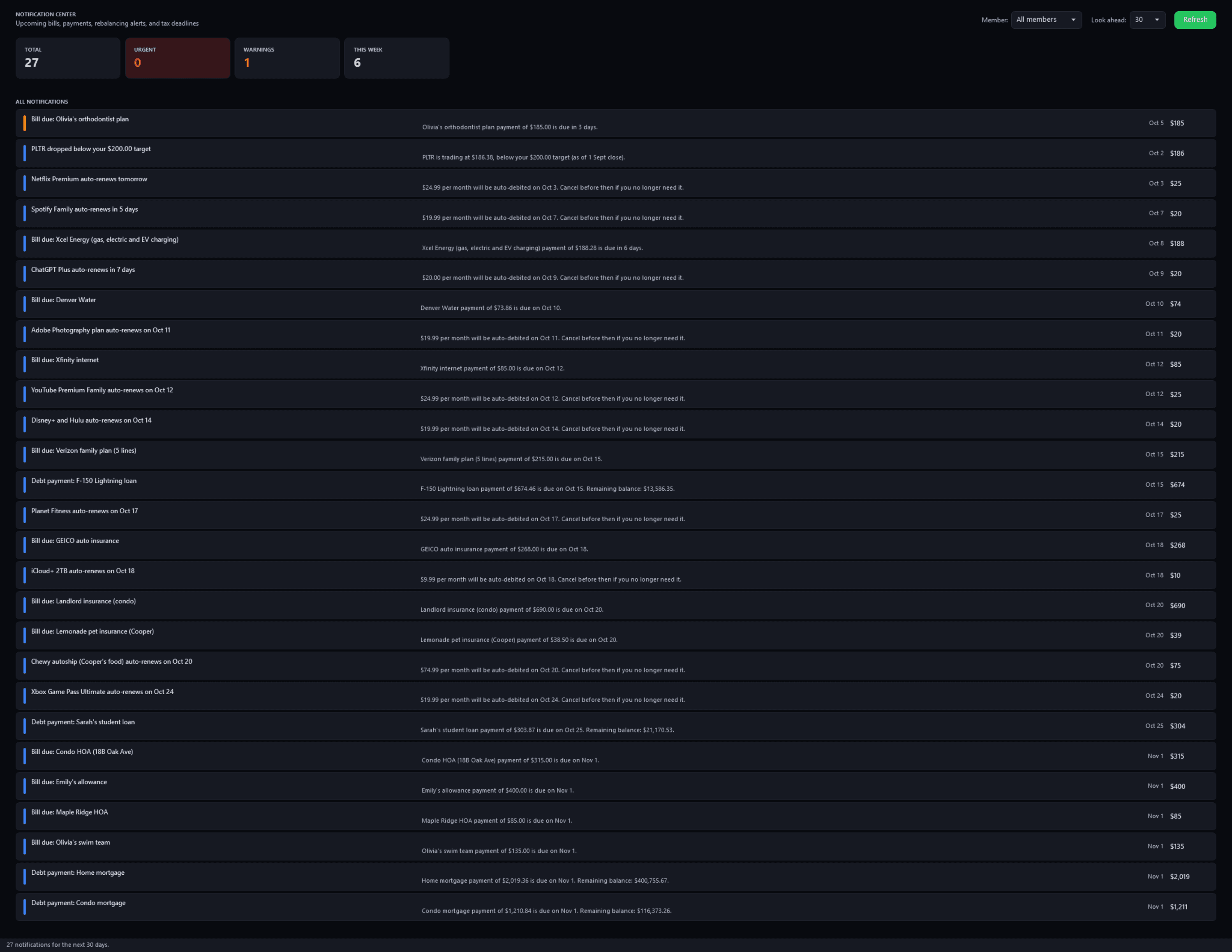
NotificationsFree
Pulse Neuron 1.5.9 · Free · the demo household, captured 2 Oct 2026. Everything dated in the next 30 days: bills, subscription renewals, debt payments and a price alert. Screens show a fictional demo household — the people, accounts, balances and trades are made up; share prices, dividends and splits are real market history. Bank, card and store names are sample labels; no affiliation is implied. Since 1.6.4 the demo's accounts, cards and lenders carry generic names; pictures captured before then may show the real names it used as sample labels.
The Invest door
51 screenshotsInvest. Holdings, returns three ways, dividends, tax and the Lab.
What you hold
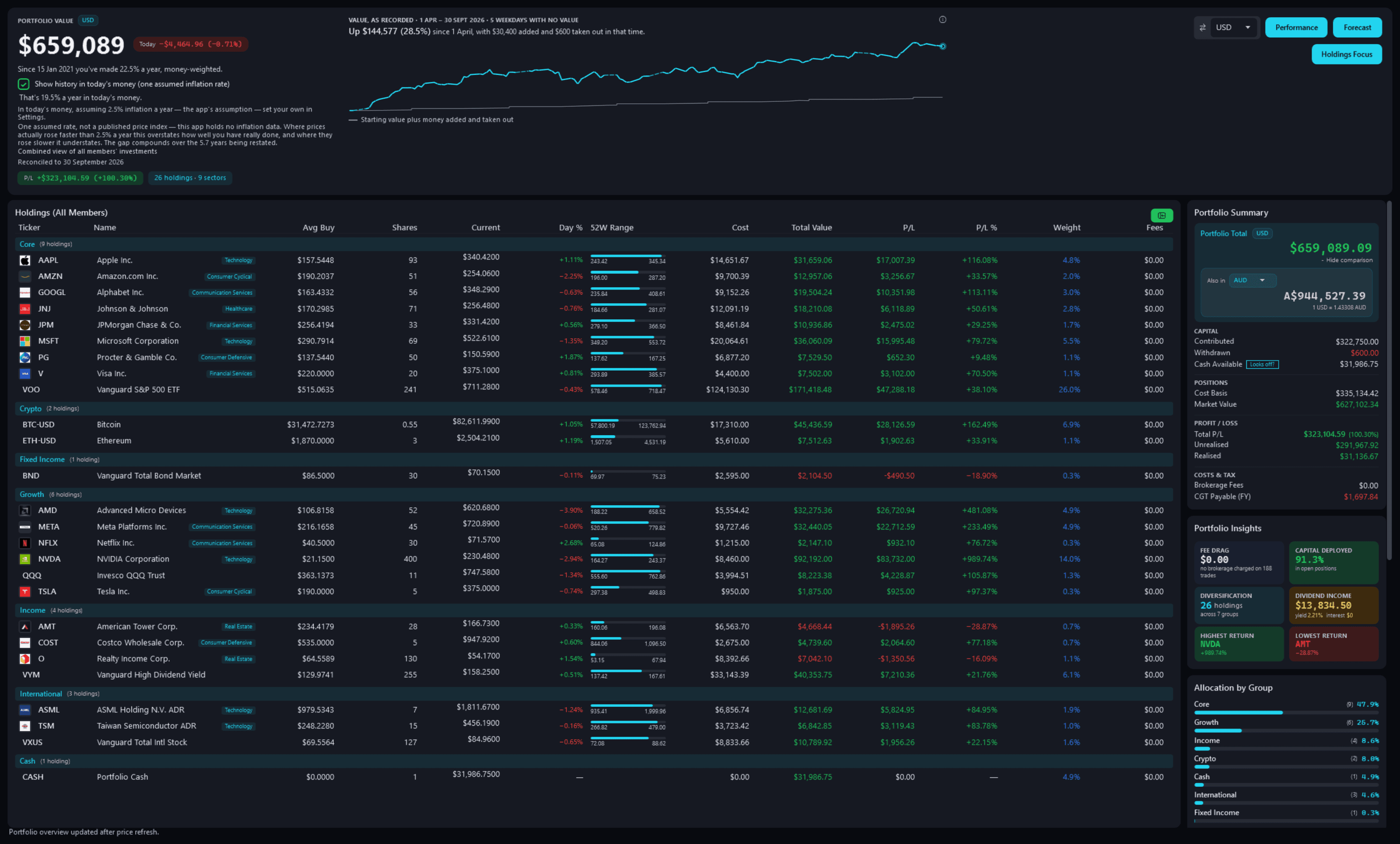
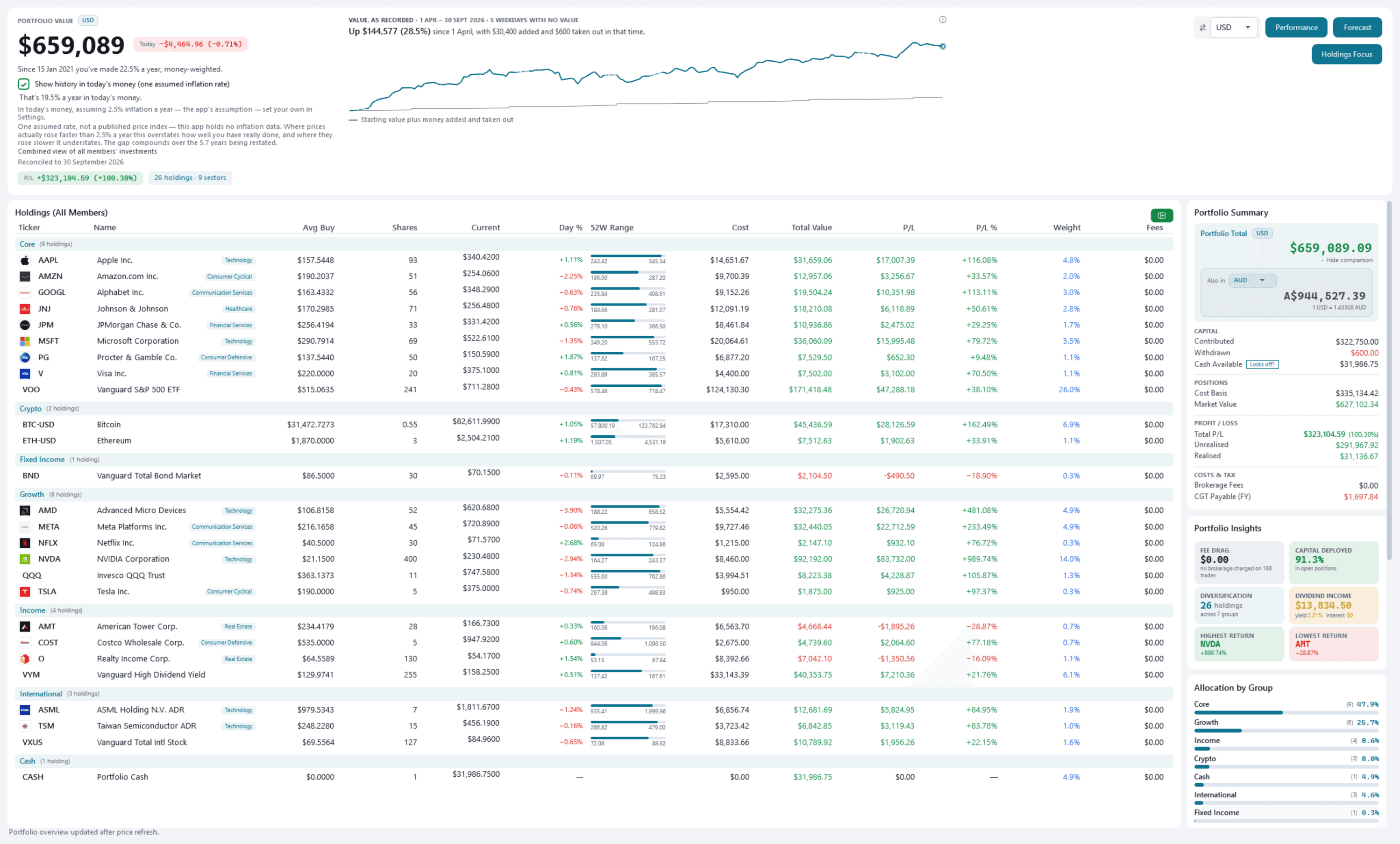
Portfolio DashboardFree
Pulse Neuron 1.6.0 · Free · the demo household, captured 9 Oct 2026. Every holding across every member, grouped, with value, today's move, profit and loss, 52-week range and weight, and beside the total, the value over time with the money added marked. Screens show a fictional demo household — the people, accounts, balances and trades are made up; share prices, dividends and splits are real market history. Bank, card and store names are sample labels; no affiliation is implied. Since 1.6.4 the demo's accounts, cards and lenders carry generic names; pictures captured before then may show the real names it used as sample labels.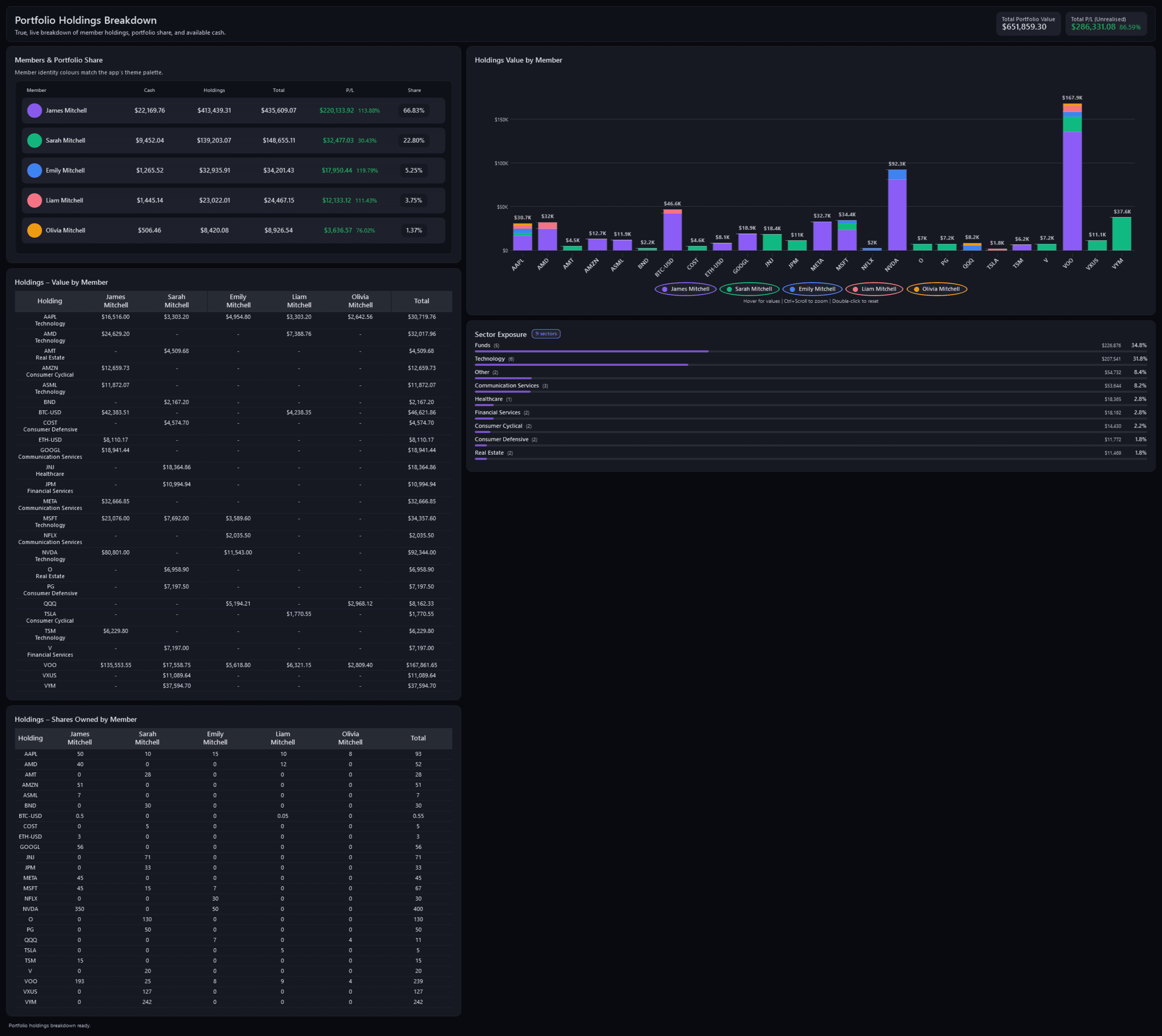
Holdings BreakdownPro
Pulse Neuron 1.5.9 · Pro · the demo household, captured 2 Oct 2026. Each member's cash, holdings and share, a chart of every holding by member, sector exposure, and value and shares member by member. Screens show a fictional demo household — the people, accounts, balances and trades are made up; share prices, dividends and splits are real market history. Bank, card and store names are sample labels; no affiliation is implied. Since 1.6.4 the demo's accounts, cards and lenders carry generic names; pictures captured before then may show the real names it used as sample labels.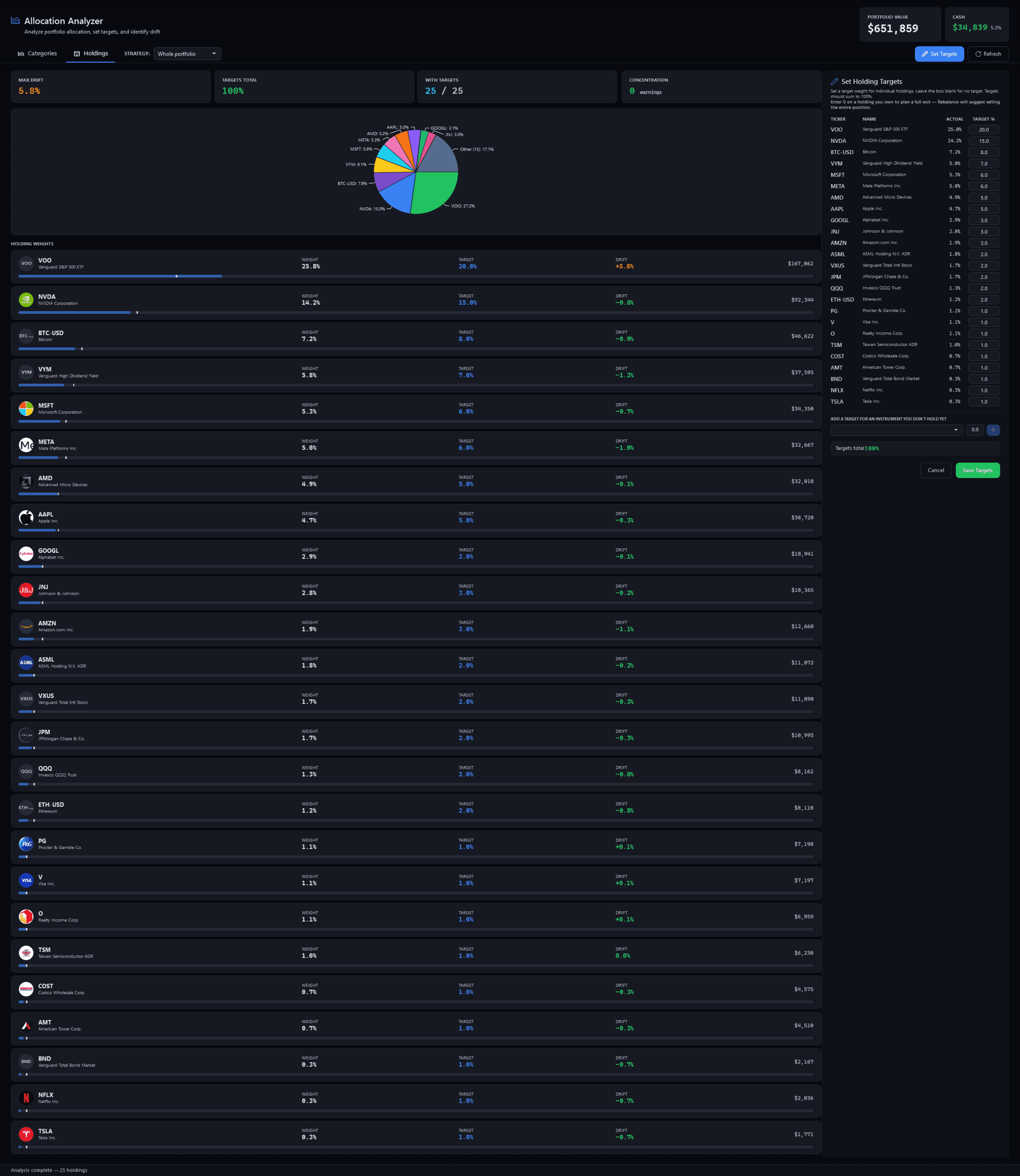
Allocation AnalyzerPro
Pulse Neuron 1.5.9 · Pro · the demo household, captured 2 Oct 2026. Each holding's weight against the target you set, with its drift, beside a pie of the portfolio and the targets editor. Since 1.6.2, Set Holding Targets also takes a target for Cash, at the bottom, and can remove a target for something you no longer hold. Screens show a fictional demo household — the people, accounts, balances and trades are made up; share prices, dividends and splits are real market history. Bank, card and store names are sample labels; no affiliation is implied. Since 1.6.4 the demo's accounts, cards and lenders carry generic names; pictures captured before then may show the real names it used as sample labels.Since 1.6.2, Set Holding Targets also takes a target for Cash, at the bottom, and can remove a target for something you no longer hold.
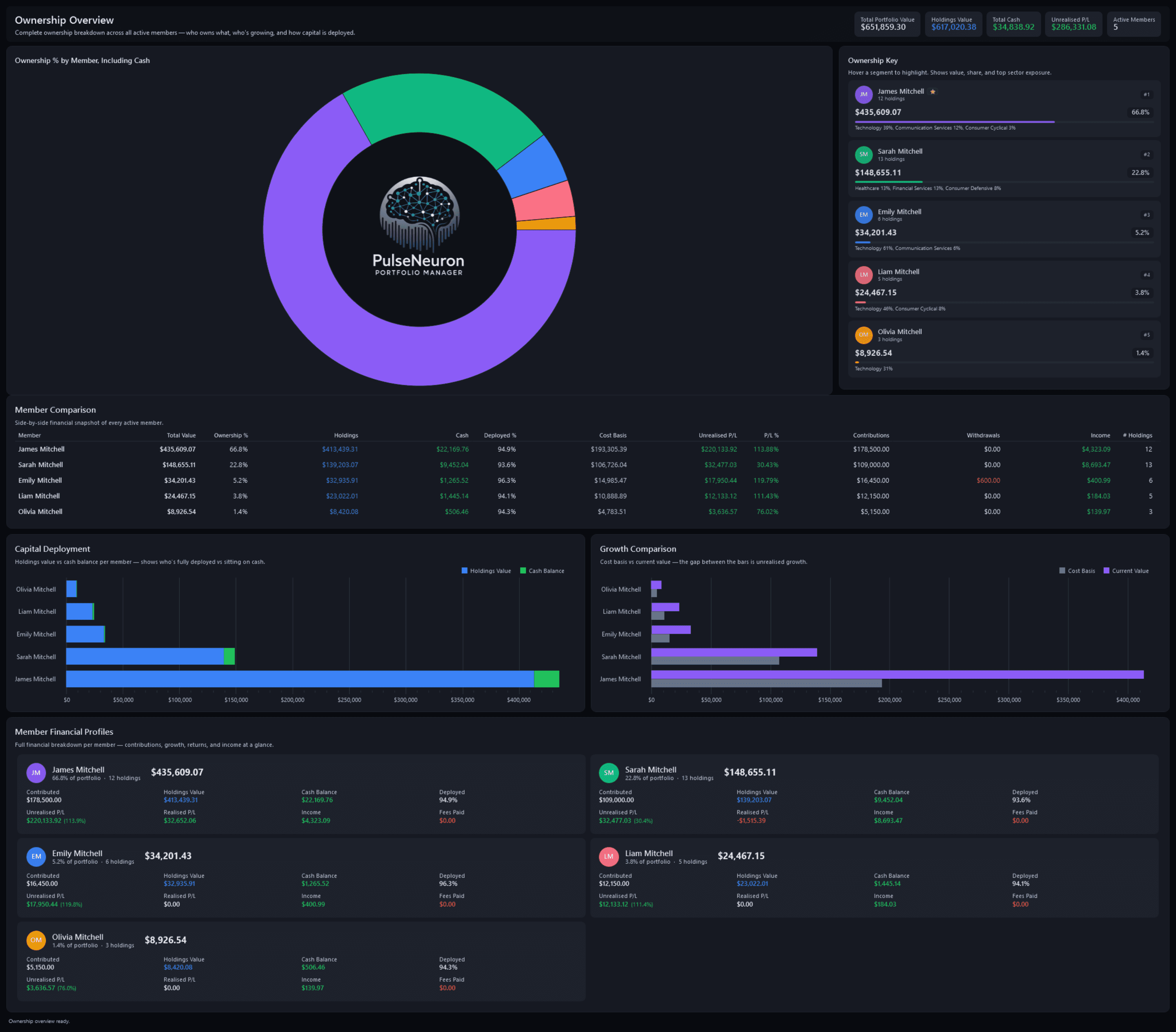
Ownership OverviewPro
Pulse Neuron 1.5.9 · Pro · the demo household, captured 2 Oct 2026. Each member's share of the portfolio, cash included, with a side-by-side comparison, capital deployed and growth per member. Screens show a fictional demo household — the people, accounts, balances and trades are made up; share prices, dividends and splits are real market history. Bank, card and store names are sample labels; no affiliation is implied. Since 1.6.4 the demo's accounts, cards and lenders carry generic names; pictures captured before then may show the real names it used as sample labels.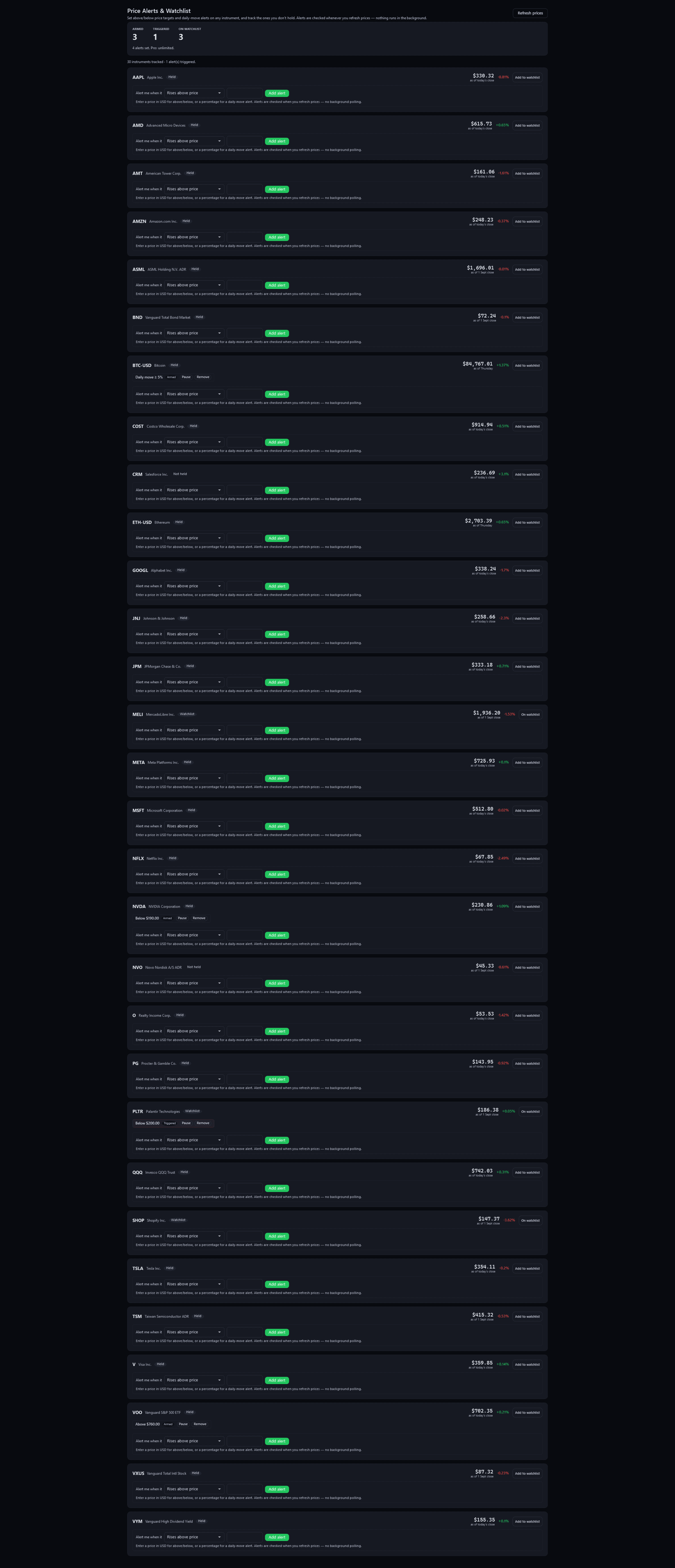
Price Alerts & WatchlistFree + Pro
Pulse Neuron 1.5.9 · Free + Pro · the demo household, captured 2 Oct 2026. Targets and daily-move alerts, checked when prices refresh. Free: up to 15 alerts; Pro: unlimited. On Free, watched symbols count toward the 15 instruments you can track, and that limit binds first. Screens show a fictional demo household — the people, accounts, balances and trades are made up; share prices, dividends and splits are real market history. Bank, card and store names are sample labels; no affiliation is implied. Since 1.6.4 the demo's accounts, cards and lenders carry generic names; pictures captured before then may show the real names it used as sample labels.
What's new, corrected prices and net proceeds
Rendered from the app for a fictional family, with invented investments and example prices.
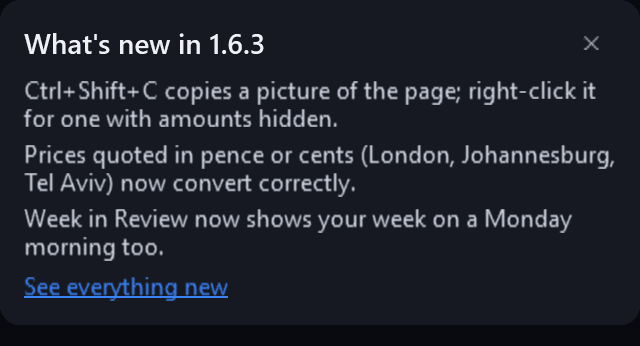
Portfolio Dashboard — the What's new cardFree
Pulse Neuron 1.6.3 · Free · rendered from the app for a fictional family, 18 Oct 2026. After an update, a short card in the Dashboard's right-hand column says what changed, once per version, with a link to this site's What's new. Pictures new in 1.6.3 are rendered from the app itself, offscreen, for a fictional family, with invented investments and example prices.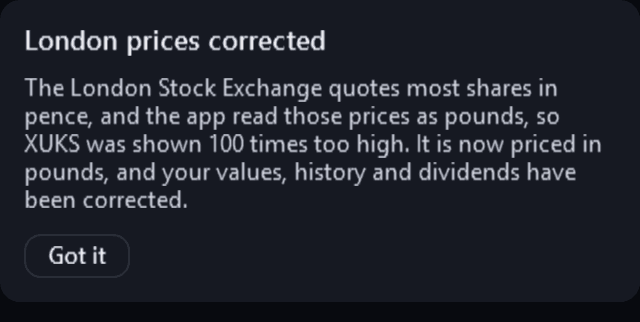
Portfolio Dashboard — London prices correctedFree
Pulse Neuron 1.6.3 · Free · rendered from the app for a fictional family, 18 Oct 2026. Once, after the update, in a portfolio whose London, Johannesburg or Tel Aviv holdings were corrected (here an invented London listing): what was wrong, and which holdings it fixed. Pictures new in 1.6.3 are rendered from the app itself, offscreen, for a fictional family, with invented investments and example prices.
Add Transaction — on a sellFree + Pro
Pulse Neuron 1.6.3 · Free + Pro · rendered from the app for a fictional family, 18 Oct 2026. On a sell, the form shows the net proceeds, units times price less brokerage, and how many units the member holds, with Sell all to fill them in. Pictures new in 1.6.3 are rendered from the app itself, offscreen, for a fictional family, with invented investments and example prices.
Group trade and cash targets
Rendered from the app for a fictional family, with invented investments and example prices.
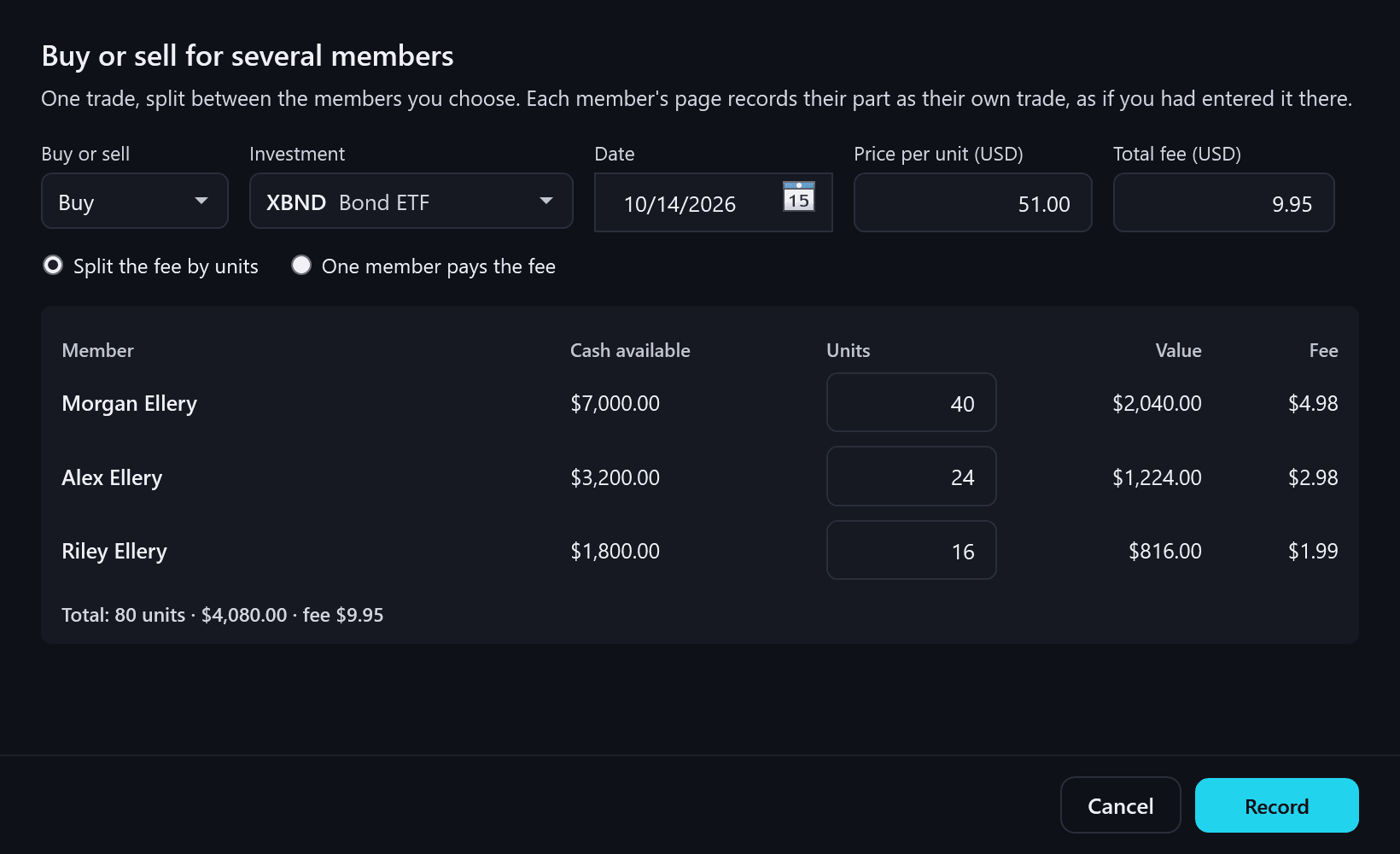
Group trade — a buy for three membersFree
Pulse Neuron 1.6.2 · Free · rendered from the app for a fictional family, 14 Oct 2026. One buy for three members: each member's units beside their cash, and the fee split by units, to the cent. Each part is recorded as that member's own trade. Pictures new in 1.6.2 are rendered from the app itself, offscreen, for a fictional family, with invented investments and example prices.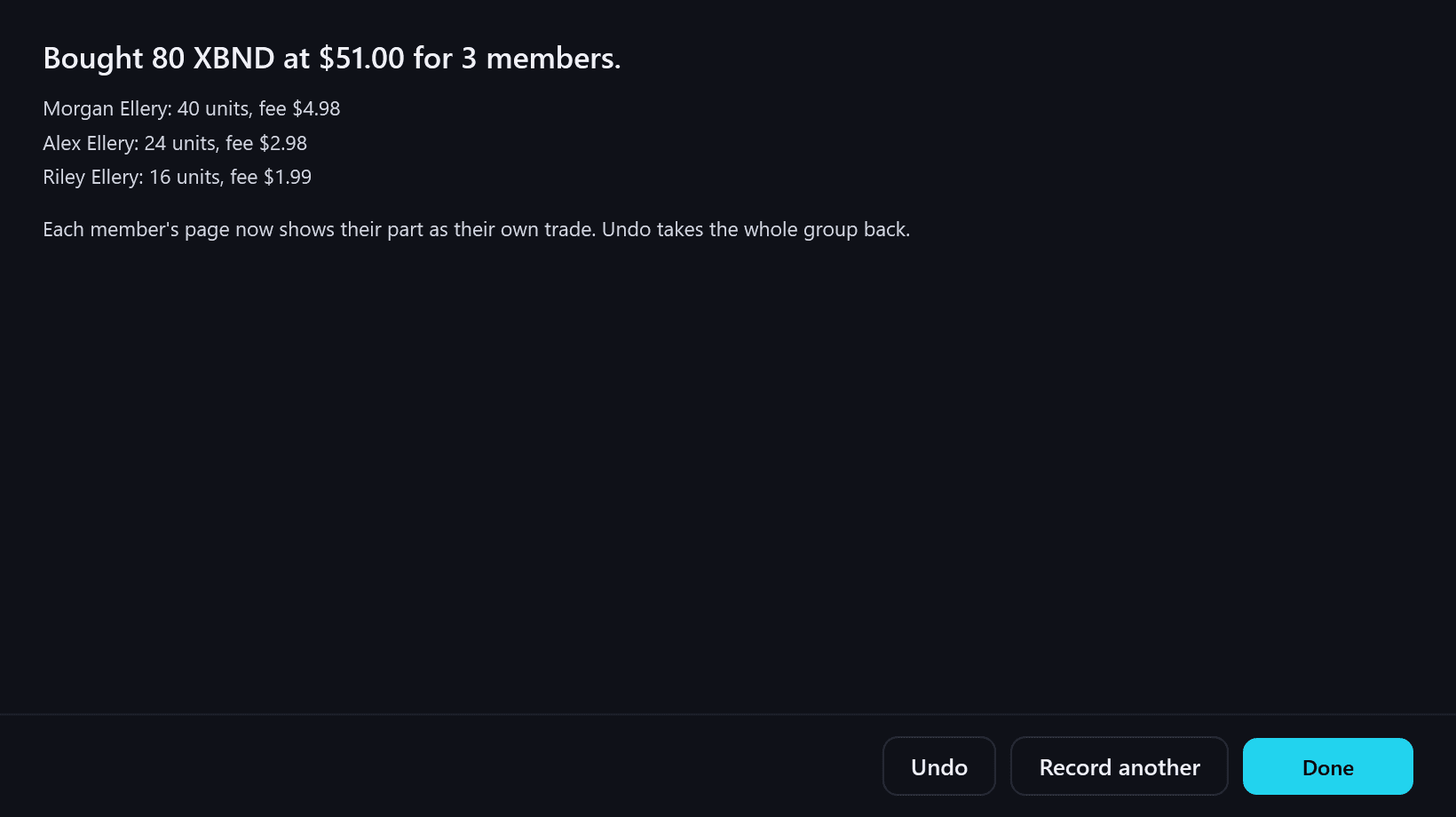
Group trade — recorded, with UndoFree
Pulse Neuron 1.6.2 · Free · rendered from the app for a fictional family, 14 Oct 2026. What was recorded for whom, with Undo straight after, which takes the whole group back. Pictures new in 1.6.2 are rendered from the app itself, offscreen, for a fictional family, with invented investments and example prices.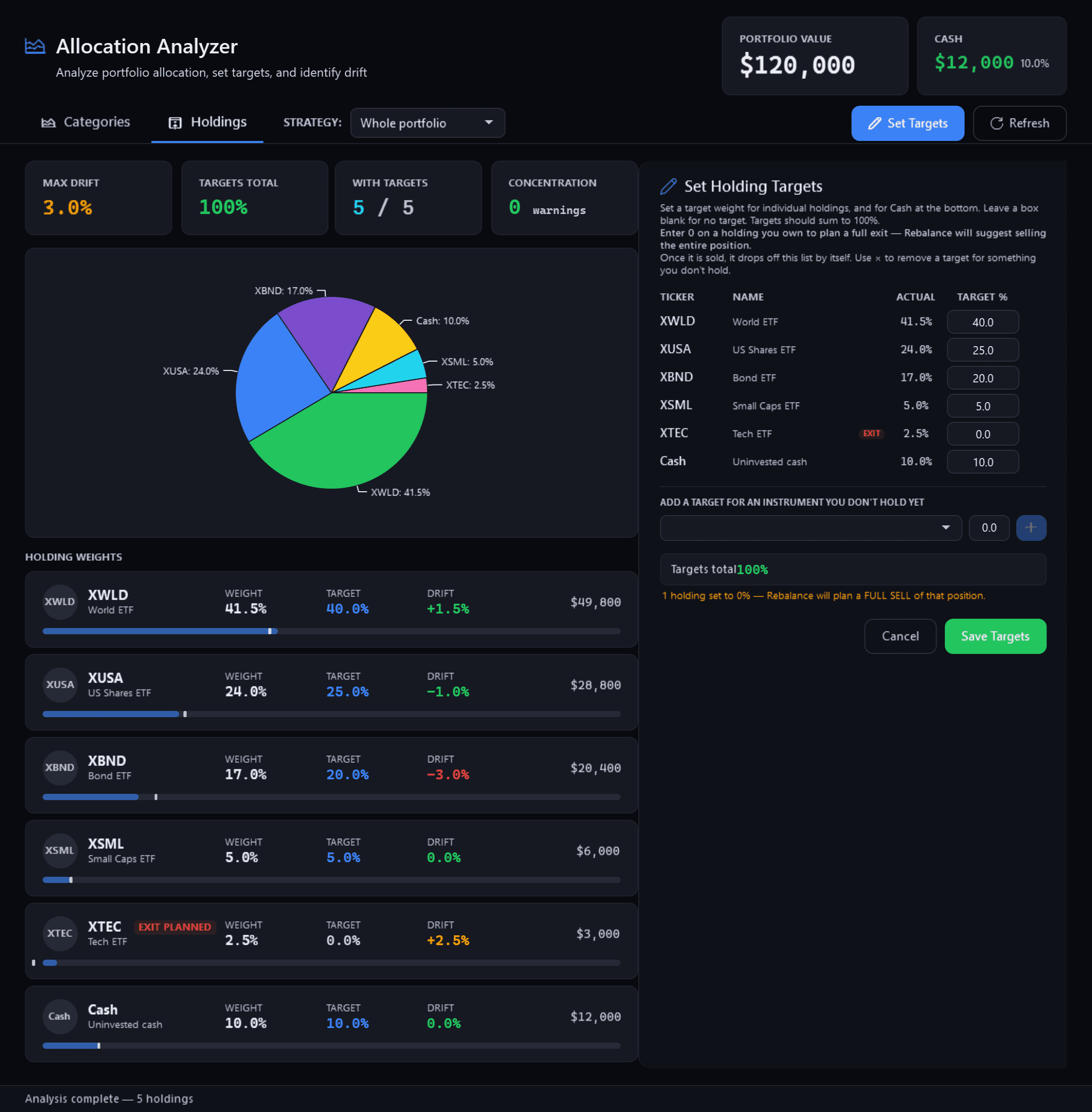
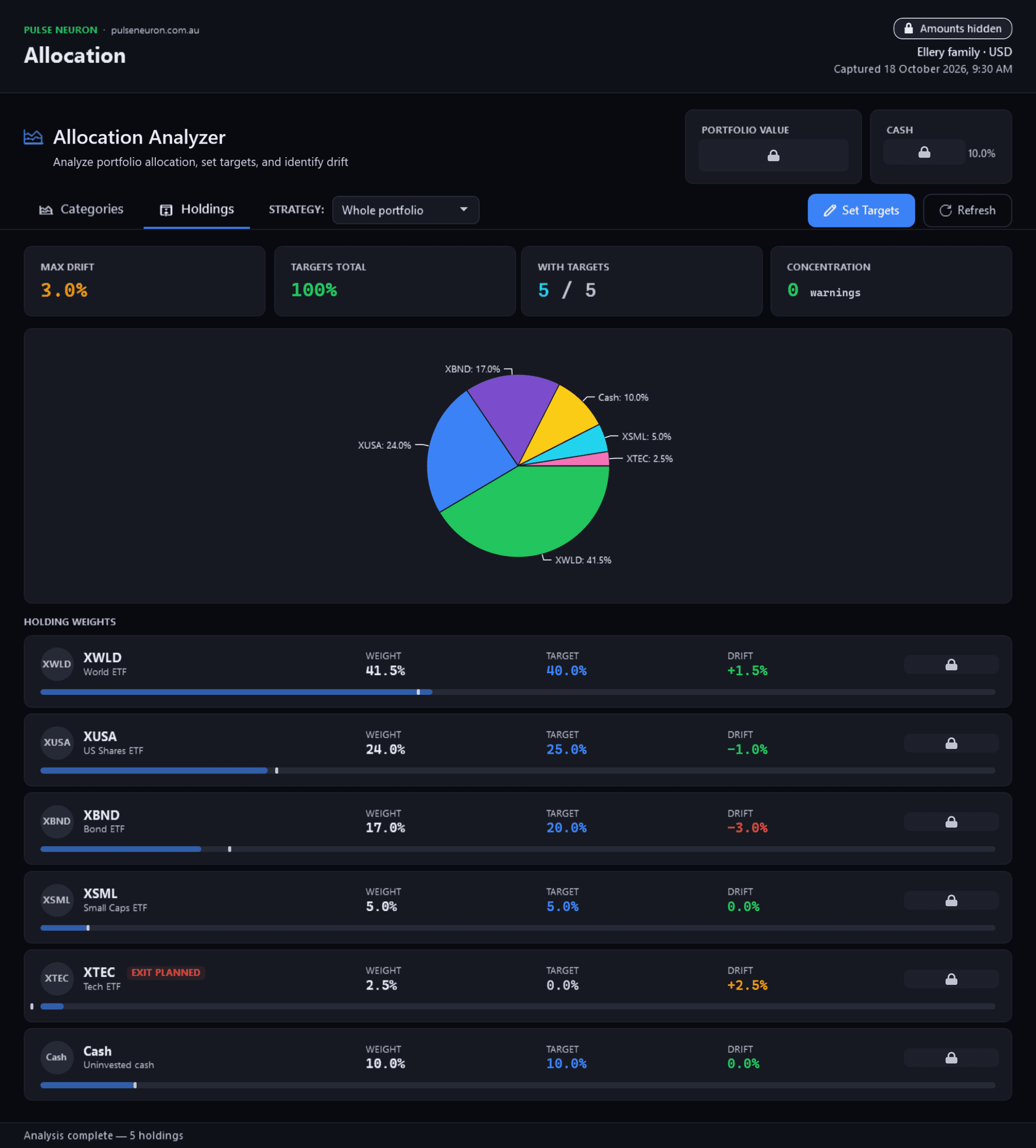
Allocation Analyzer — a Cash targetPro
Pulse Neuron 1.6.2 · Pro · rendered from the app for a fictional family, 14 Oct 2026. Cash takes a target like a holding: the last row of Set Holding Targets, and a row of its own in the weights and the chart. Pictures new in 1.6.2 are rendered from the app itself, offscreen, for a fictional family, with invented investments and example prices.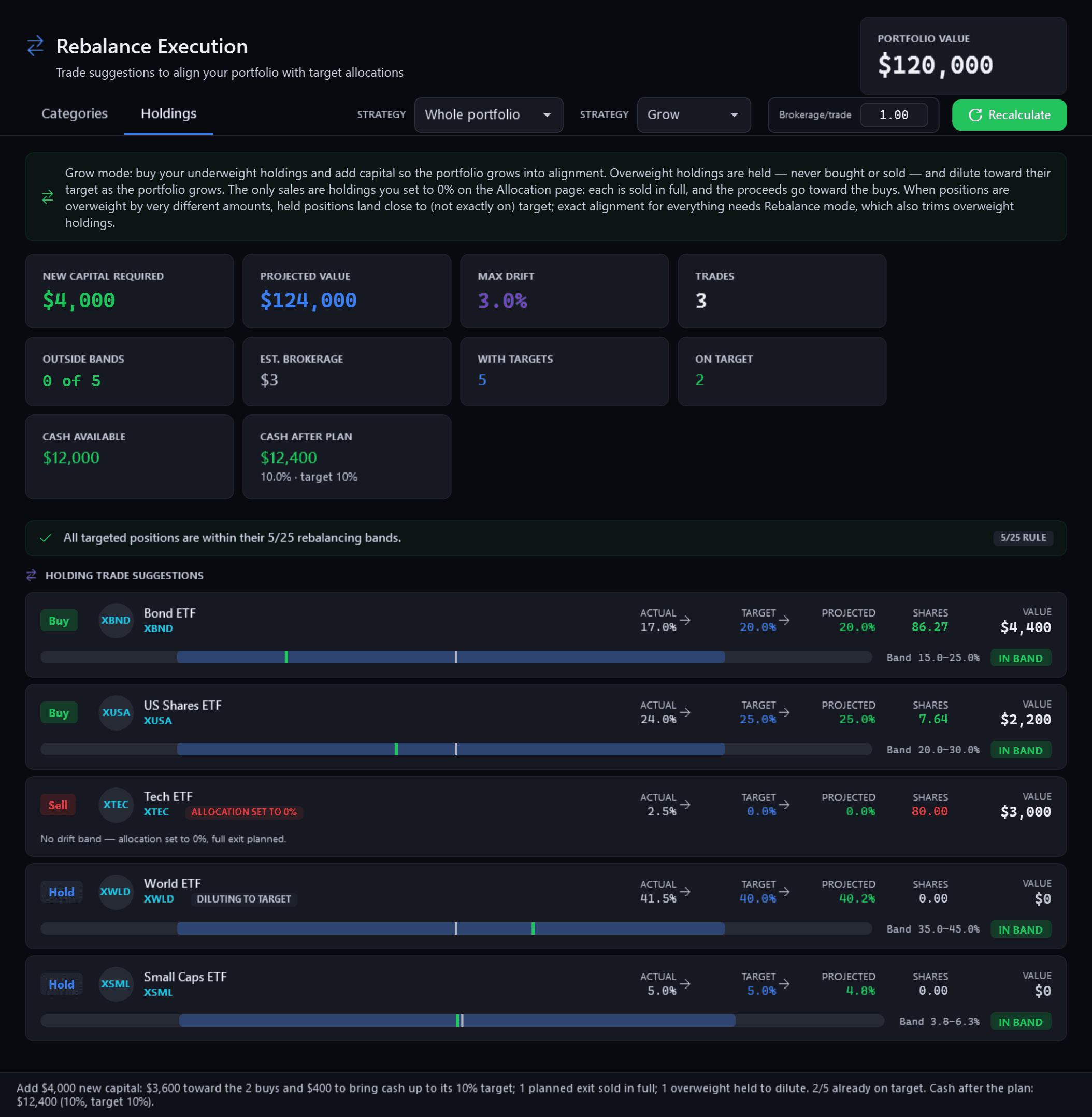
Rebalance Execution — Grow, with a Cash targetPro
Pulse Neuron 1.6.2 · Pro · rendered from the app for a fictional family, 14 Oct 2026. In Grow mode with a Cash target: the buys, a holding set to 0% sold in full, and the cash after the plan beside its 10% target. Pictures new in 1.6.2 are rendered from the app itself, offscreen, for a fictional family, with invented investments and example prices.
Set up what you already own
Rendered from the app for a fictional person, with example prices: the setup is not available in the demo.
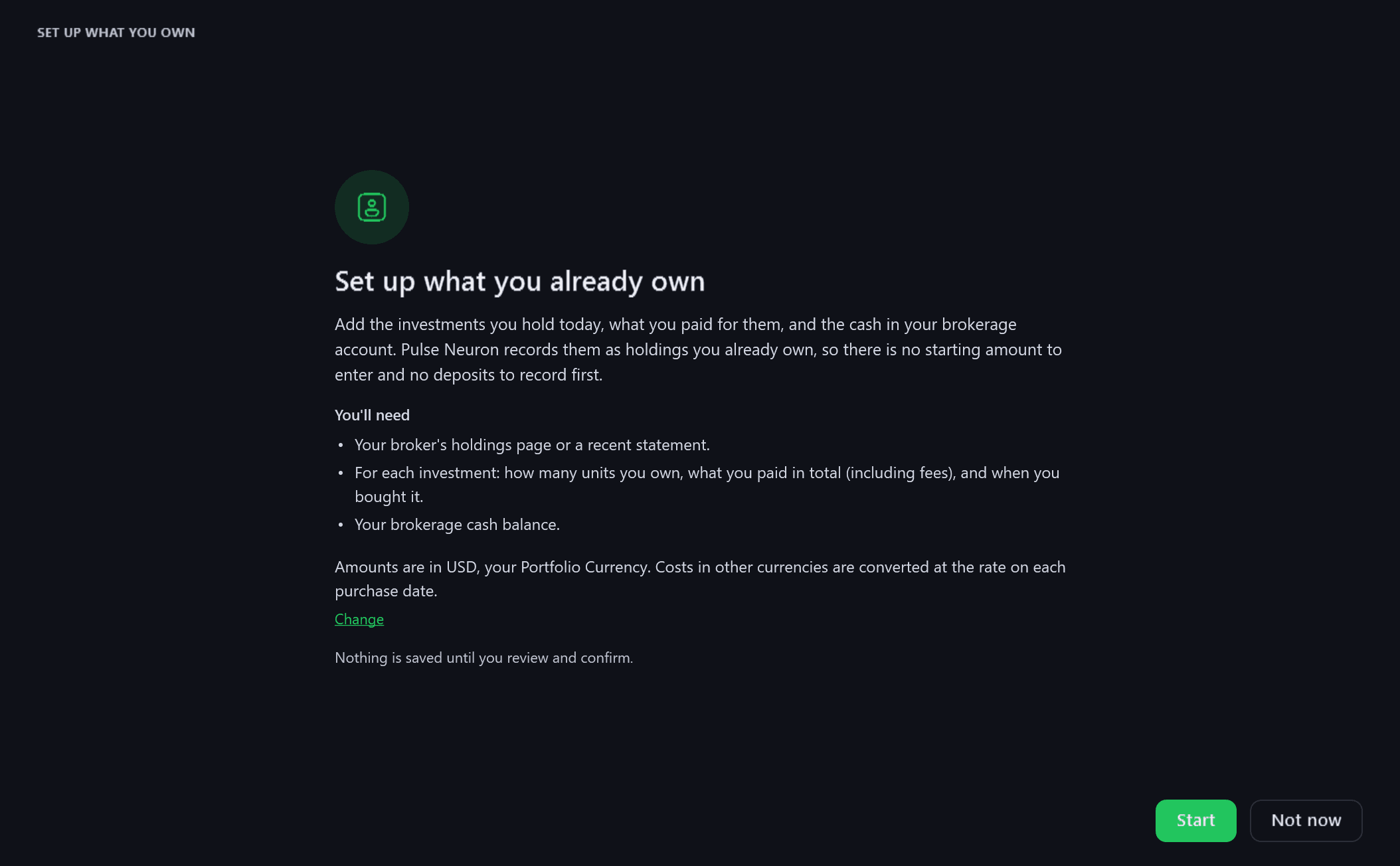
Set up what you already own — WelcomeFree
Pulse Neuron 1.6.1 · Free · rendered from the app for a fictional person, 12 Oct 2026. What you will need, with no starting amount to enter and no deposits to record first. Nothing is saved until you review and confirm. Pictures of Set up what you already own are rendered from the app itself, offscreen, for a fictional person with example prices and exchange rates: the setup is not available in the demo.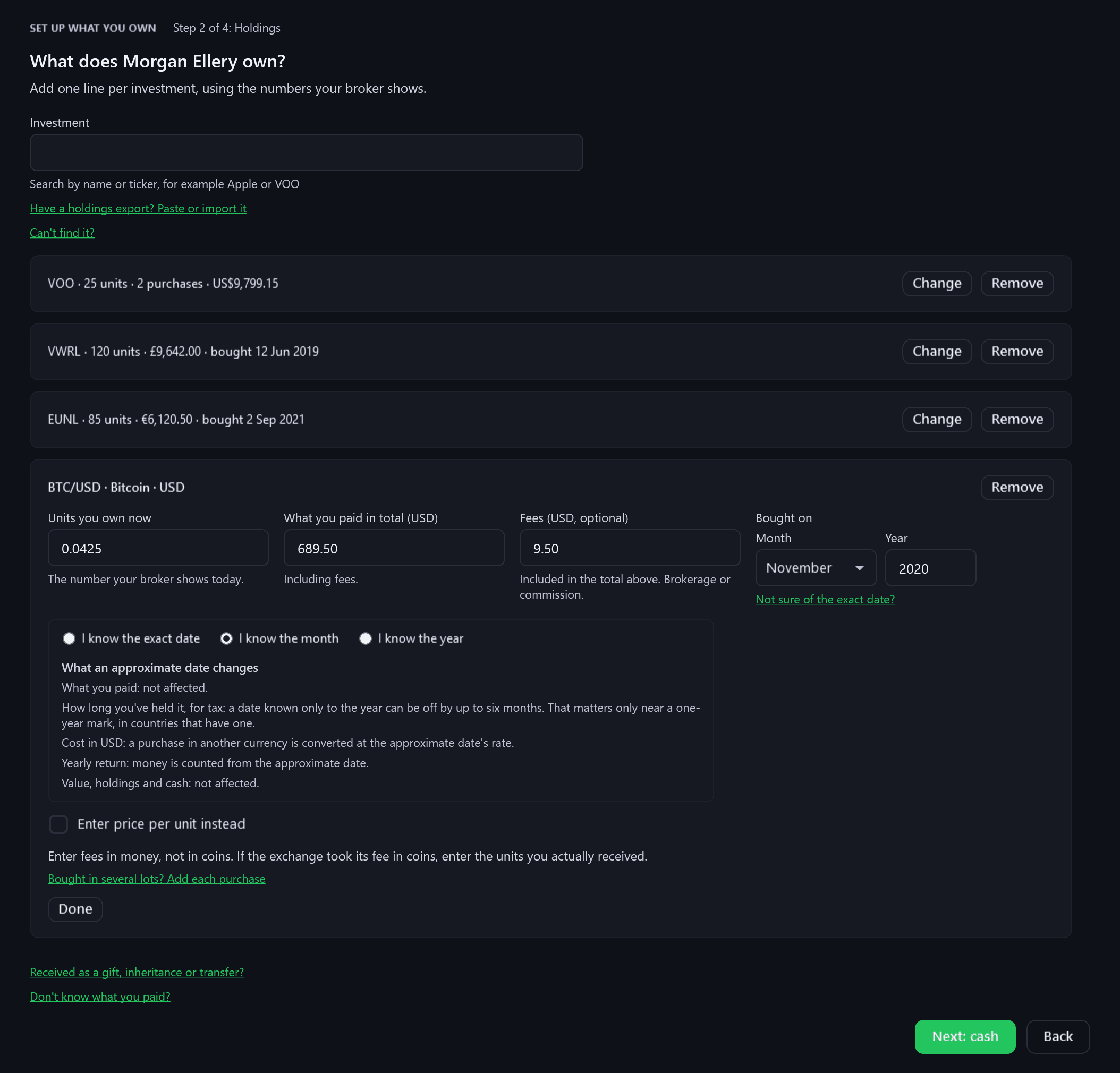
Set up what you already own — HoldingsFree
Pulse Neuron 1.6.1 · Free · rendered from the app for a fictional person, 12 Oct 2026. One line per investment: several purchases, a month or a year when you are not sure of the day, and costs in other currencies, converted at the rate on each purchase date. Pictures of Set up what you already own are rendered from the app itself, offscreen, for a fictional person with example prices and exchange rates: the setup is not available in the demo.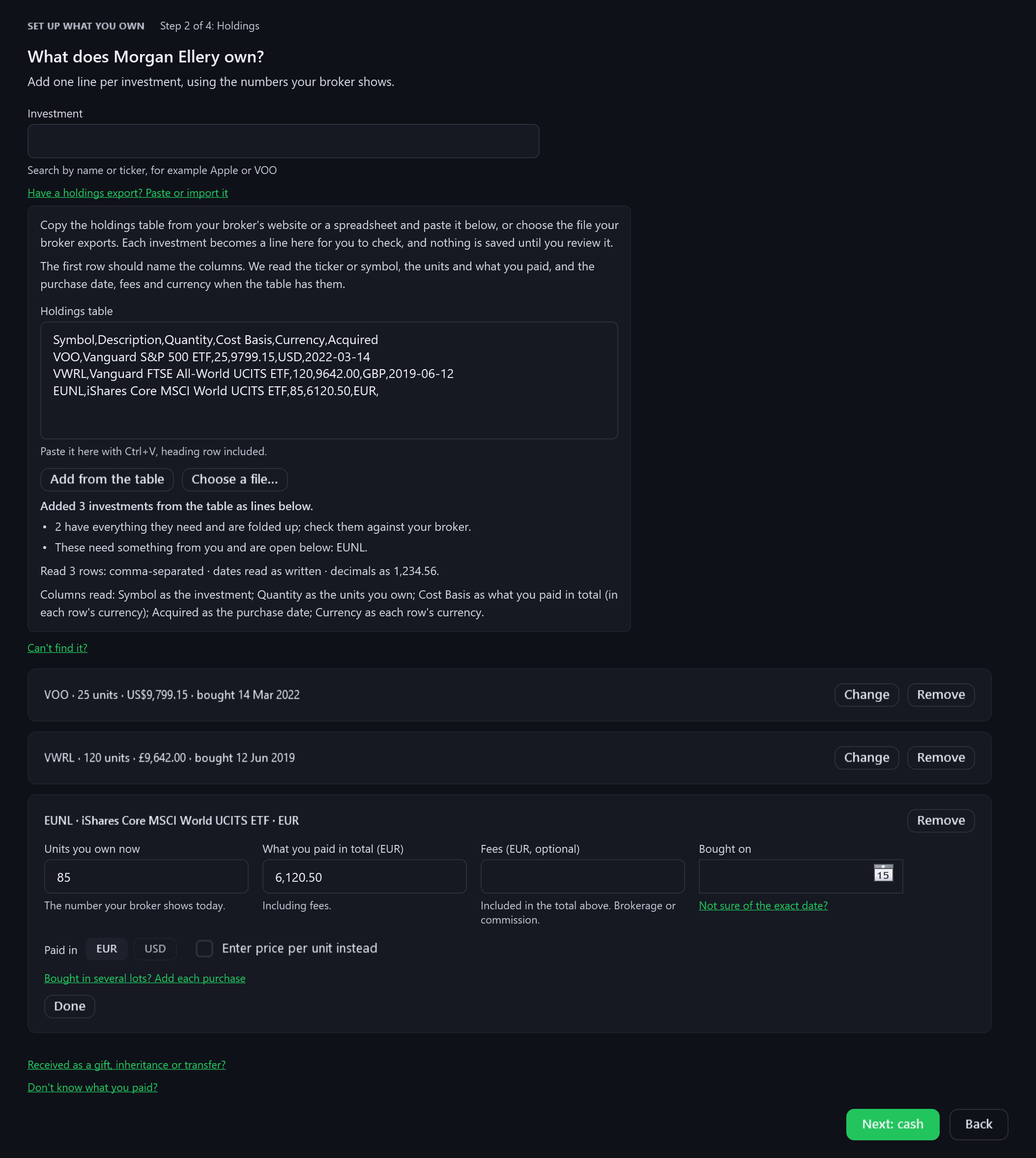
Set up what you already own — Holdings fileFree
Pulse Neuron 1.6.1 · Free · rendered from the app for a fictional person, 12 Oct 2026. Paste your broker's holdings table, or choose its CSV, TSV or TXT export. Each investment becomes a line for you to check, and nothing is saved until you review it. Pictures of Set up what you already own are rendered from the app itself, offscreen, for a fictional person with example prices and exchange rates: the setup is not available in the demo.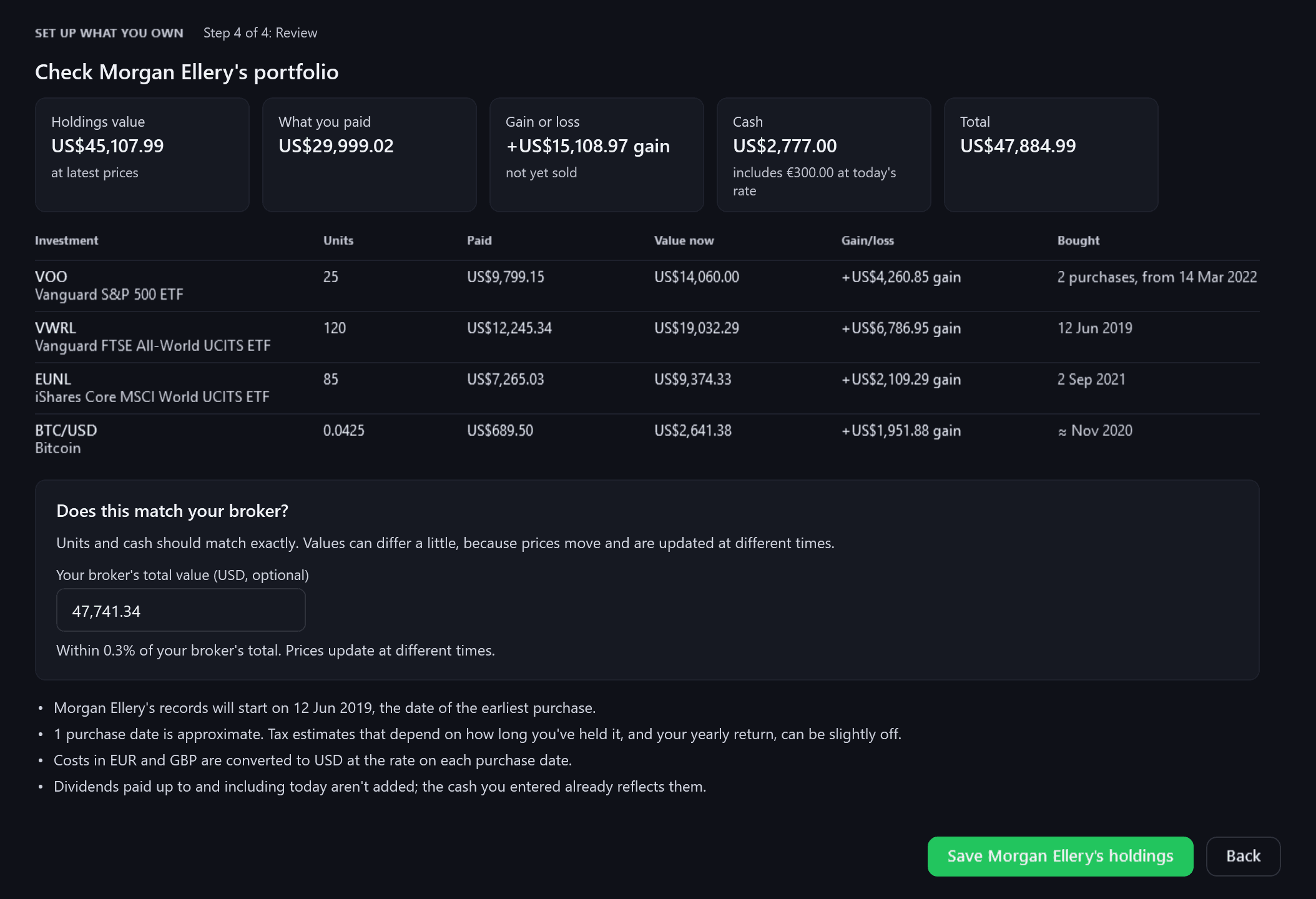
Set up what you already own — ReviewFree
Pulse Neuron 1.6.1 · Free · rendered from the app for a fictional person, 12 Oct 2026. What you hold, what you paid, the gain or loss, the cash and the total, checked against your broker's total before anything is saved. Pictures of Set up what you already own are rendered from the app itself, offscreen, for a fictional person with example prices and exchange rates: the setup is not available in the demo.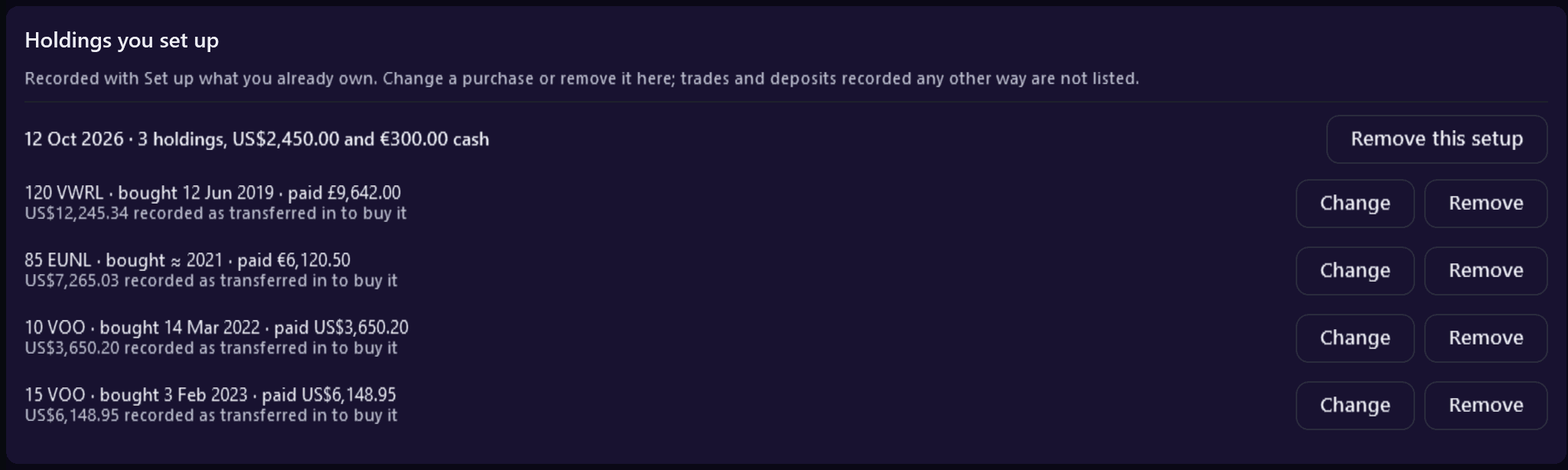
Holdings you set upFree + Pro
Pulse Neuron 1.6.1 · Free + Pro · rendered from the app for a fictional person, 12 Oct 2026. Every setup on the person's dashboard, with each purchase and the money recorded as transferred in to buy it, to change or remove. Pictures of Set up what you already own are rendered from the app itself, offscreen, for a fictional person with example prices and exchange rates: the setup is not available in the demo.
Each member's dashboard
Captured on 1.5.9. Since 1.6.0, each member's page also shows their value over time, in the Account Summary.
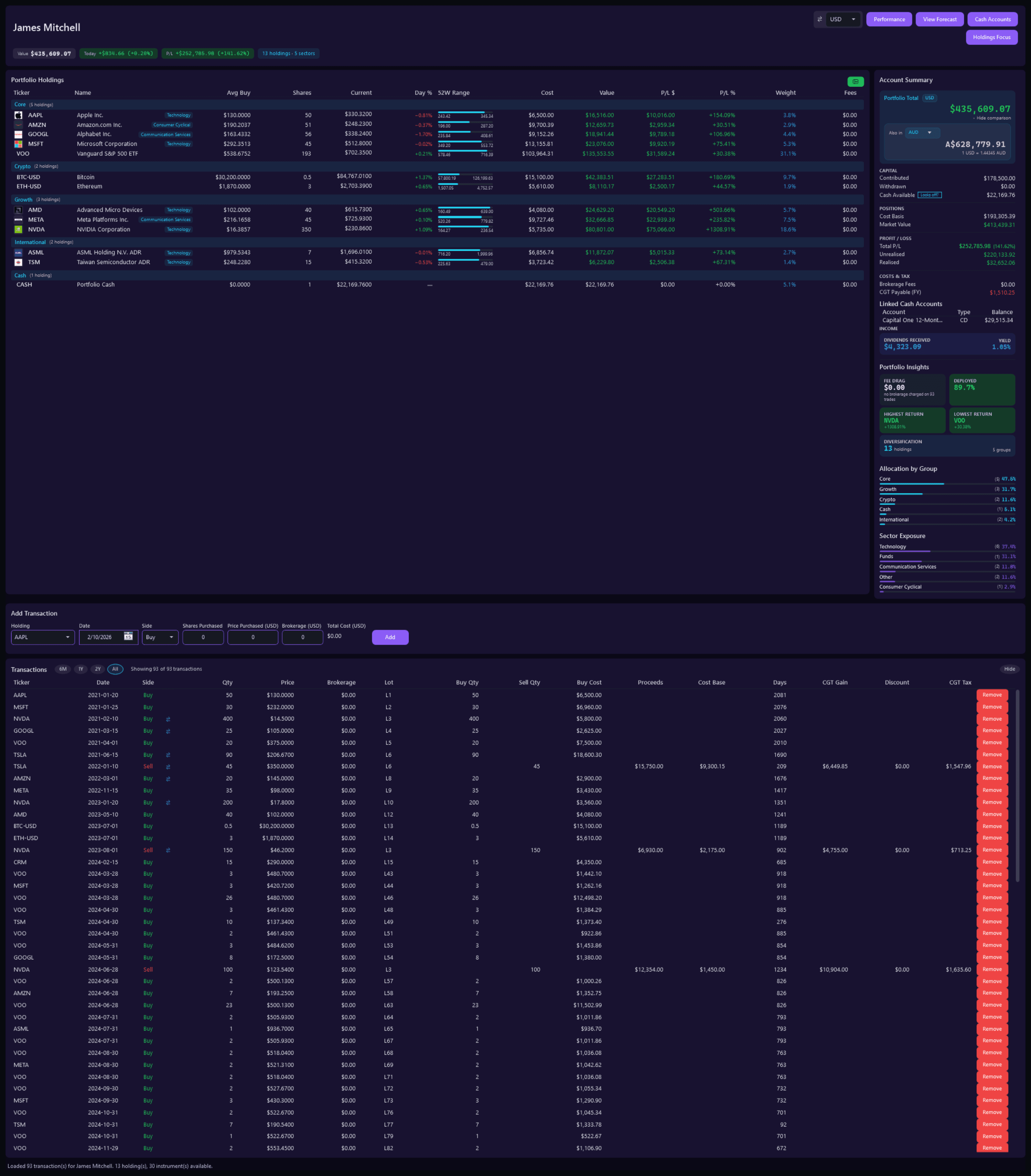
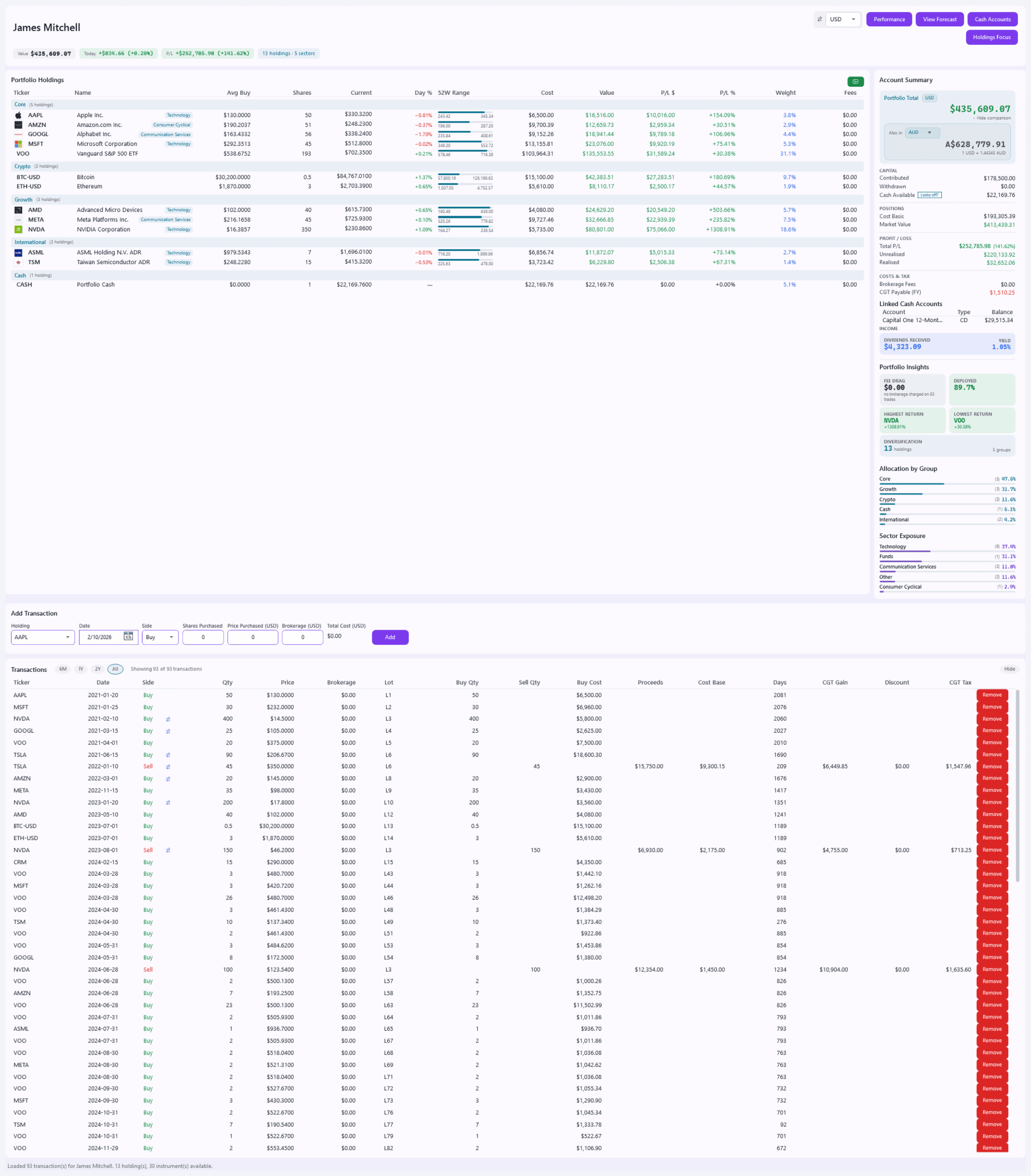
Member dashboard — JamesFree + Pro
Pulse Neuron 1.5.9 · Free + Pro · the demo household, captured 2 Oct 2026. The portfolio dashboard for one person, in their own colour: James's holdings, account summary, add-transaction form and trades. Free opens the first two members' dashboards; Pro opens every member's. Screens show a fictional demo household — the people, accounts, balances and trades are made up; share prices, dividends and splits are real market history. Bank, card and store names are sample labels; no affiliation is implied. Since 1.6.4 the demo's accounts, cards and lenders carry generic names; pictures captured before then may show the real names it used as sample labels.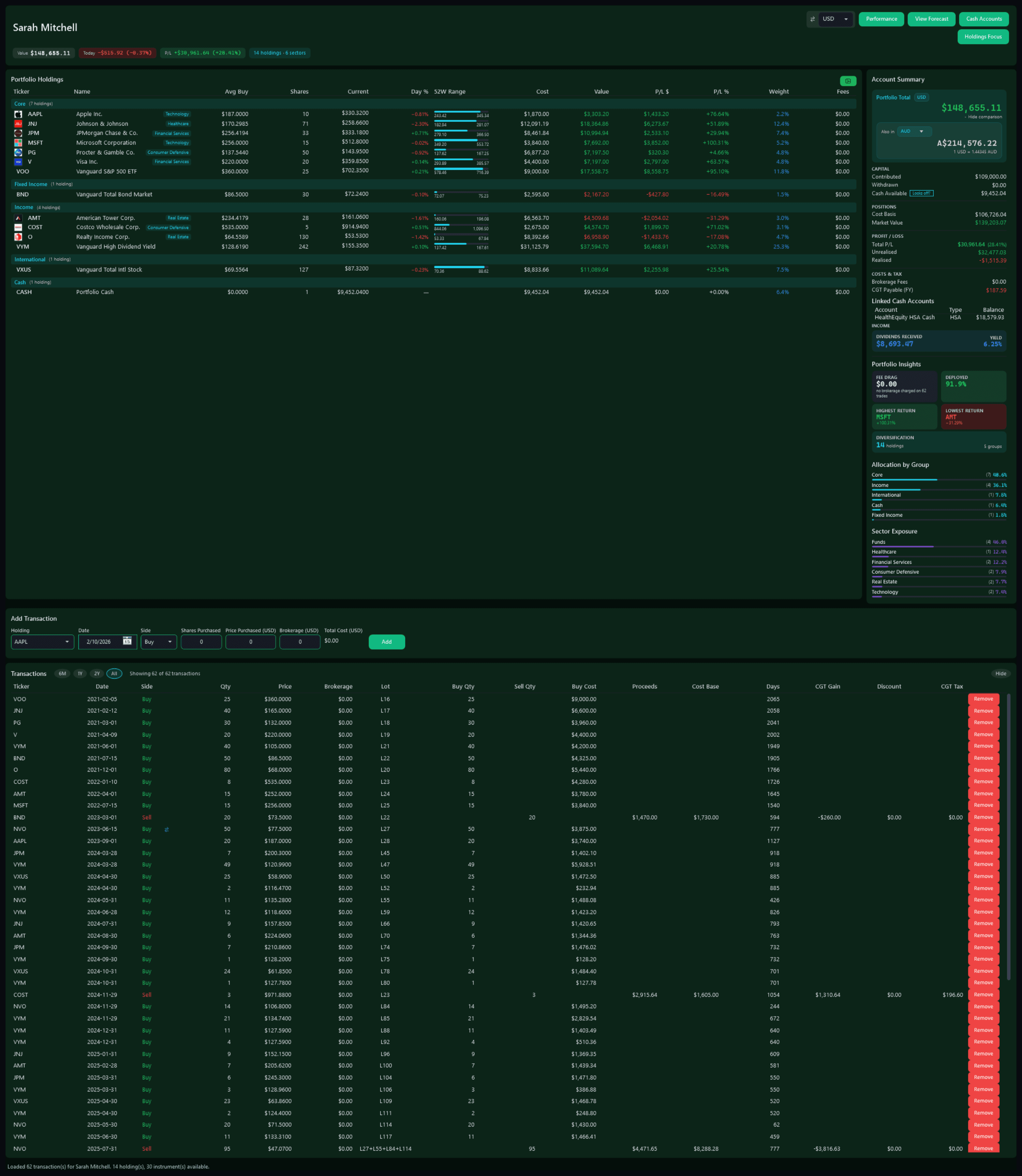
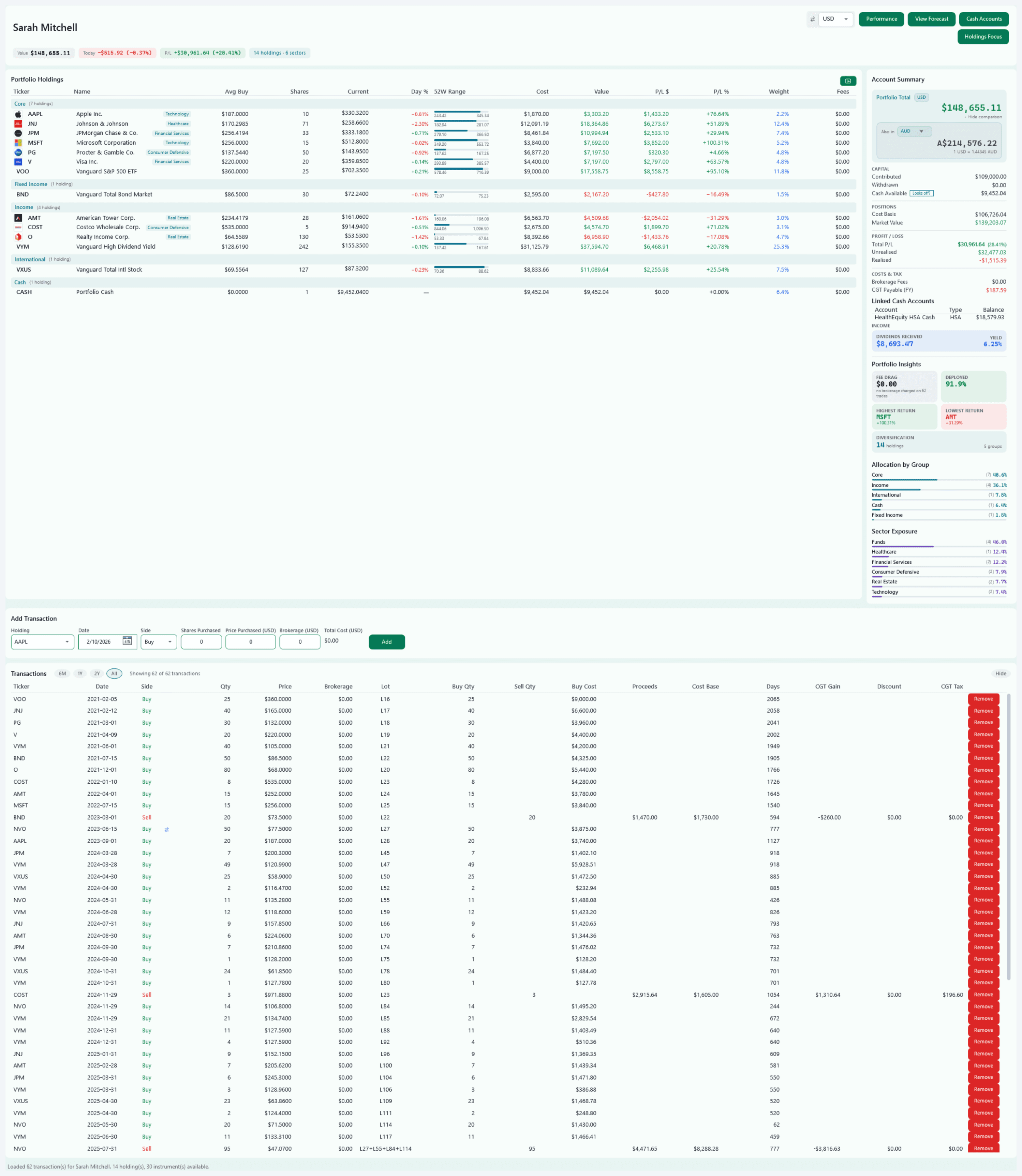
Member dashboard — SarahFree + Pro
Pulse Neuron 1.5.9 · Free + Pro · the demo household, captured 2 Oct 2026. Each member keeps their own colour, on their dashboard, in charts and on the household roster, so you can tell whose figures you are reading. Screens show a fictional demo household — the people, accounts, balances and trades are made up; share prices, dividends and splits are real market history. Bank, card and store names are sample labels; no affiliation is implied. Since 1.6.4 the demo's accounts, cards and lenders carry generic names; pictures captured before then may show the real names it used as sample labels.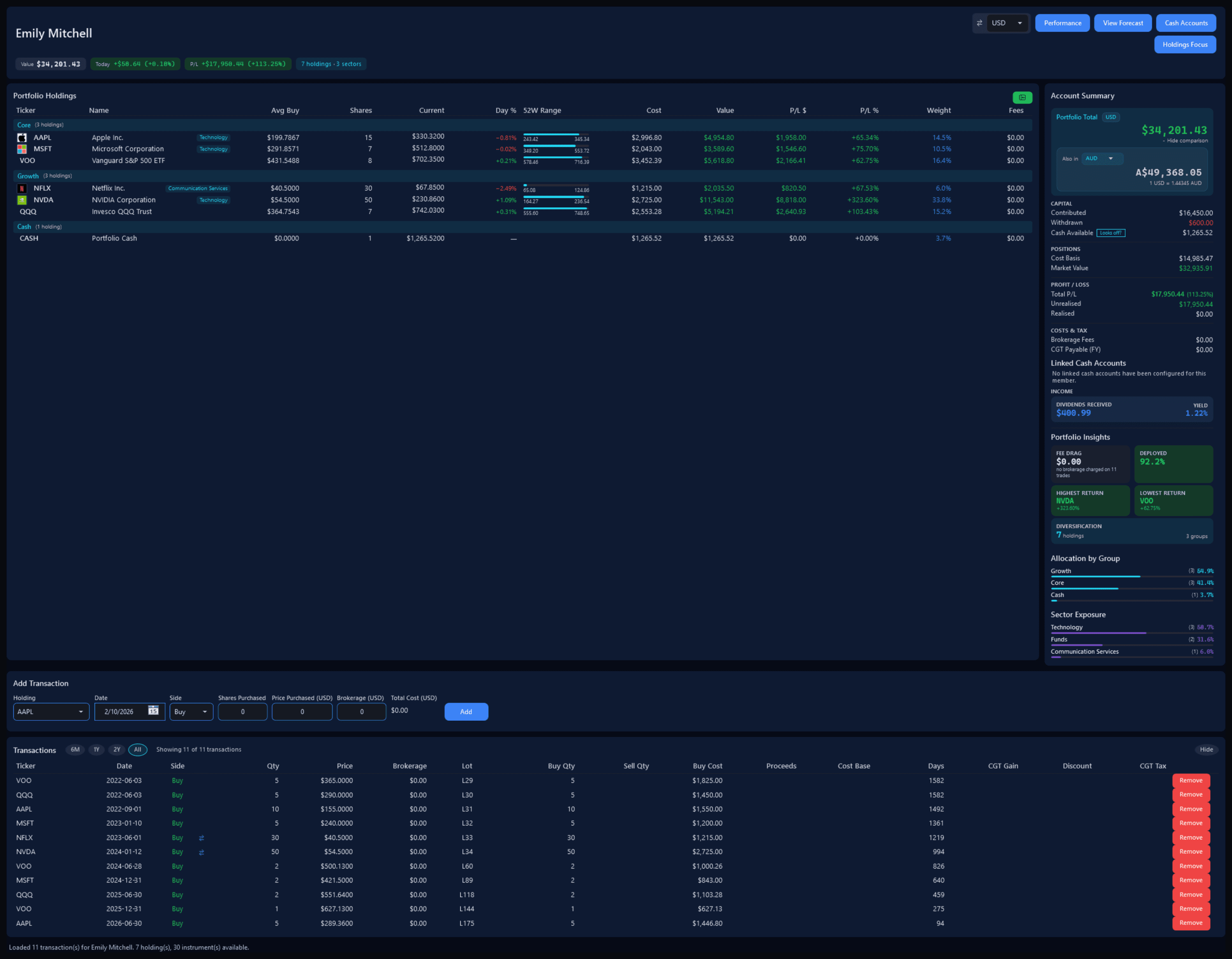
Member dashboard — EmilyFree + Pro
Pulse Neuron 1.5.9 · Free + Pro · the demo household, captured 2 Oct 2026. Emily's dashboard in her own blue: seven holdings, her trades and an account summary that counts a $600 withdrawal. Screens show a fictional demo household — the people, accounts, balances and trades are made up; share prices, dividends and splits are real market history. Bank, card and store names are sample labels; no affiliation is implied. Since 1.6.4 the demo's accounts, cards and lenders carry generic names; pictures captured before then may show the real names it used as sample labels.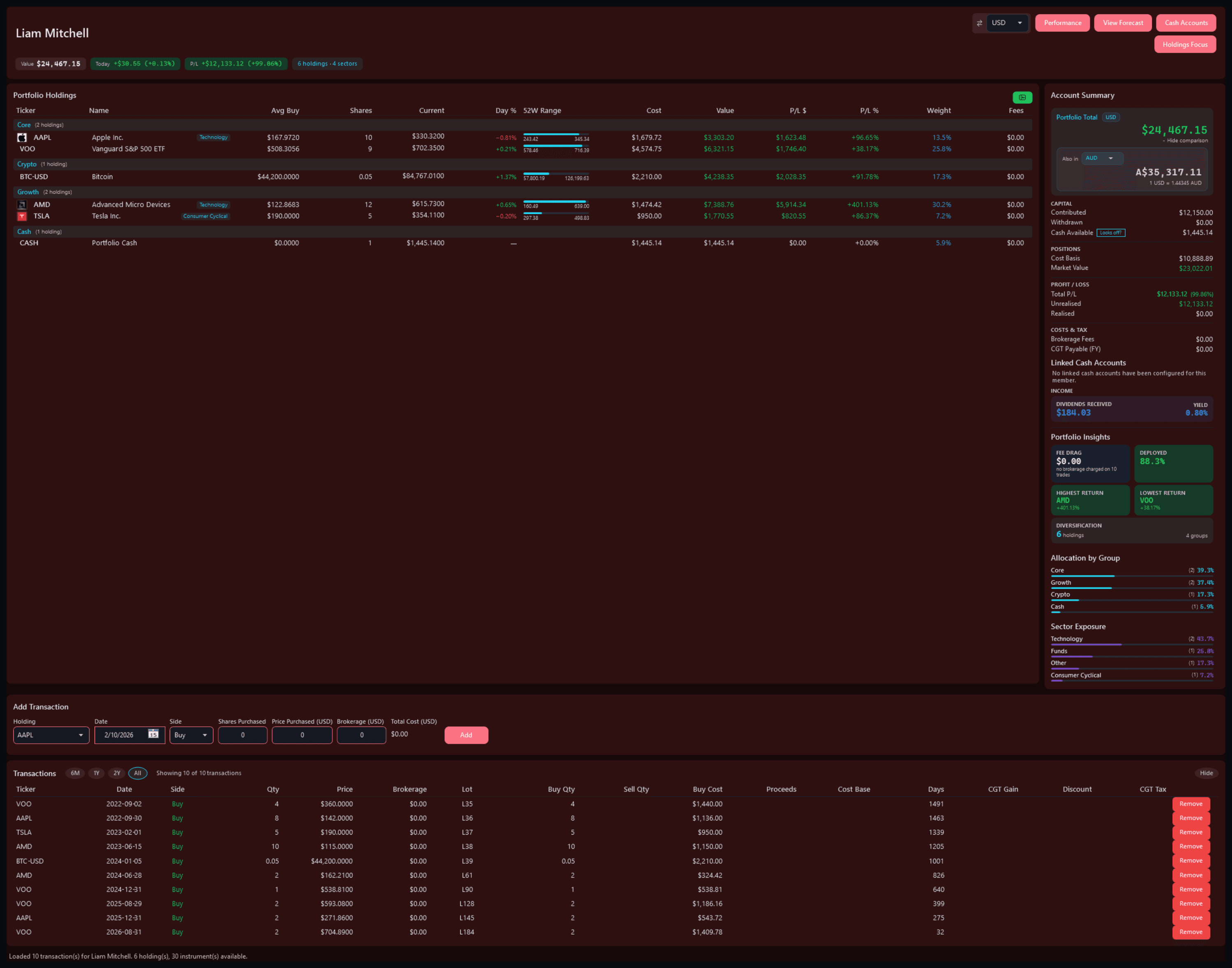
Member dashboard — LiamFree + Pro
Pulse Neuron 1.5.9 · Free + Pro · the demo household, captured 2 Oct 2026. Liam's dashboard in his own colour: his holdings, his trades and his account summary. Screens show a fictional demo household — the people, accounts, balances and trades are made up; share prices, dividends and splits are real market history. Bank, card and store names are sample labels; no affiliation is implied. Since 1.6.4 the demo's accounts, cards and lenders carry generic names; pictures captured before then may show the real names it used as sample labels.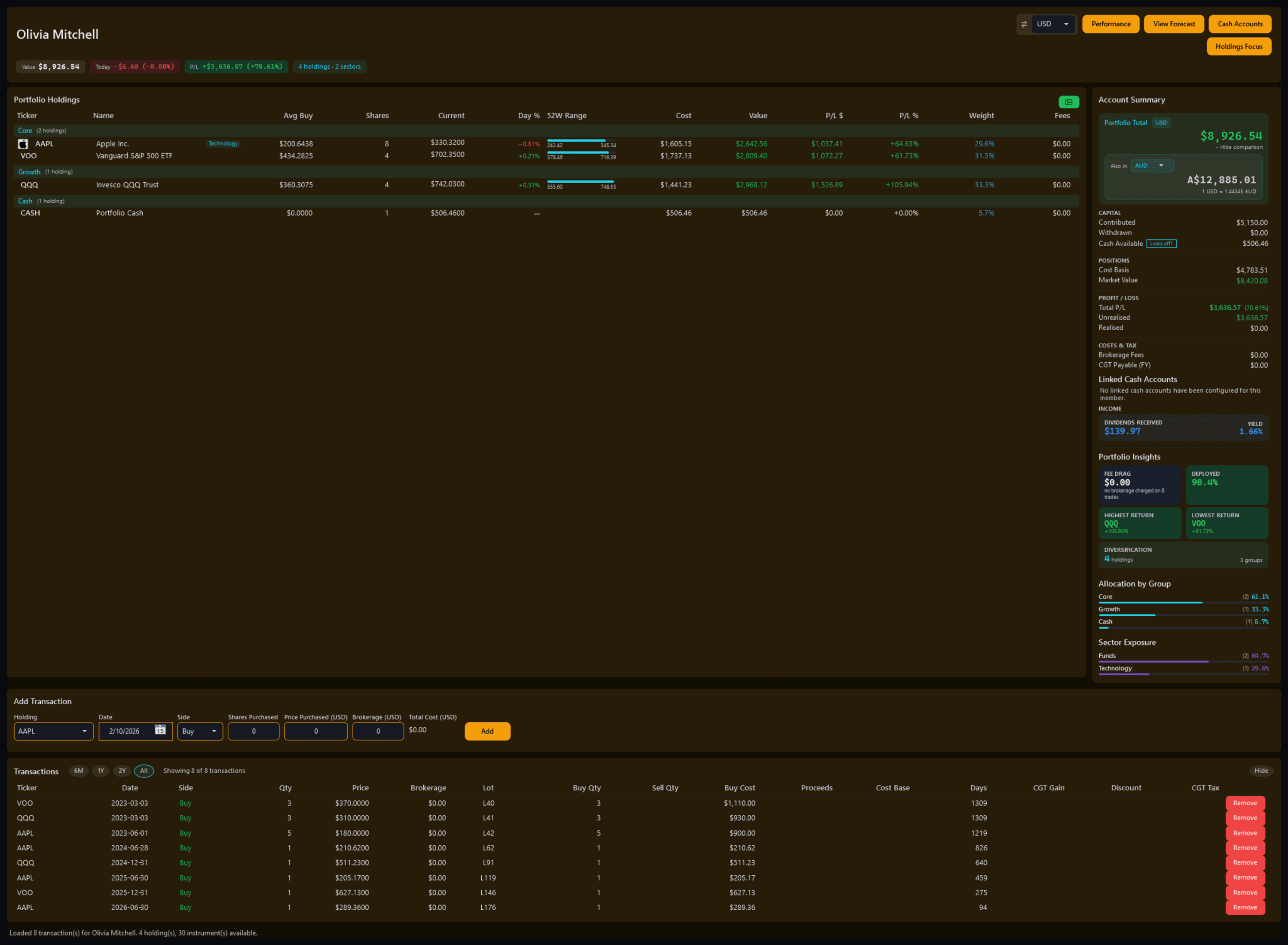
Member dashboard — OliviaFree + Pro
Pulse Neuron 1.5.9 · Free + Pro · the demo household, captured 2 Oct 2026. Olivia's dashboard in her own colour: her holdings, her trades and her account summary. Screens show a fictional demo household — the people, accounts, balances and trades are made up; share prices, dividends and splits are real market history. Bank, card and store names are sample labels; no affiliation is implied. Since 1.6.4 the demo's accounts, cards and lenders carry generic names; pictures captured before then may show the real names it used as sample labels.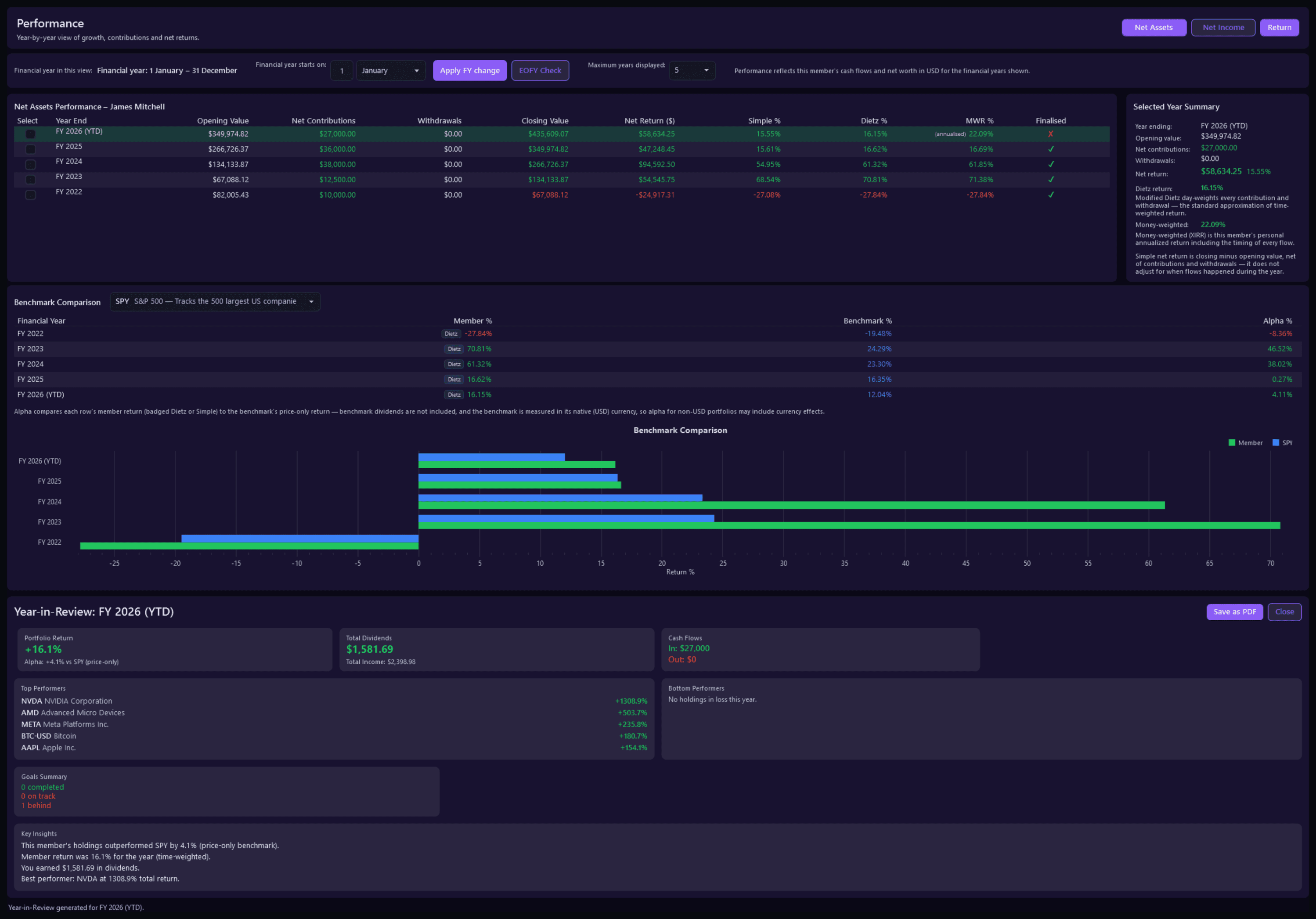
Member PerformancePro
Pulse Neuron 1.5.9 · Pro · the demo household, captured 2 Oct 2026. One member's year-by-year returns from FY 2022, simple, Modified Dietz and money-weighted, against SPY, with a Year in Review. Screens show a fictional demo household — the people, accounts, balances and trades are made up; share prices, dividends and splits are real market history. Bank, card and store names are sample labels; no affiliation is implied. Since 1.6.4 the demo's accounts, cards and lenders carry generic names; pictures captured before then may show the real names it used as sample labels.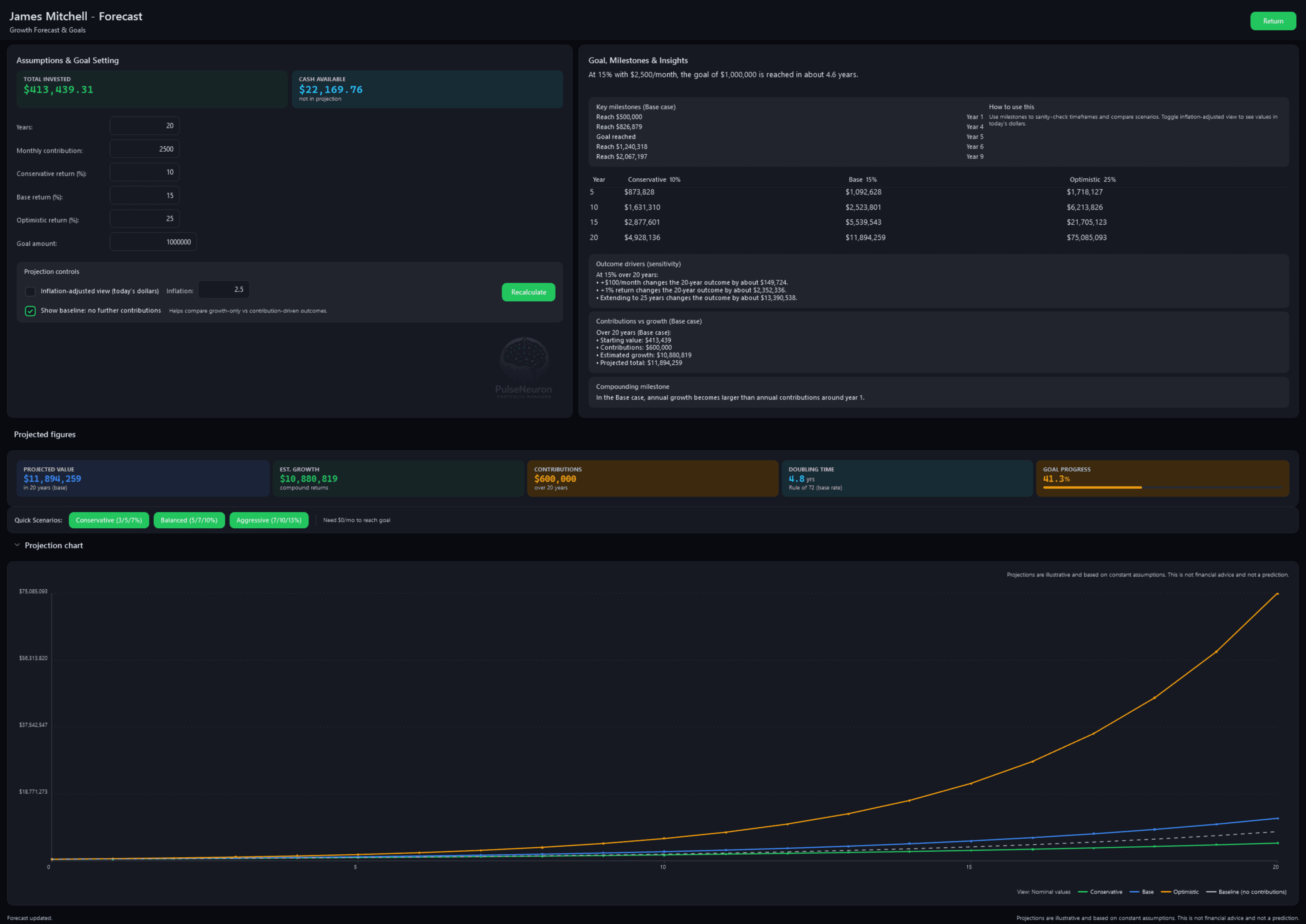
Member ForecastPro
Pulse Neuron 1.5.9 · Pro · the demo household, captured 2 Oct 2026. One member's projected growth under three rates you set, with the milestones, what drives the outcome and a 20-year chart. Screens show a fictional demo household — the people, accounts, balances and trades are made up; share prices, dividends and splits are real market history. Bank, card and store names are sample labels; no affiliation is implied. Since 1.6.4 the demo's accounts, cards and lenders carry generic names; pictures captured before then may show the real names it used as sample labels.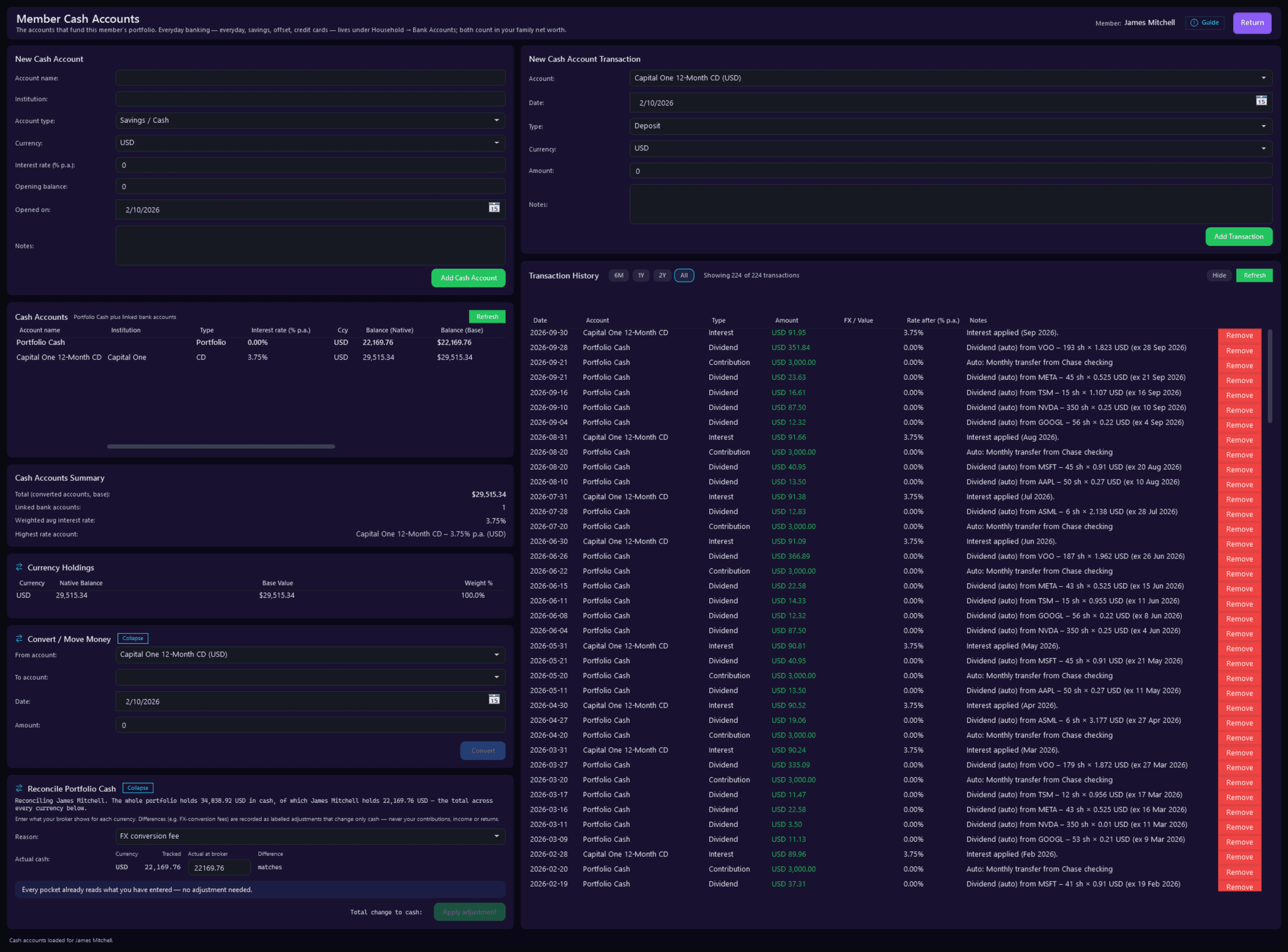
Cash AccountsPro
Pulse Neuron 1.5.9 · Pro · the demo household, captured 2 Oct 2026. James's cash accounts: Portfolio Cash and a 3.75% CD, every movement with its interest, and a reconciliation that needs no adjustment. Screens show a fictional demo household — the people, accounts, balances and trades are made up; share prices, dividends and splits are real market history. Bank, card and store names are sample labels; no affiliation is implied. Since 1.6.4 the demo's accounts, cards and lenders carry generic names; pictures captured before then may show the real names it used as sample labels.
How it is doing
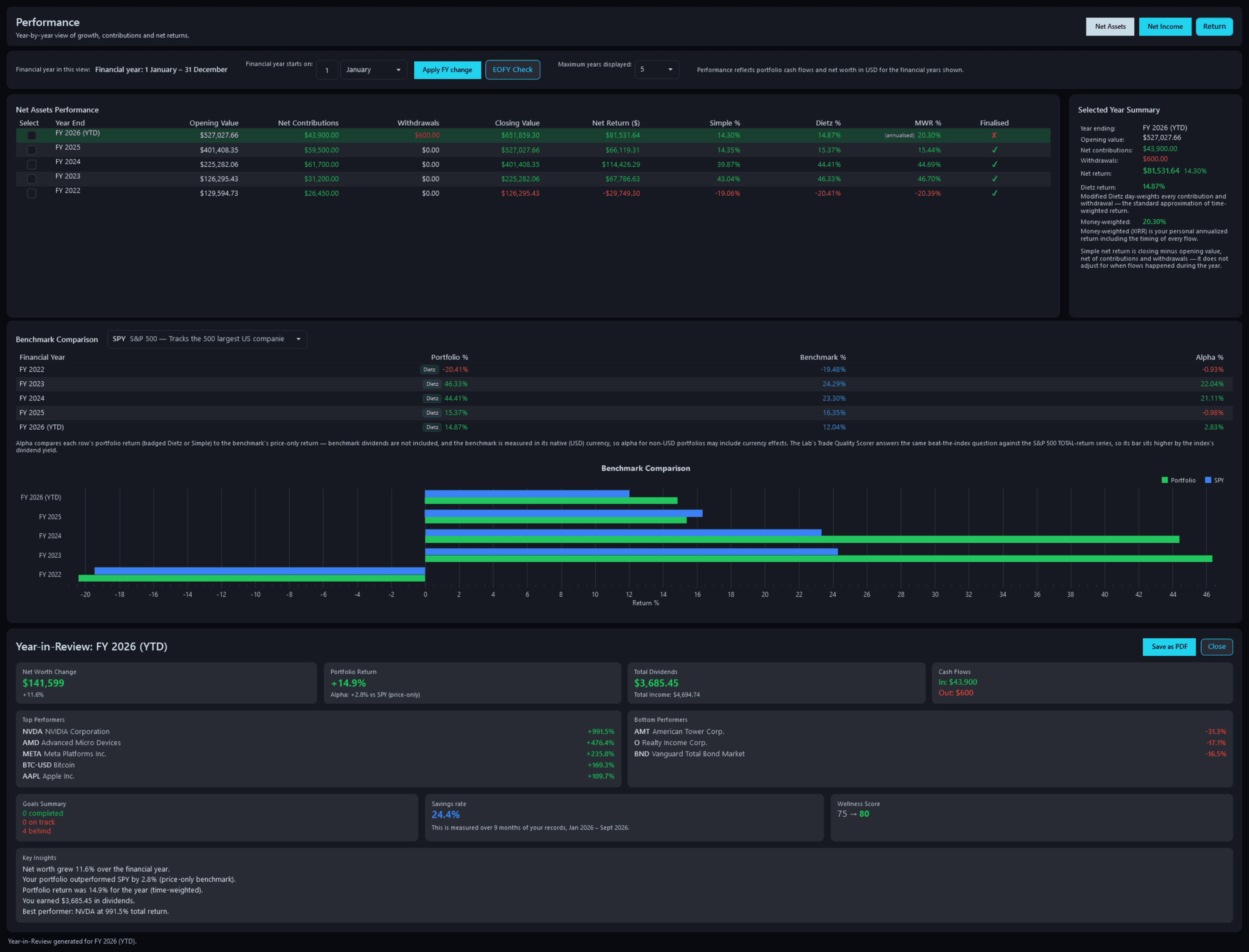
Portfolio PerformancePro
Pulse Neuron 1.5.9 · Pro · the demo household, captured 2 Oct 2026. Each financial year three ways (simple, Modified Dietz and money-weighted) against the S&P 500, with a Year in Review for the current year. Screens show a fictional demo household — the people, accounts, balances and trades are made up; share prices, dividends and splits are real market history. Bank, card and store names are sample labels; no affiliation is implied. Since 1.6.4 the demo's accounts, cards and lenders carry generic names; pictures captured before then may show the real names it used as sample labels.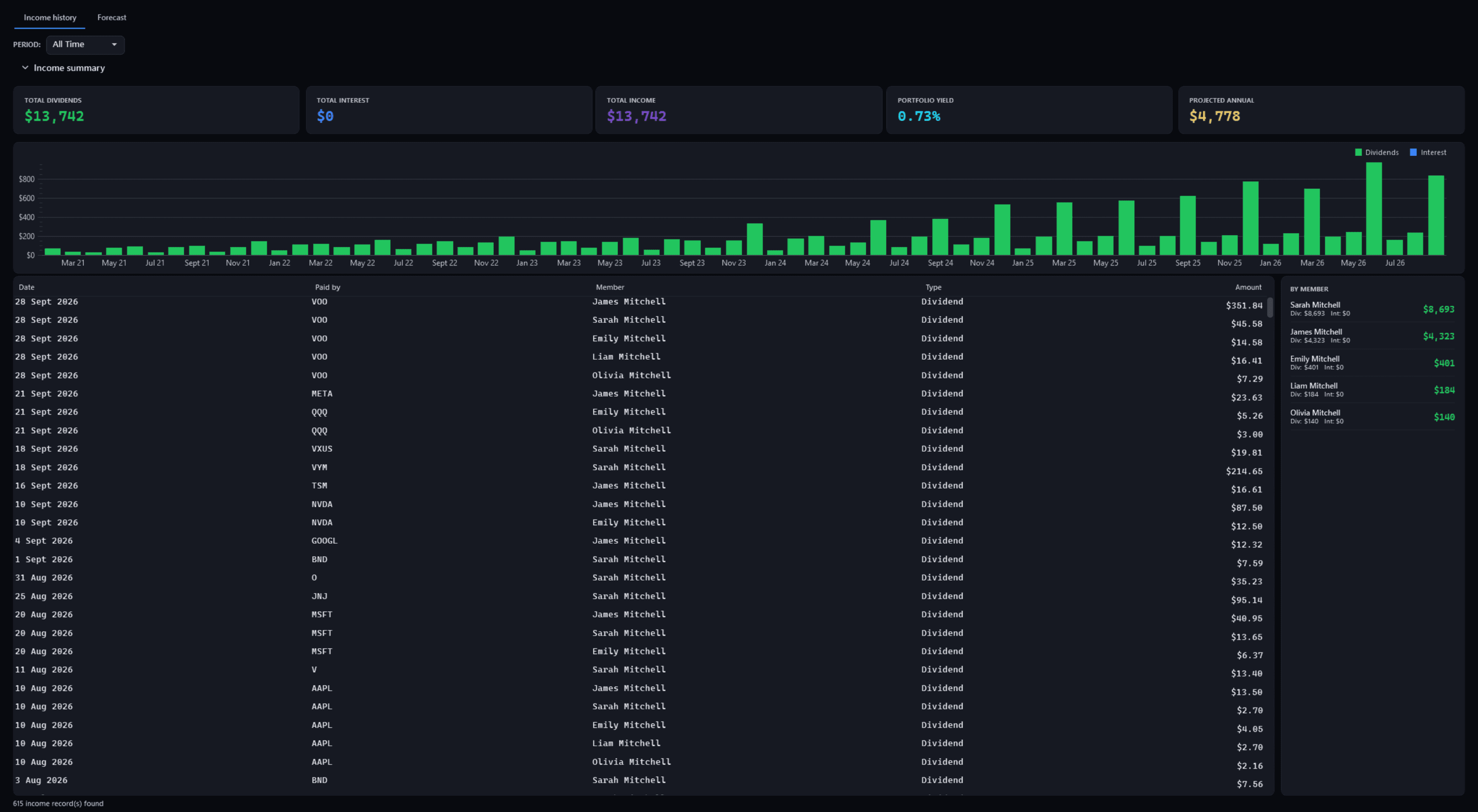
Dividend IncomeFree
Pulse Neuron 1.5.9 · Free · the demo household, captured 2 Oct 2026. What the holdings have paid since 2021, dividends and interest kept apart, month by month and by member. Screens show a fictional demo household — the people, accounts, balances and trades are made up; share prices, dividends and splits are real market history. Bank, card and store names are sample labels; no affiliation is implied. Since 1.6.4 the demo's accounts, cards and lenders carry generic names; pictures captured before then may show the real names it used as sample labels.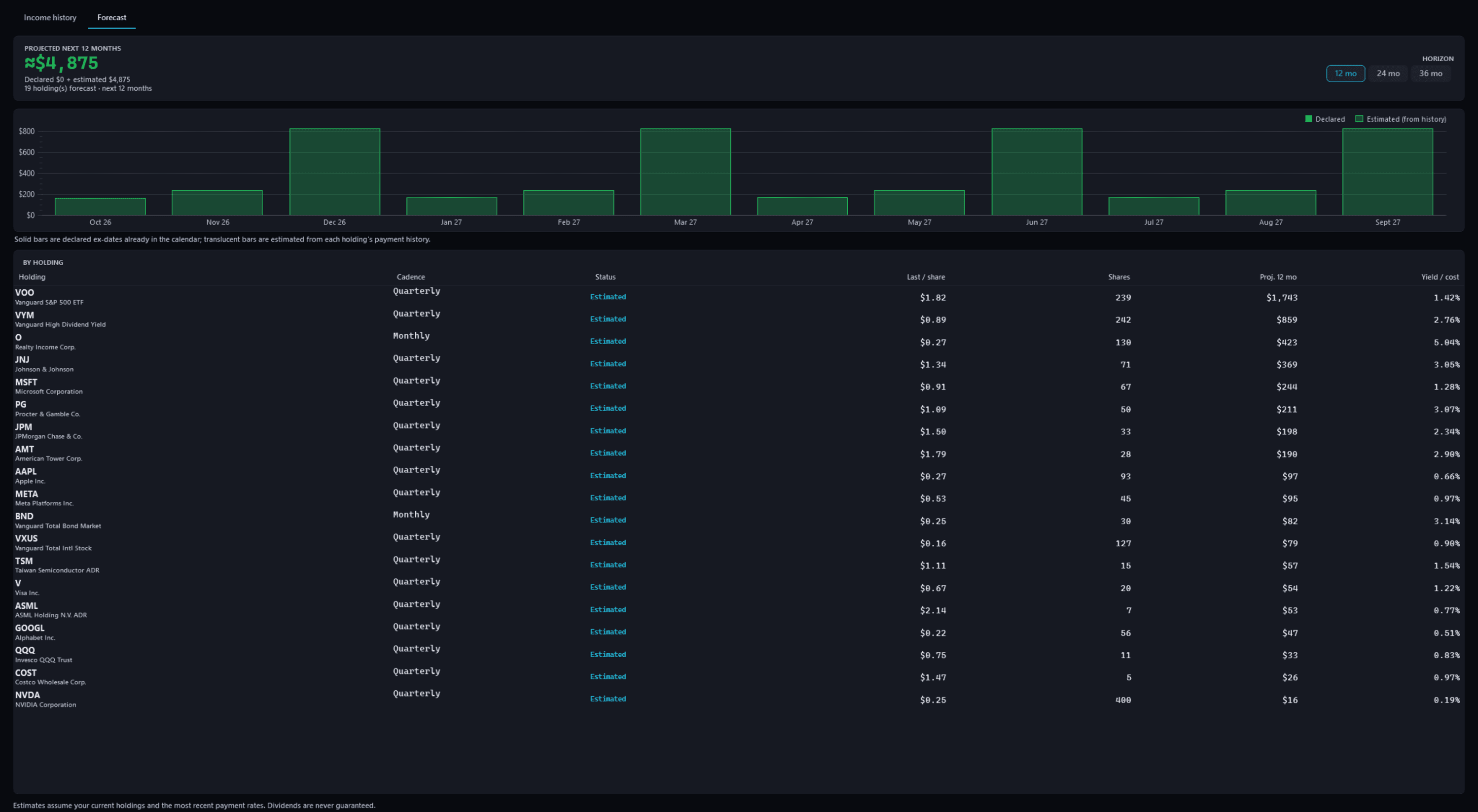
Dividend Income — forecastFree
Pulse Neuron 1.5.9 · Free · the demo household, captured 2 Oct 2026. A 12-month forecast built from each holding's own payment history; 24 and 36 months on Pro. Screens show a fictional demo household — the people, accounts, balances and trades are made up; share prices, dividends and splits are real market history. Bank, card and store names are sample labels; no affiliation is implied. Since 1.6.4 the demo's accounts, cards and lenders carry generic names; pictures captured before then may show the real names it used as sample labels.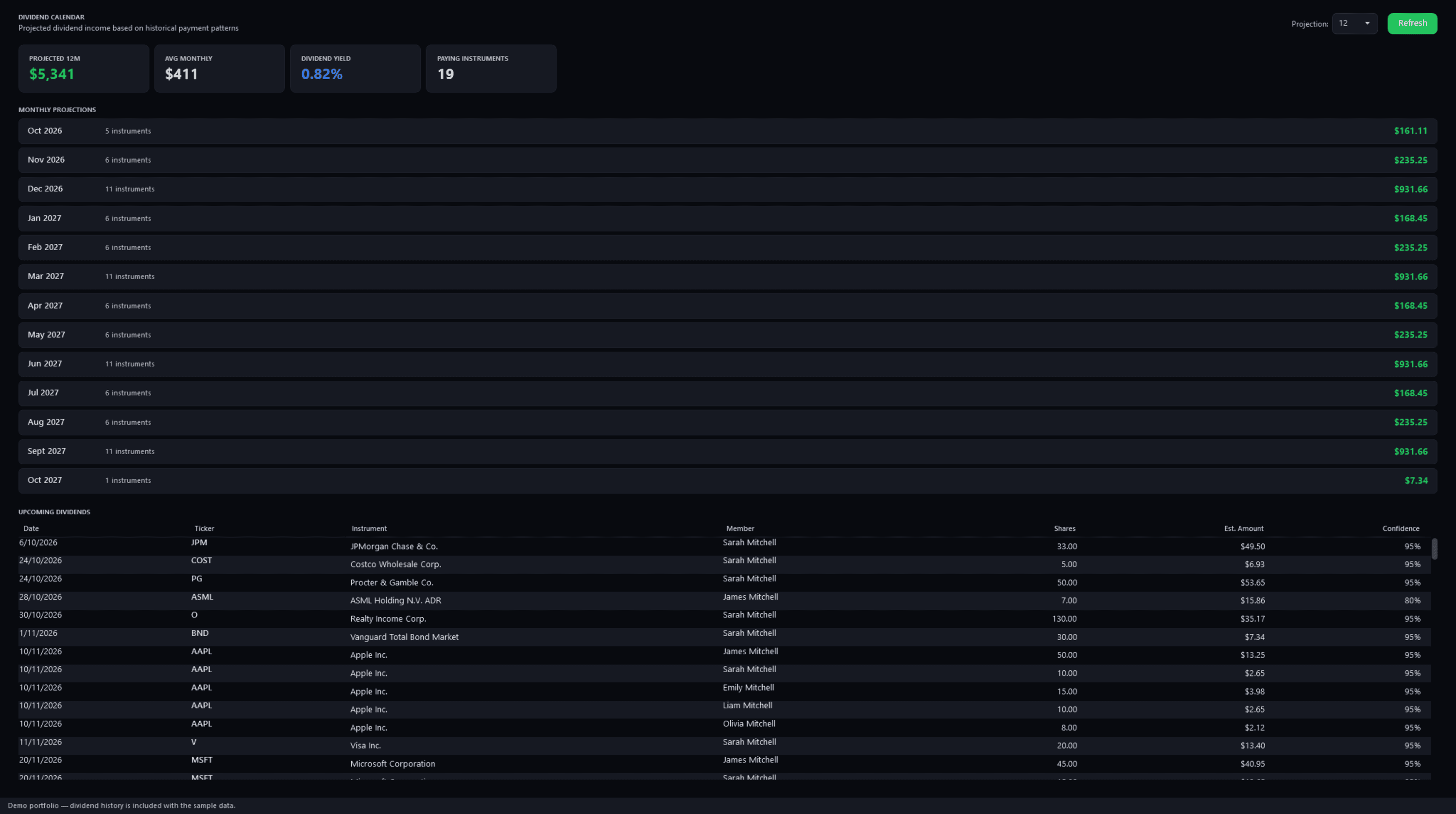
Dividend CalendarPro
Pulse Neuron 1.5.9 · Pro · the demo household, captured 2 Oct 2026. Projected payments month by month from each holding's payment history, and the upcoming dividends with a confidence for each. Since 1.6.0 its Refresh button is “Check for new dividends”, which runs in the background and tells you when it is done. Screens show a fictional demo household — the people, accounts, balances and trades are made up; share prices, dividends and splits are real market history. Bank, card and store names are sample labels; no affiliation is implied. Since 1.6.4 the demo's accounts, cards and lenders carry generic names; pictures captured before then may show the real names it used as sample labels.Since 1.6.0 its Refresh button is “Check for new dividends”, which runs in the background and tells you when it is done.
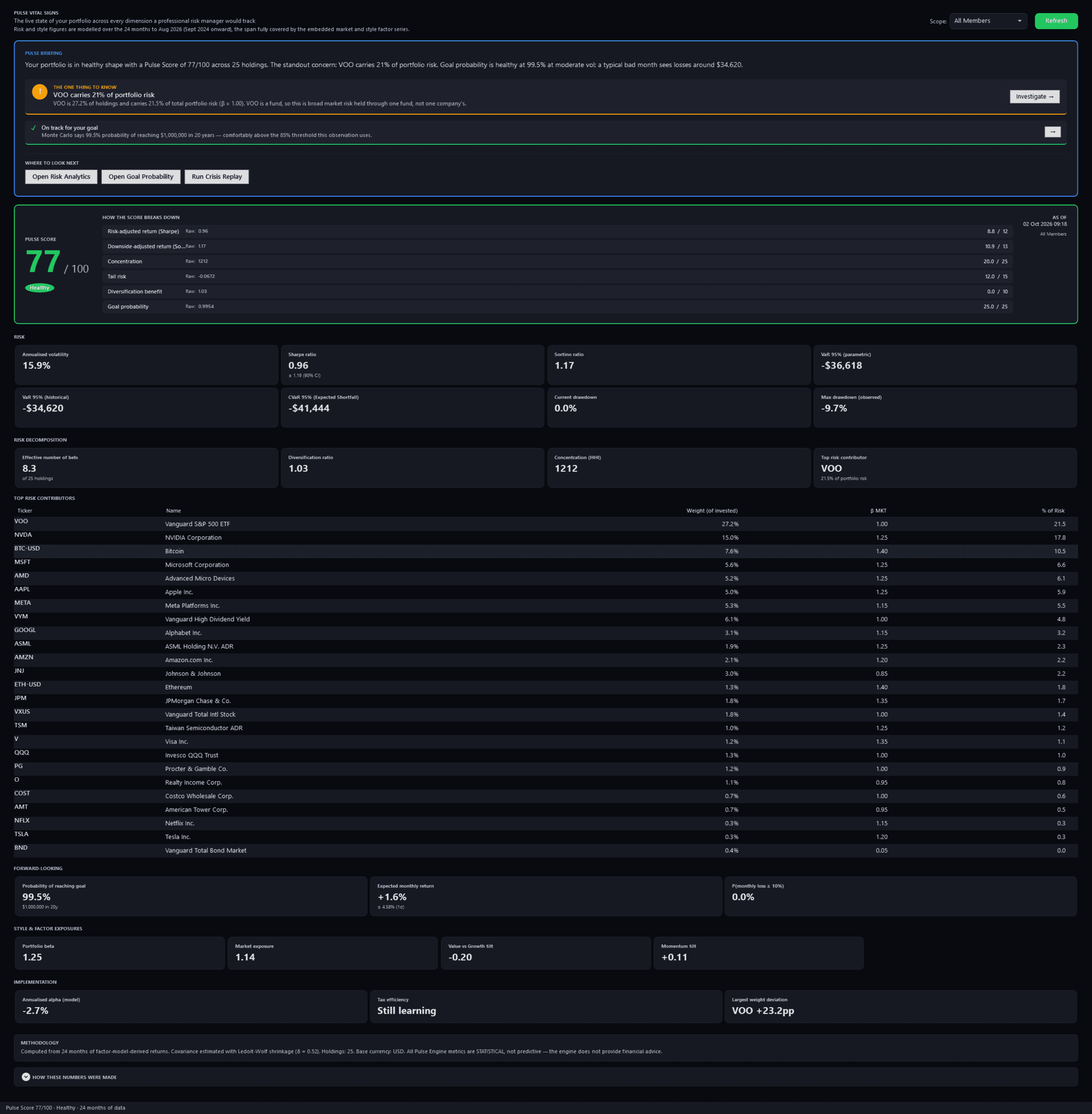
Vital SignsPro
Pulse Neuron 1.5.9 · Pro · the demo household, captured 2 Oct 2026. A modelled risk dashboard: the Pulse Score and how it breaks down, volatility, Sharpe and Sortino, Value-at-Risk, drawdown and the top risk contributors. Screens show a fictional demo household — the people, accounts, balances and trades are made up; share prices, dividends and splits are real market history. Bank, card and store names are sample labels; no affiliation is implied. Since 1.6.4 the demo's accounts, cards and lenders carry generic names; pictures captured before then may show the real names it used as sample labels.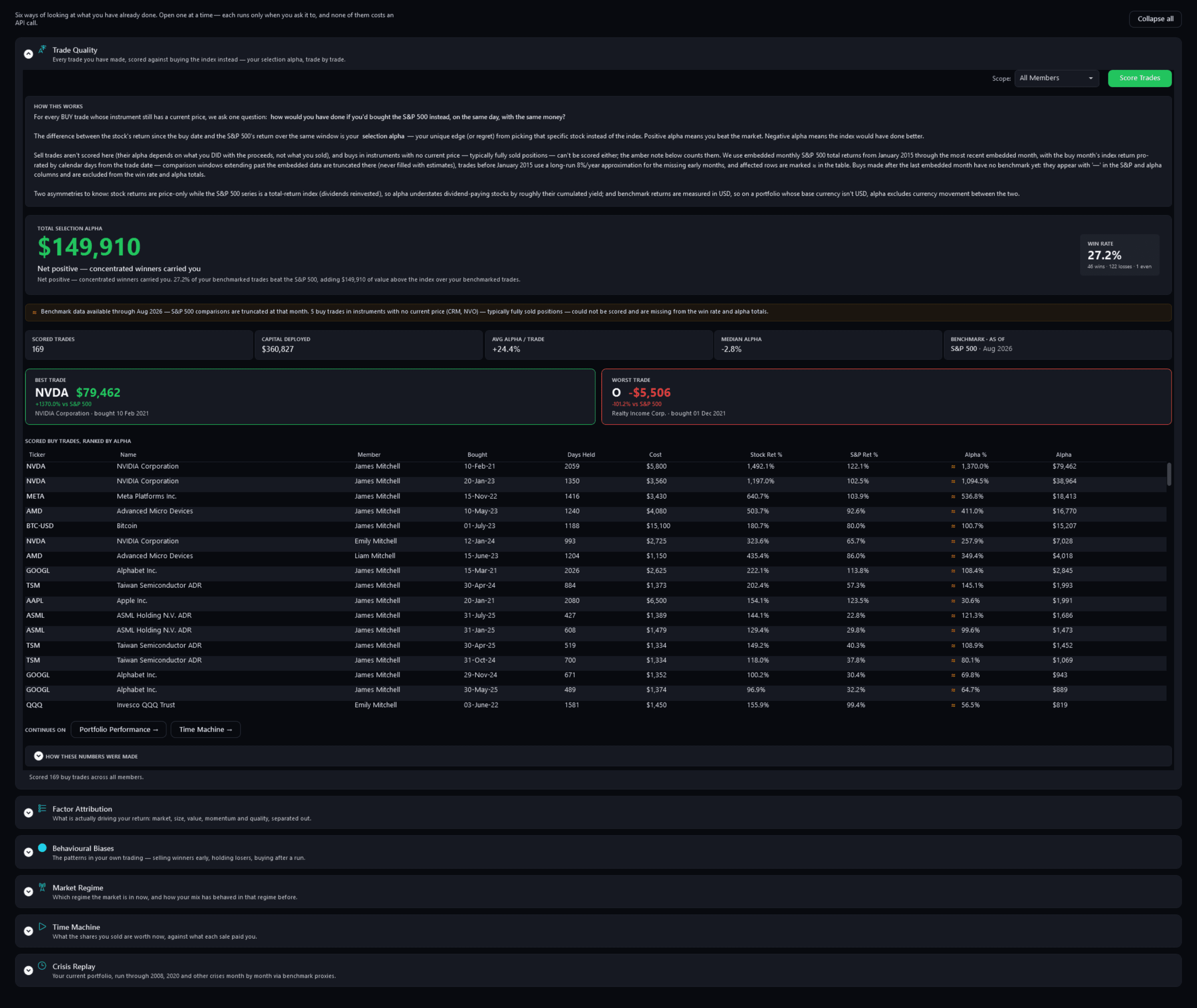
The Lab — Trade QualityPro
Pulse Neuron 1.5.9 · Pro · the demo household, captured 2 Oct 2026. 169 buys measured against the S&P 500 on the same day: the total selection alpha, the win rate, and its Best Trade and Worst Trade cards. Screens show a fictional demo household — the people, accounts, balances and trades are made up; share prices, dividends and splits are real market history. Bank, card and store names are sample labels; no affiliation is implied. Since 1.6.4 the demo's accounts, cards and lenders carry generic names; pictures captured before then may show the real names it used as sample labels.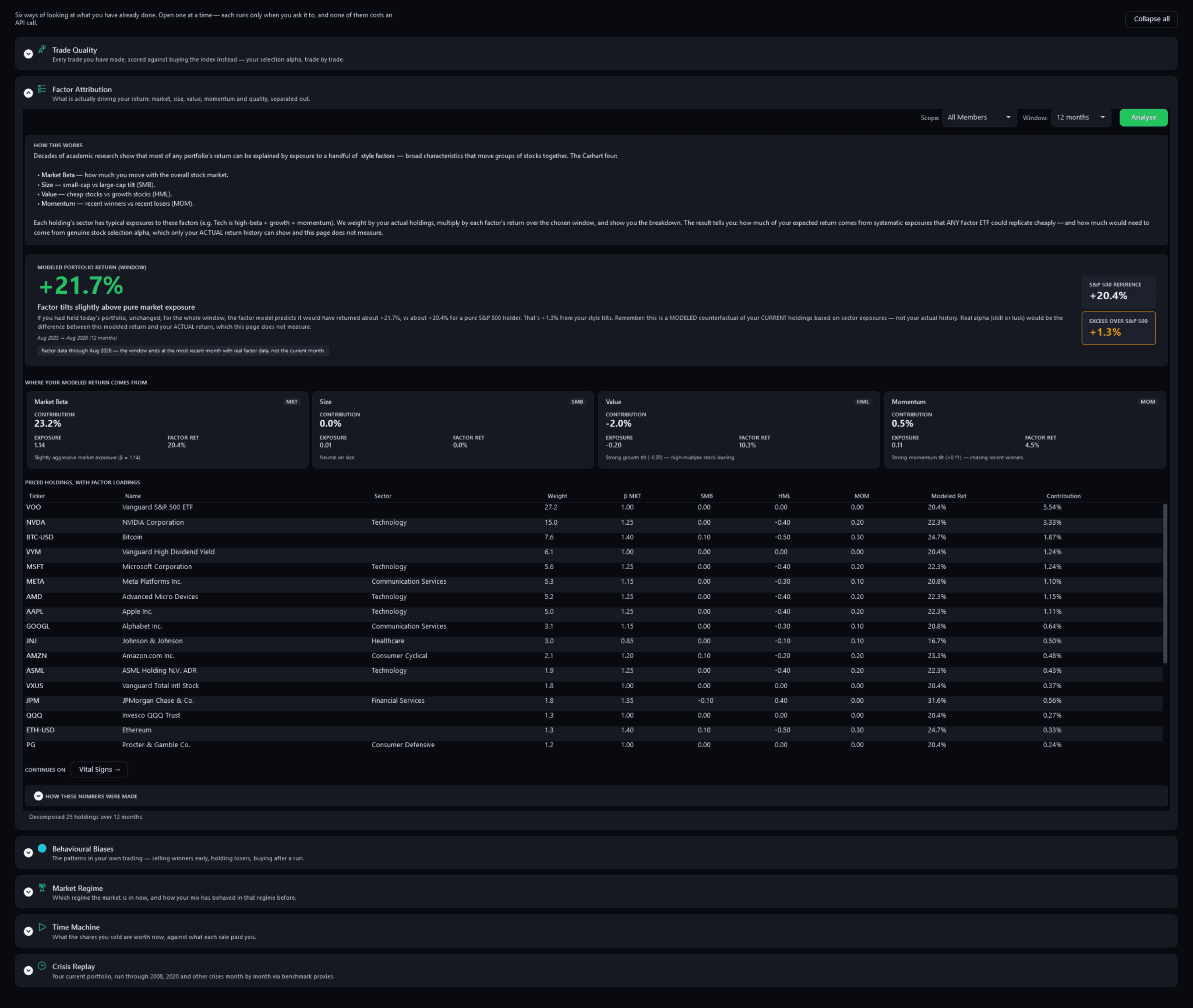
The Lab — Factor AttributionPro
Pulse Neuron 1.5.9 · Pro · the demo household, captured 2 Oct 2026. A modelled 12-month return of 21.7% against the S&P 500's 20.4%, split across market, size, value and momentum, holding by holding. Since 1.6.1, its line names the four factors it measures: market, size, value and momentum. Screens show a fictional demo household — the people, accounts, balances and trades are made up; share prices, dividends and splits are real market history. Bank, card and store names are sample labels; no affiliation is implied. Since 1.6.4 the demo's accounts, cards and lenders carry generic names; pictures captured before then may show the real names it used as sample labels.Since 1.6.1, its line names the four factors it measures: market, size, value and momentum.
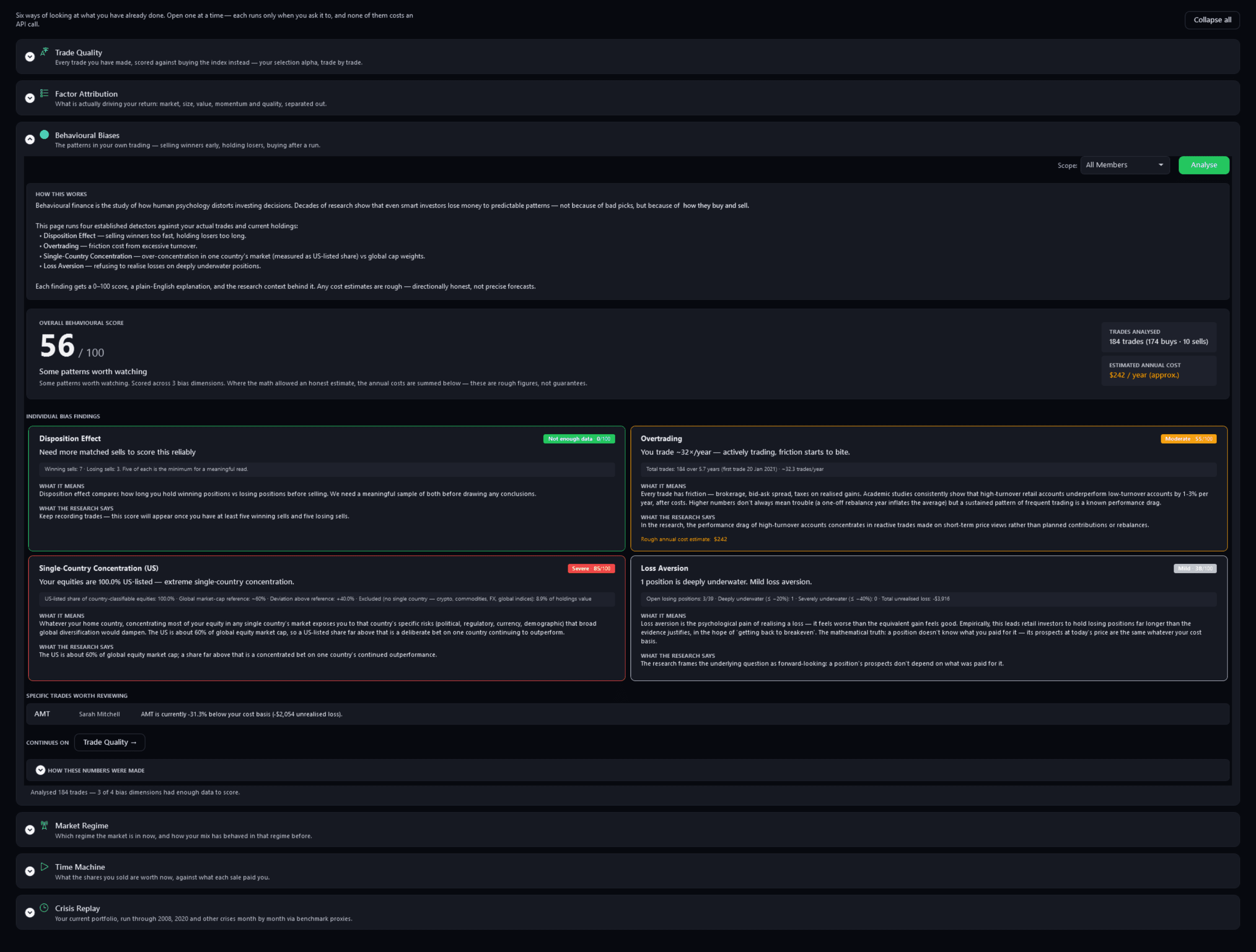
The Lab — Behavioural BiasesPro
Pulse Neuron 1.5.9 · Pro · the demo household, captured 2 Oct 2026. Four habit detectors on 184 trades: an overall 56 out of 100, with overtrading, US-listed concentration and loss aversion scored and the disposition effect waiting for more sells. Screens show a fictional demo household — the people, accounts, balances and trades are made up; share prices, dividends and splits are real market history. Bank, card and store names are sample labels; no affiliation is implied. Since 1.6.4 the demo's accounts, cards and lenders carry generic names; pictures captured before then may show the real names it used as sample labels.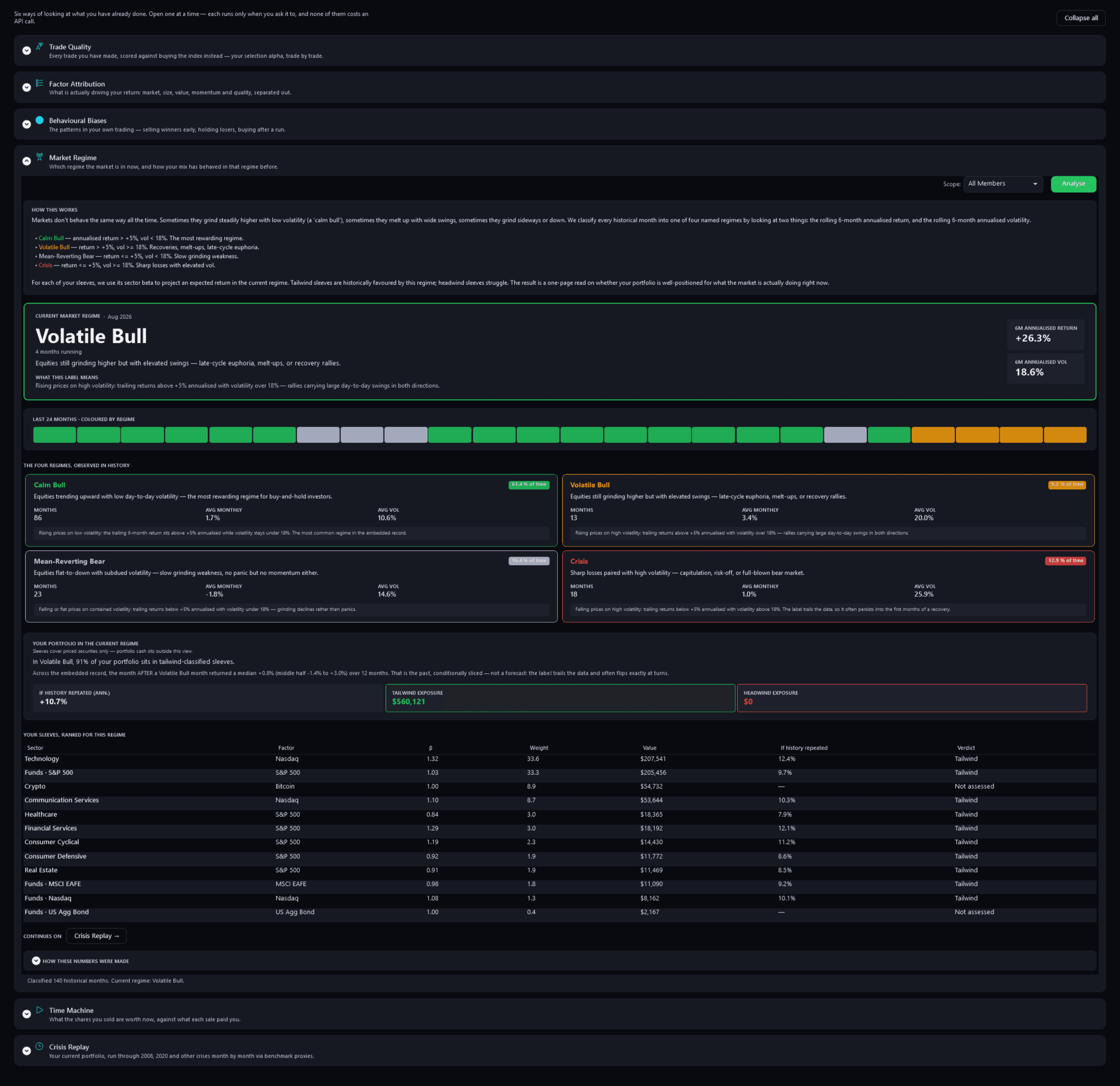
The Lab — Market RegimePro
Pulse Neuron 1.5.9 · Pro · the demo household, captured 2 Oct 2026. The latest regime, Volatile Bull, the last 24 months coloured by regime, how each regime has behaved, and each sleeve marked tailwind or not assessed. Screens show a fictional demo household — the people, accounts, balances and trades are made up; share prices, dividends and splits are real market history. Bank, card and store names are sample labels; no affiliation is implied. Since 1.6.4 the demo's accounts, cards and lenders carry generic names; pictures captured before then may show the real names it used as sample labels.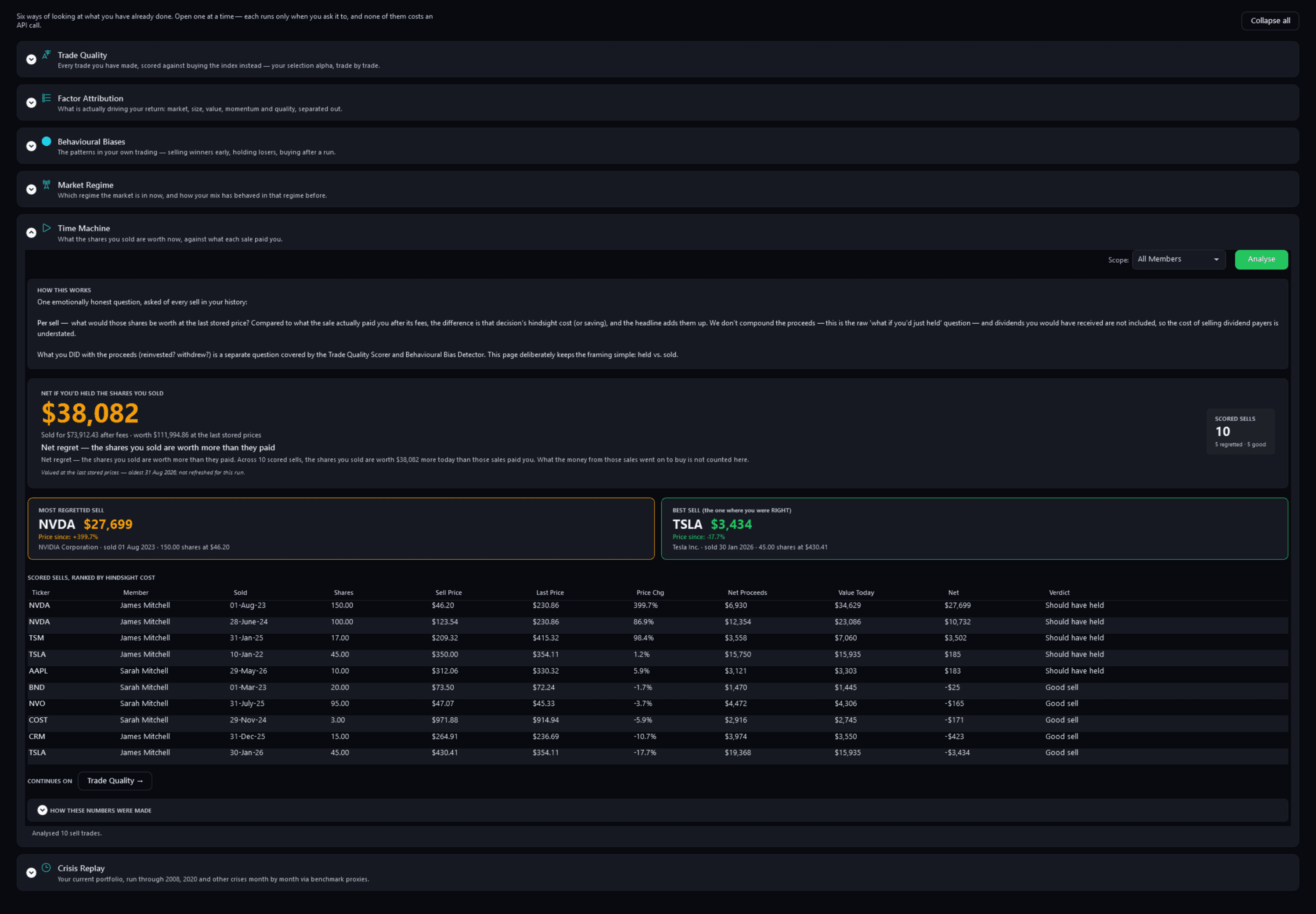
The Lab — Time MachinePro
Pulse Neuron 1.5.9 · Pro · the demo household, captured 2 Oct 2026. Each sell it can price: those shares at the last stored price against what the sale paid you after its fees. Screens show a fictional demo household — the people, accounts, balances and trades are made up; share prices, dividends and splits are real market history. Bank, card and store names are sample labels; no affiliation is implied. Since 1.6.4 the demo's accounts, cards and lenders carry generic names; pictures captured before then may show the real names it used as sample labels.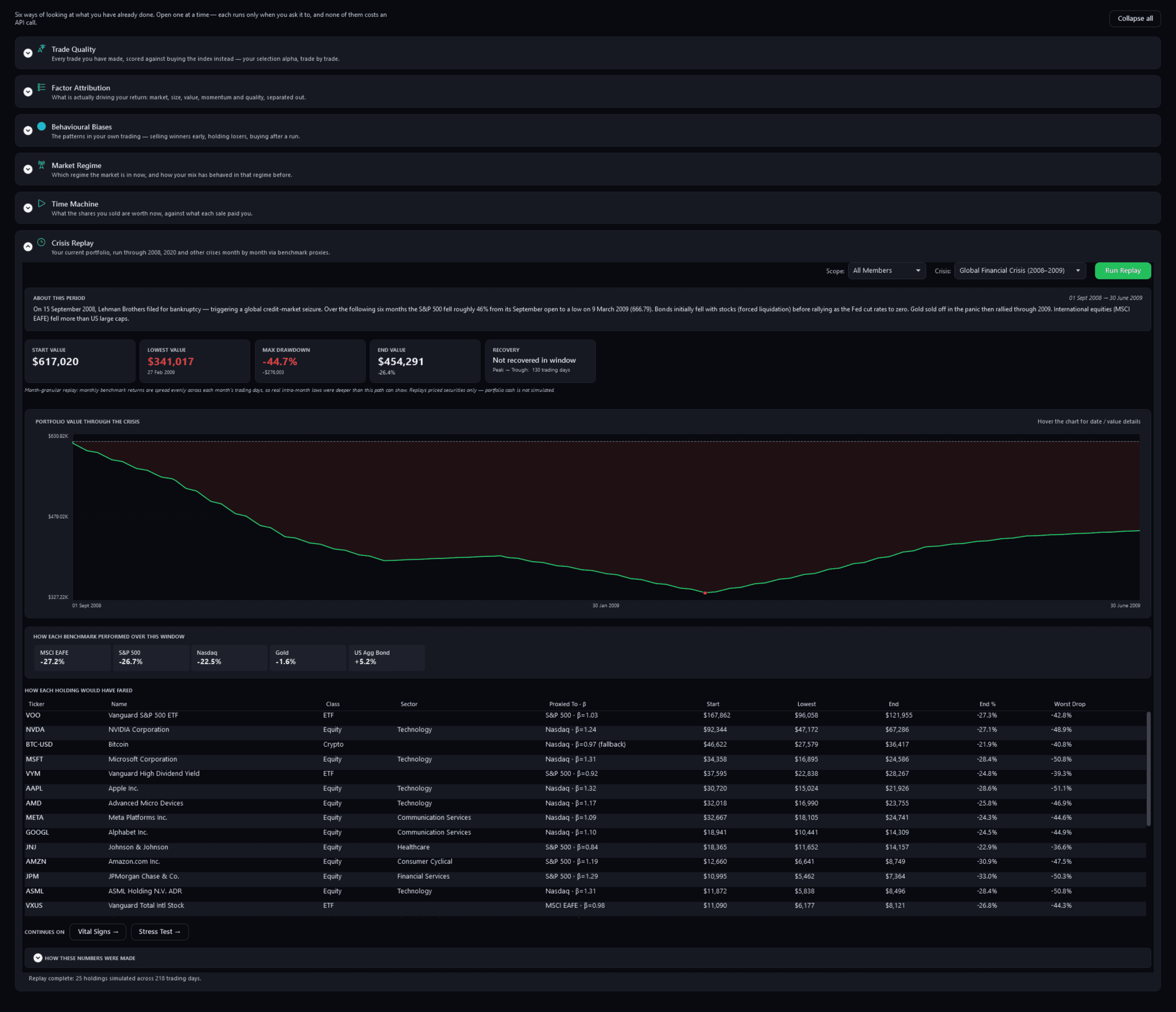
The Lab — Crisis ReplayPro
Pulse Neuron 1.5.9 · Pro · the demo household, captured 2 Oct 2026. Today's holdings replayed month by month through 2008 and 2009: down 44.7% at the low in February 2009, and not recovered by the end of June. Screens show a fictional demo household — the people, accounts, balances and trades are made up; share prices, dividends and splits are real market history. Bank, card and store names are sample labels; no affiliation is implied. Since 1.6.4 the demo's accounts, cards and lenders carry generic names; pictures captured before then may show the real names it used as sample labels.
What to do next
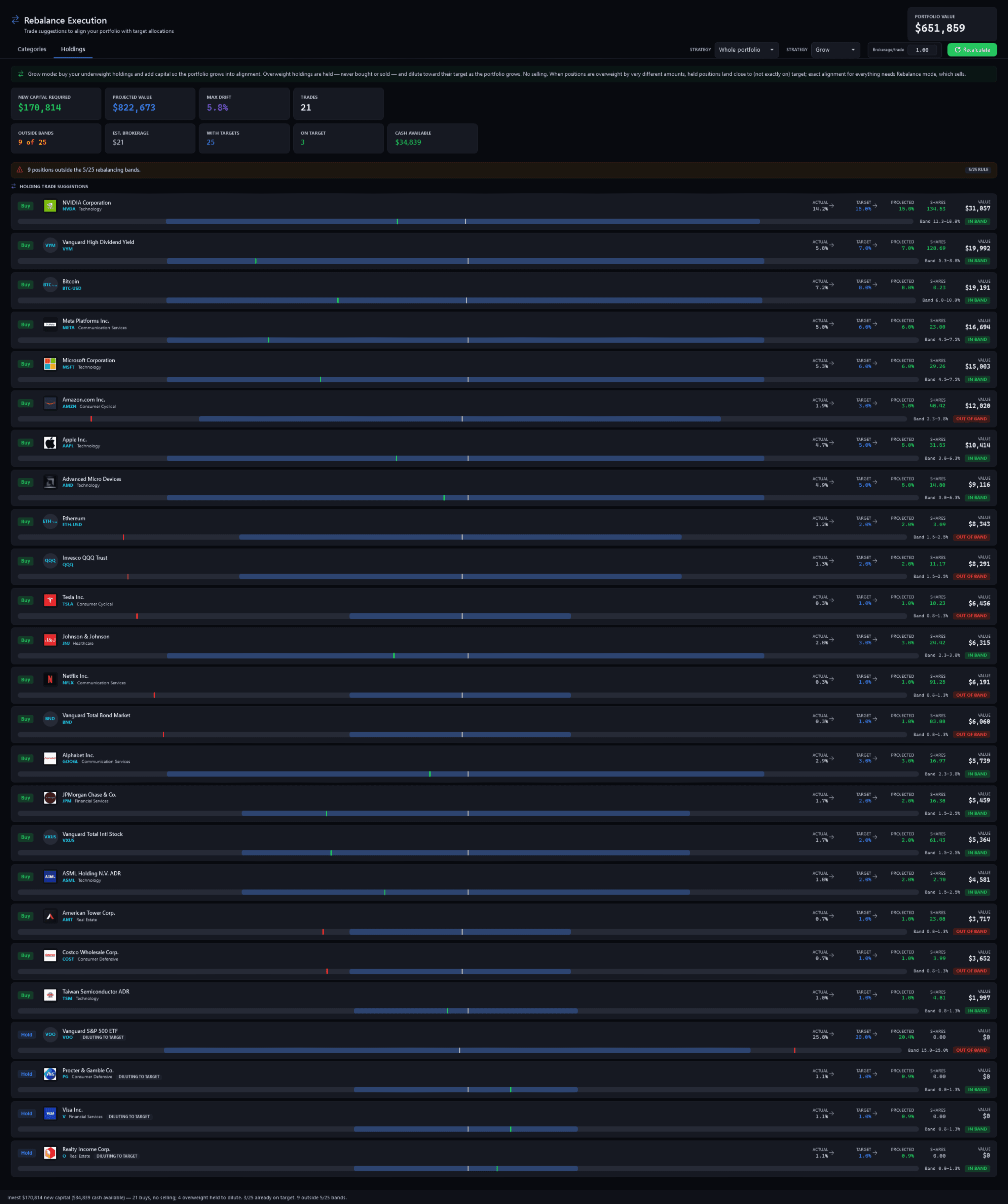
Rebalance ExecutionPro
Pulse Neuron 1.5.9 · Pro · the demo household, captured 2 Oct 2026. In Grow mode, the buys that would bring each holding to its target, with each holding's band, drift and projected weight. Since 1.6.2, Grow mode sells a holding you set to 0% on the Allocation page in full, and its banner says so instead of “No selling”. Screens show a fictional demo household — the people, accounts, balances and trades are made up; share prices, dividends and splits are real market history. Bank, card and store names are sample labels; no affiliation is implied. Since 1.6.4 the demo's accounts, cards and lenders carry generic names; pictures captured before then may show the real names it used as sample labels.Since 1.6.2, Grow mode sells a holding you set to 0% on the Allocation page in full, and its banner says so instead of “No selling”.
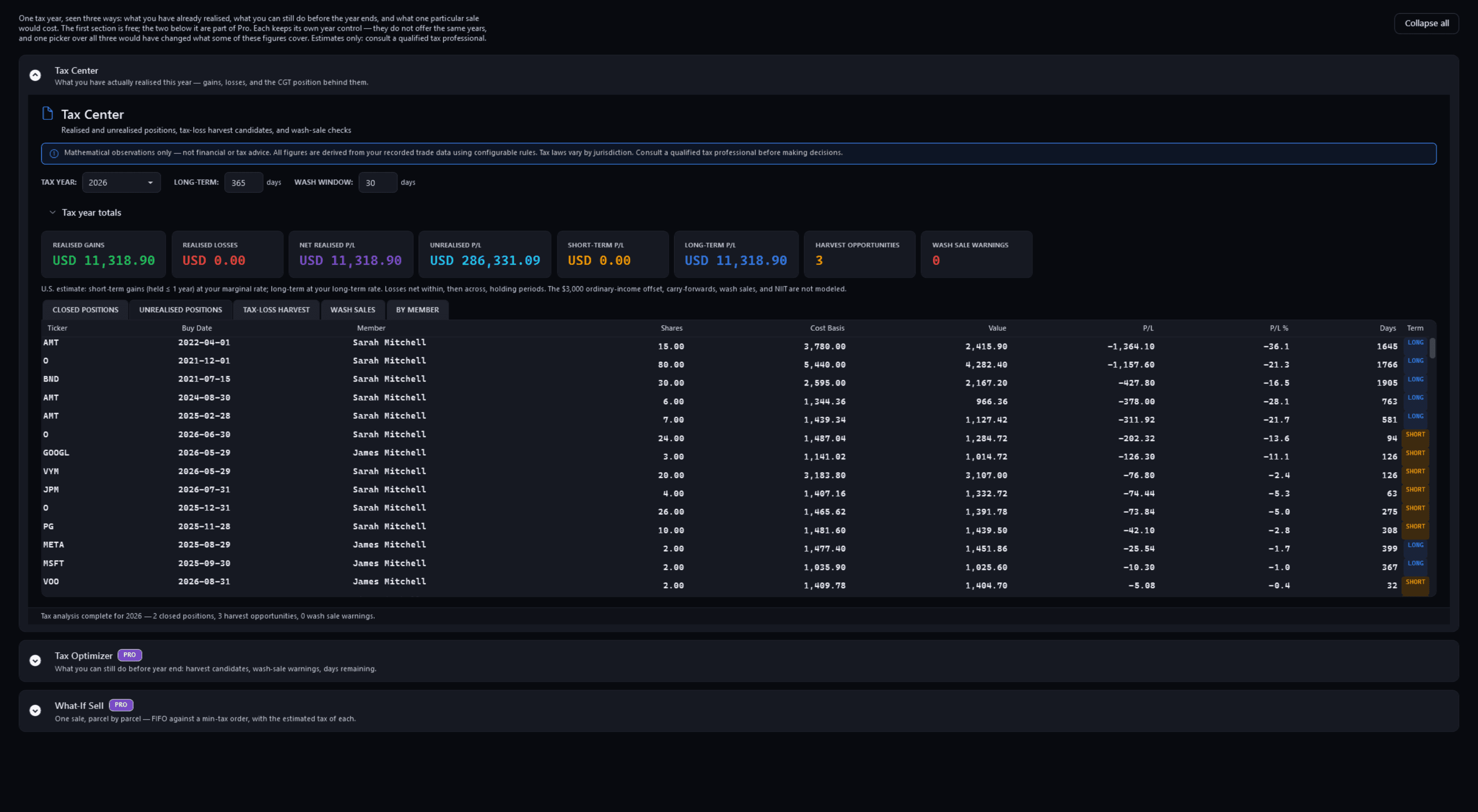
Tax — Tax CenterFree
Pulse Neuron 1.5.9 · Free · the demo household, captured 2 Oct 2026. Realised gains, unrealised positions and capital-gains estimates under the country you choose. Free. Since 1.6.0 it opens on the current year of your financial-year calendar, with past years that have activity a click away. Screens show a fictional demo household — the people, accounts, balances and trades are made up; share prices, dividends and splits are real market history. Bank, card and store names are sample labels; no affiliation is implied. Since 1.6.4 the demo's accounts, cards and lenders carry generic names; pictures captured before then may show the real names it used as sample labels.Since 1.6.0 it opens on the current year of your financial-year calendar, with past years that have activity a click away.
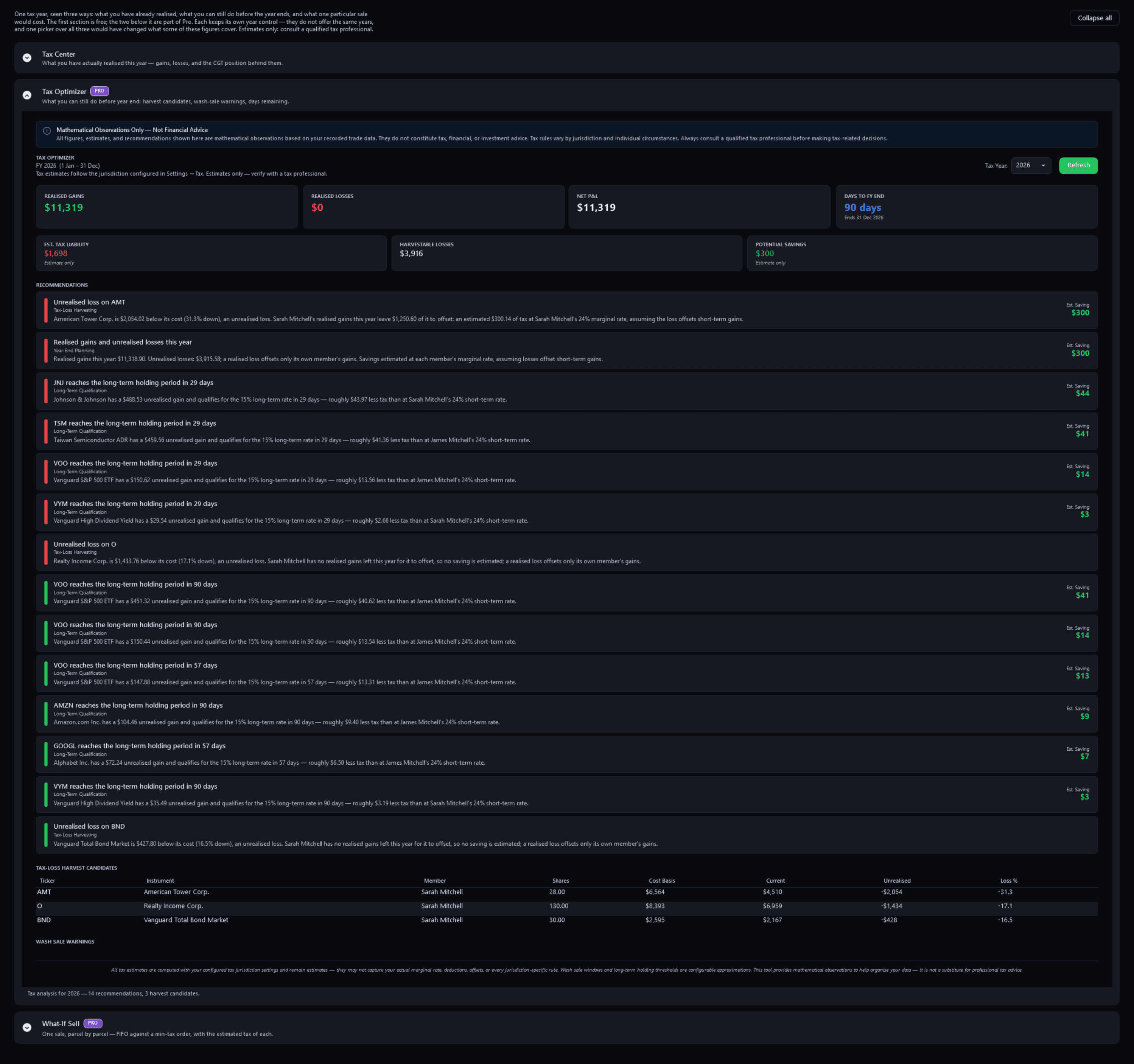
Tax — Tax OptimizerPro
Pulse Neuron 1.5.9 · Pro · the demo household, captured 2 Oct 2026. Harvest candidates, long-term dates coming up and the days left in the tax year, each with an estimated saving. Estimates only. Since 1.6.0 each item names the member it belongs to, and the page opens on the current year of your financial-year calendar. Since 1.6.1, its list is headed “WHAT THE PLANNER FOUND”. Screens show a fictional demo household — the people, accounts, balances and trades are made up; share prices, dividends and splits are real market history. Bank, card and store names are sample labels; no affiliation is implied. Since 1.6.4 the demo's accounts, cards and lenders carry generic names; pictures captured before then may show the real names it used as sample labels.Since 1.6.0 each item names the member it belongs to, and the page opens on the current year of your financial-year calendar. Since 1.6.1, its list is headed “WHAT THE PLANNER FOUND”.
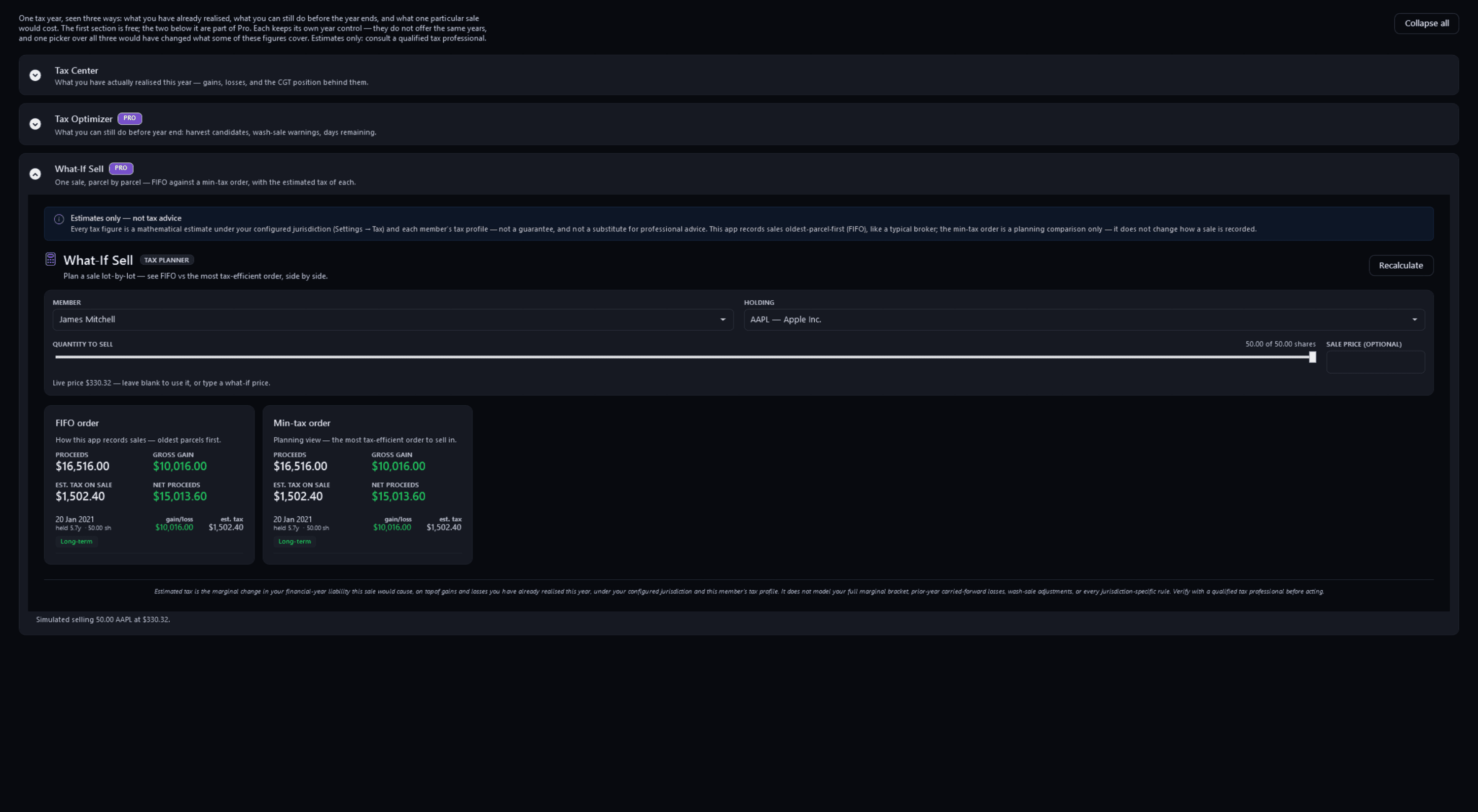
Tax — What-If SellPro
Pulse Neuron 1.5.9 · Pro · the demo household, captured 2 Oct 2026. One sale planned parcel by parcel: first-in, first-out beside the lower-tax order, the same here because all 50 shares were bought in one lot. Screens show a fictional demo household — the people, accounts, balances and trades are made up; share prices, dividends and splits are real market history. Bank, card and store names are sample labels; no affiliation is implied. Since 1.6.4 the demo's accounts, cards and lenders carry generic names; pictures captured before then may show the real names it used as sample labels.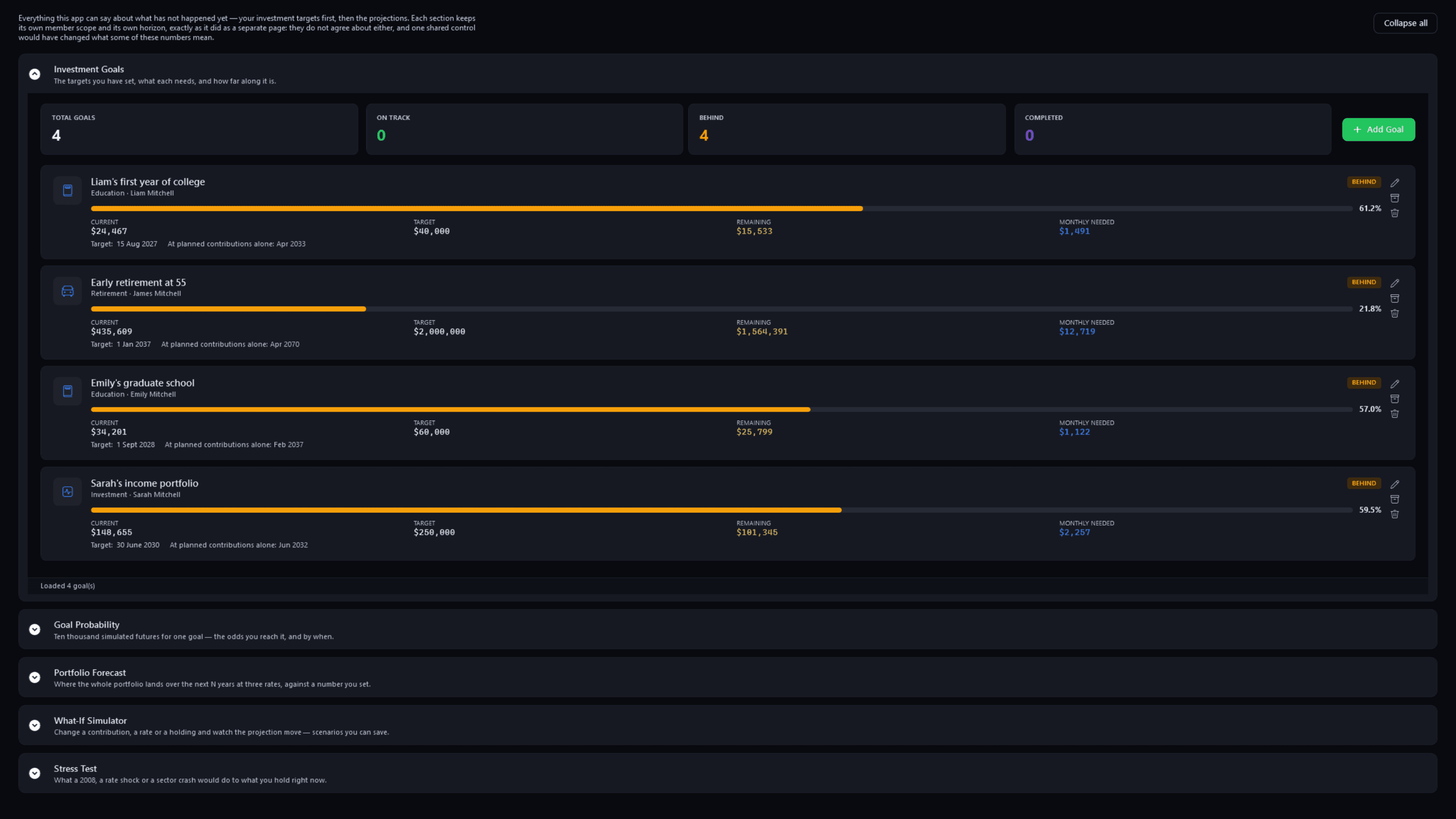
Look Ahead — Investment GoalsPro
Pulse Neuron 1.5.9 · Pro · the demo household, captured 2 Oct 2026. Each investment goal with its member, progress, what remains and the monthly amount it needs. Screens show a fictional demo household — the people, accounts, balances and trades are made up; share prices, dividends and splits are real market history. Bank, card and store names are sample labels; no affiliation is implied. Since 1.6.4 the demo's accounts, cards and lenders carry generic names; pictures captured before then may show the real names it used as sample labels.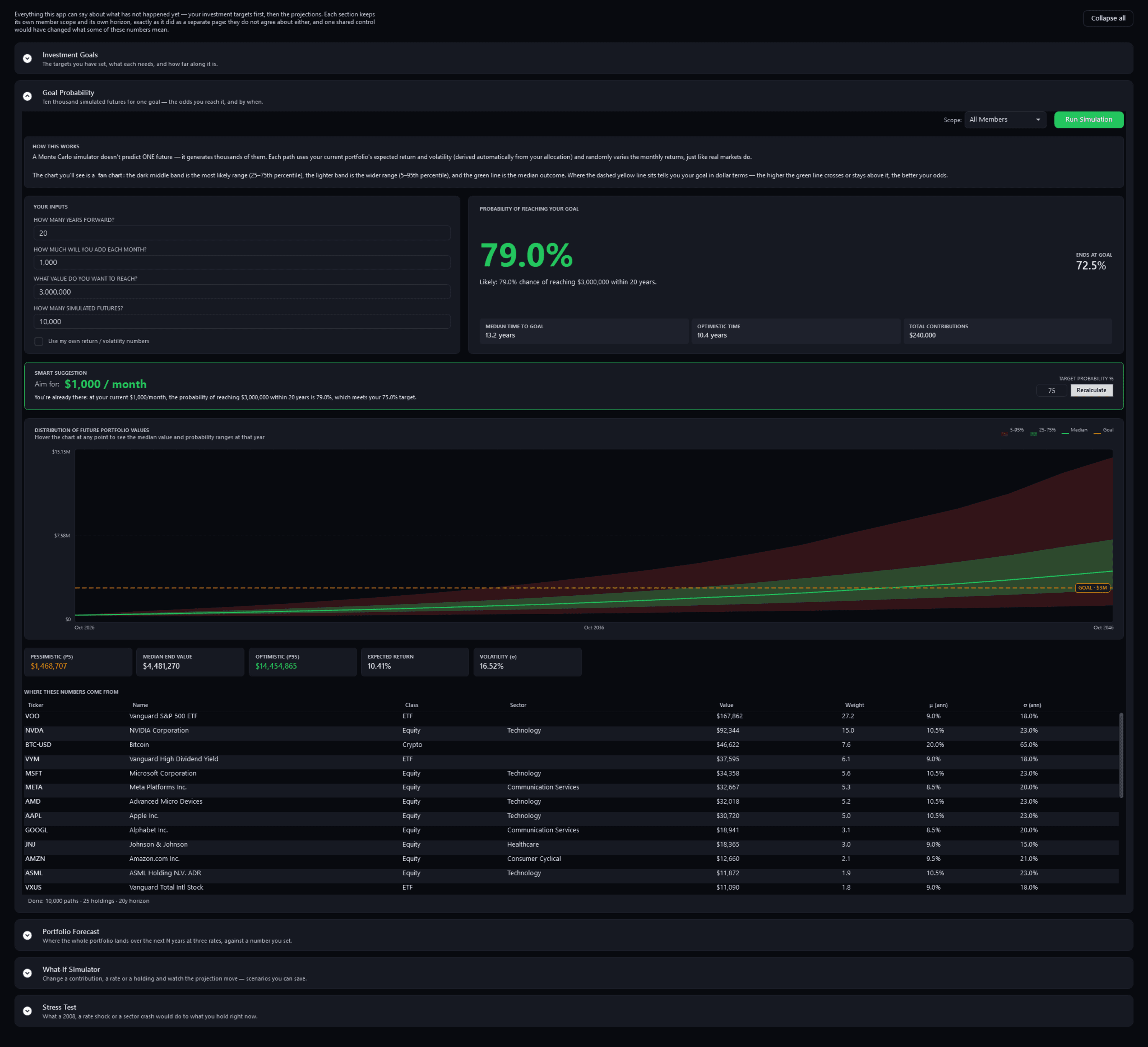
Look Ahead — Goal ProbabilityPro
Pulse Neuron 1.5.9 · Pro · the demo household, captured 2 Oct 2026. The odds of reaching one goal across 10,000 simulated futures, the median and optimistic years to get there, and the spread of outcomes year by year. Screens show a fictional demo household — the people, accounts, balances and trades are made up; share prices, dividends and splits are real market history. Bank, card and store names are sample labels; no affiliation is implied. Since 1.6.4 the demo's accounts, cards and lenders carry generic names; pictures captured before then may show the real names it used as sample labels.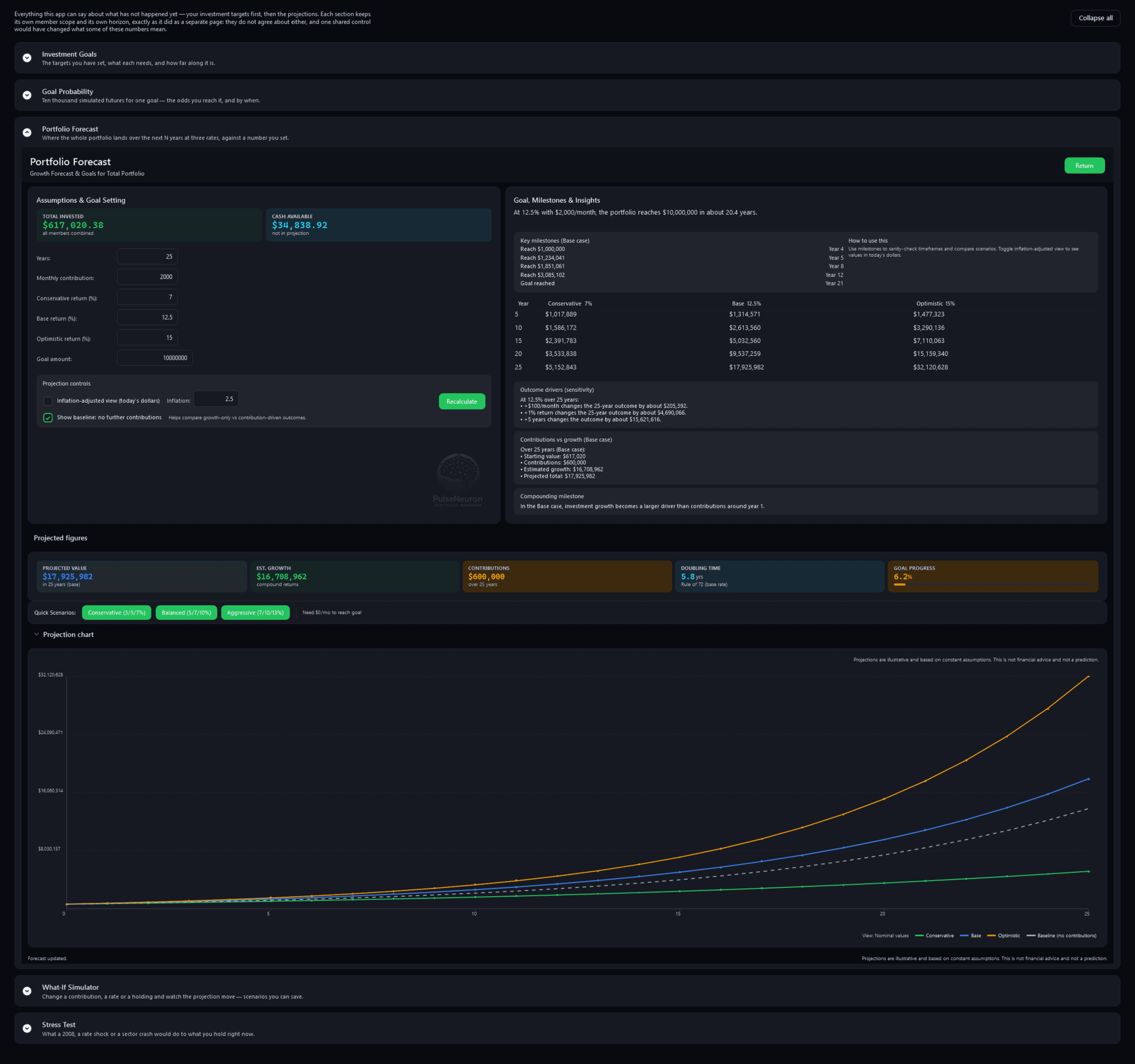
Look Ahead — Portfolio ForecastPro
Pulse Neuron 1.5.9 · Pro · the demo household, captured 2 Oct 2026. The whole portfolio projected at three rates you set against a goal amount, with milestones, a year-by-year table and the projection chart. Screens show a fictional demo household — the people, accounts, balances and trades are made up; share prices, dividends and splits are real market history. Bank, card and store names are sample labels; no affiliation is implied. Since 1.6.4 the demo's accounts, cards and lenders carry generic names; pictures captured before then may show the real names it used as sample labels.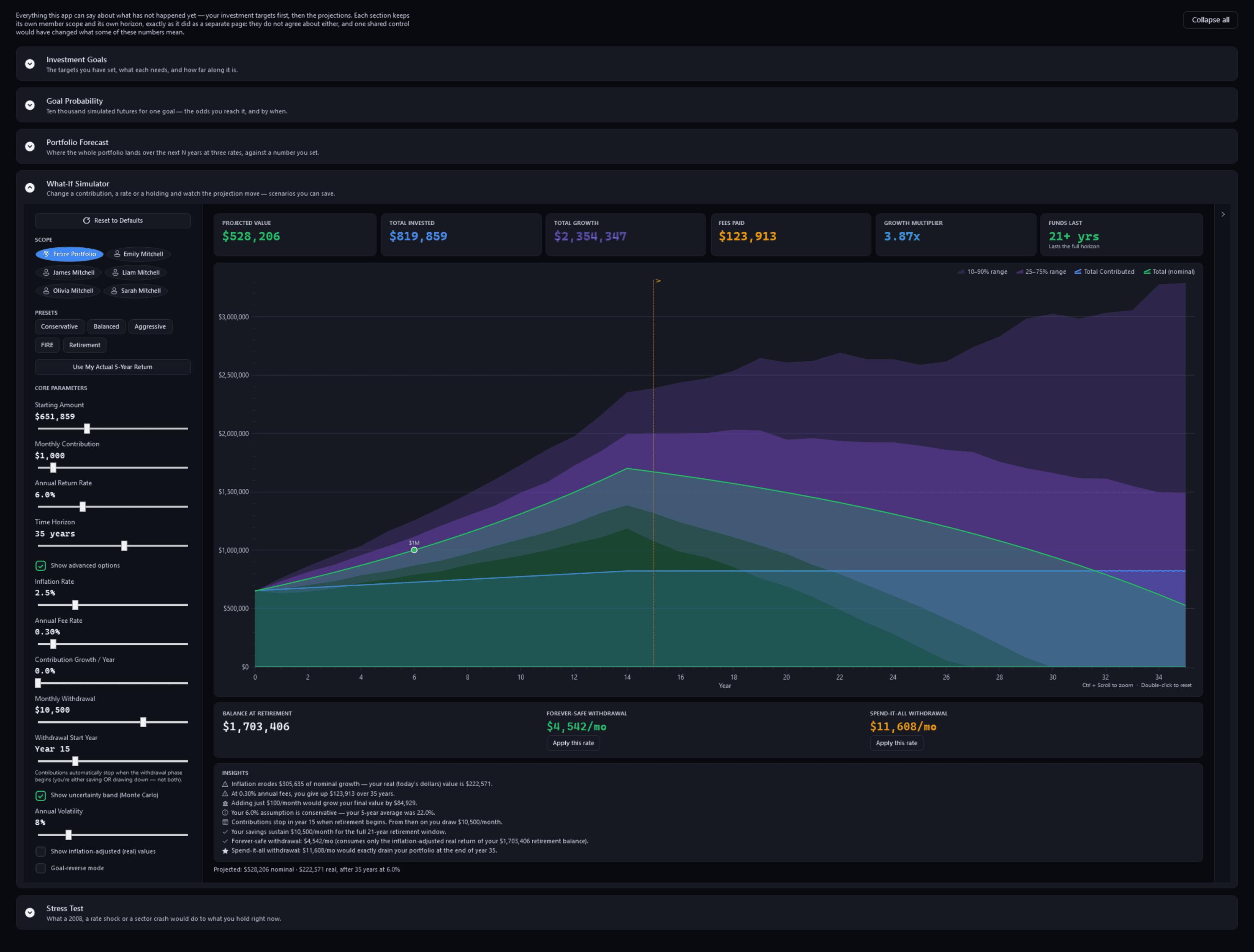
Look Ahead — What-If SimulatorPro
Pulse Neuron 1.5.9 · Pro · the demo household, captured 2 Oct 2026. Change the starting amount, contributions, return, horizon or a withdrawal and see the projection, its uncertainty band and two withdrawal rates worked out from it. Screens show a fictional demo household — the people, accounts, balances and trades are made up; share prices, dividends and splits are real market history. Bank, card and store names are sample labels; no affiliation is implied. Since 1.6.4 the demo's accounts, cards and lenders carry generic names; pictures captured before then may show the real names it used as sample labels.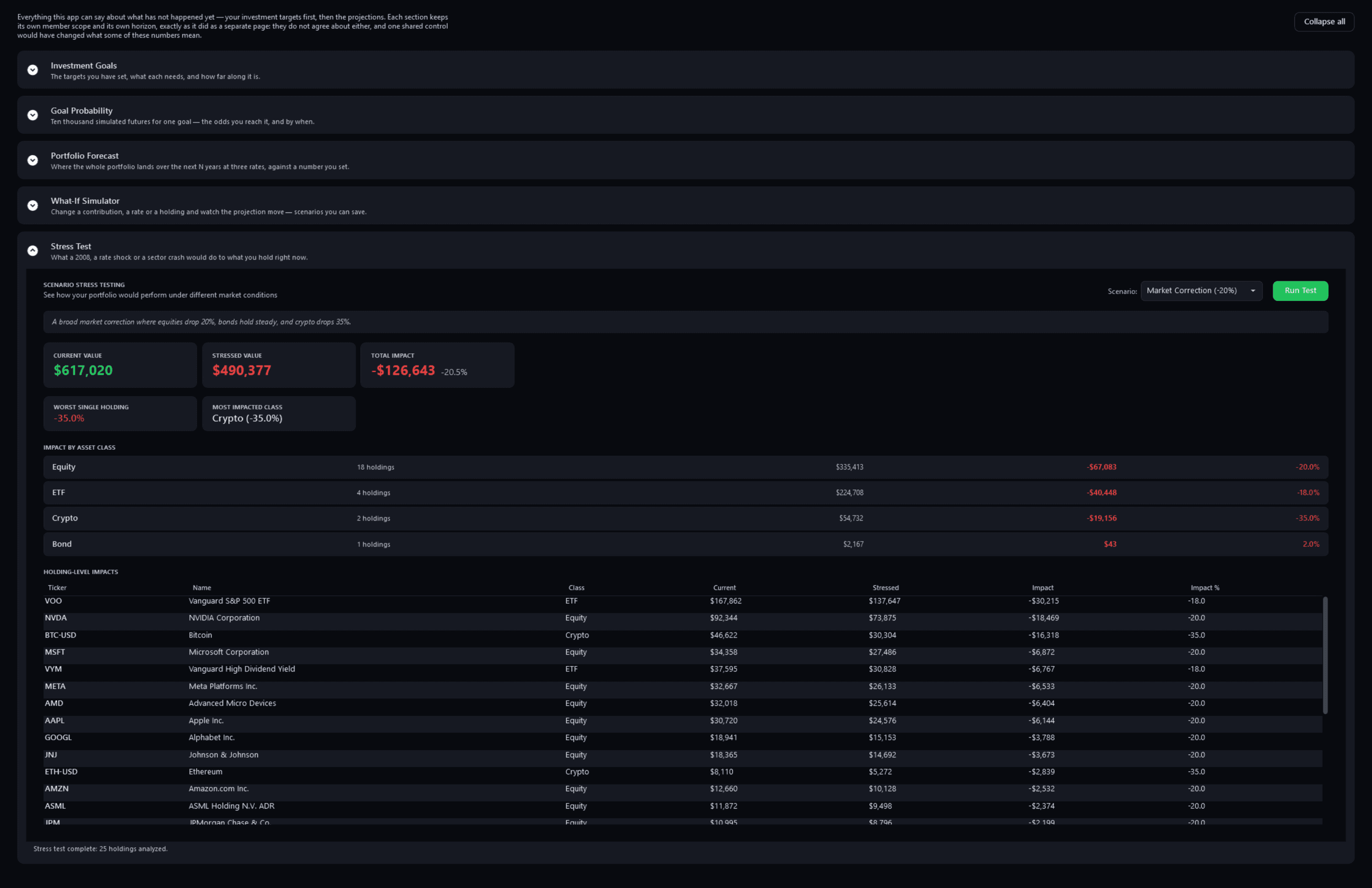
Look Ahead — Stress TestPro
Pulse Neuron 1.5.9 · Pro · the demo household, captured 2 Oct 2026. A preset market correction applied to what you hold now, by asset class and holding by holding. Screens show a fictional demo household — the people, accounts, balances and trades are made up; share prices, dividends and splits are real market history. Bank, card and store names are sample labels; no affiliation is implied. Since 1.6.4 the demo's accounts, cards and lenders carry generic names; pictures captured before then may show the real names it used as sample labels.
A sale counted in parts
Rendered from the app for its fictional demo family; merchant names are sample labels.
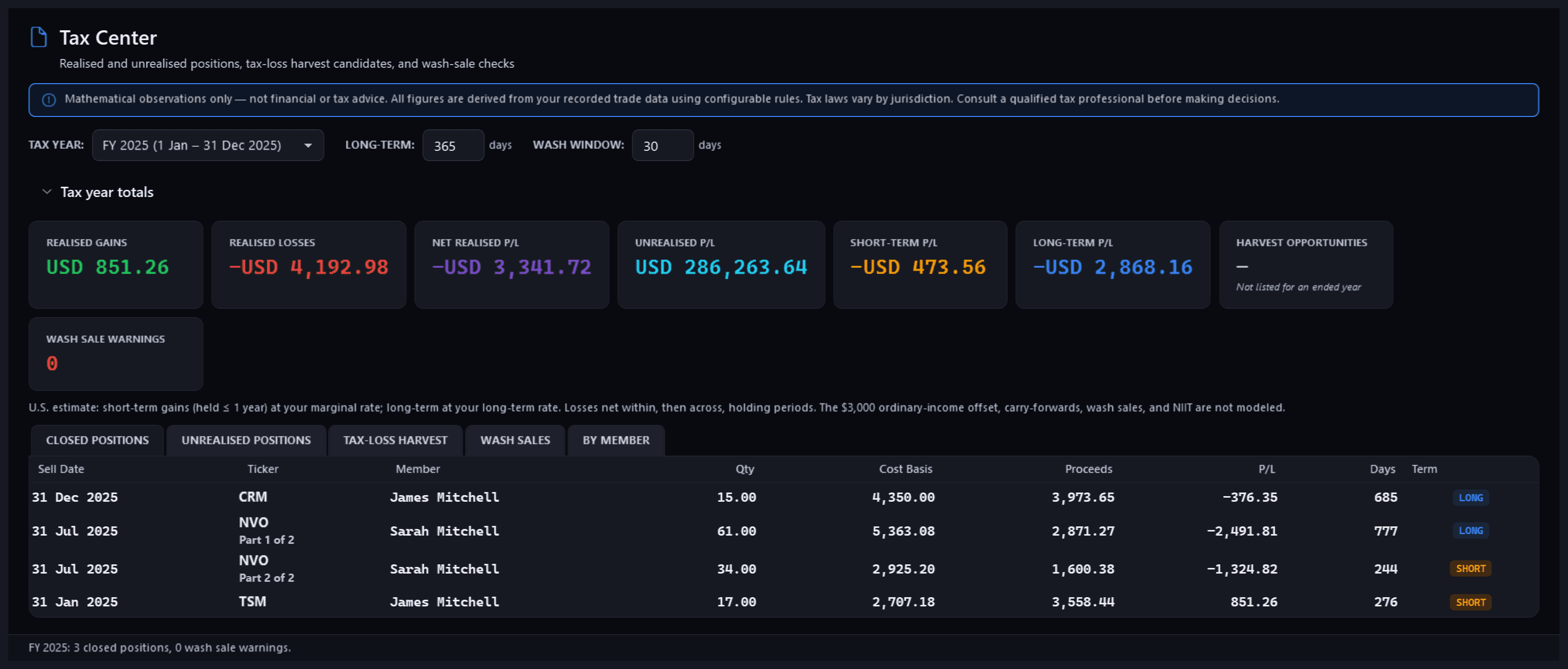
Tax — Tax Center, a sale in two partsFree
Pulse Neuron 1.6.4 · Free · rendered from the app for its fictional demo family, 22 Oct 2026. A sale of parcels bought at different times is counted in parts: those held more than 12 months (at the default threshold) apart from the rest. Pictures new in 1.6.4 are rendered from the app itself, offscreen, for its fictional demo family: the people, accounts, payments and trades are made up; share prices are real market history. Merchant names are sample labels; no affiliation is implied.
Cash in and out
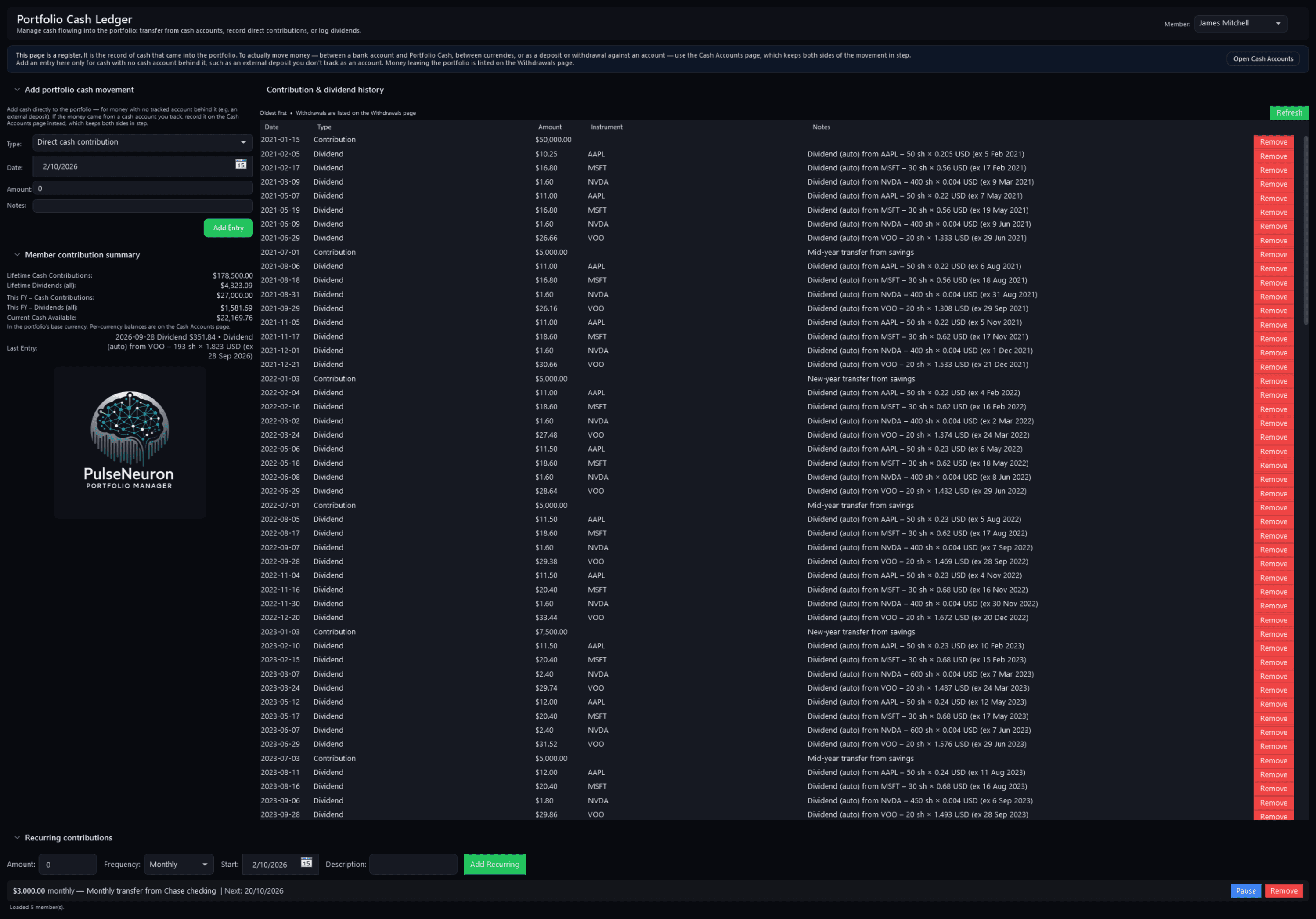
Cash LedgerFree
Pulse Neuron 1.5.9 · Free · the demo household, captured 2 Oct 2026. James's cash register: every contribution and dividend since January 2021, his contribution summary and a recurring monthly transfer. Screens show a fictional demo household — the people, accounts, balances and trades are made up; share prices, dividends and splits are real market history. Bank, card and store names are sample labels; no affiliation is implied. Since 1.6.4 the demo's accounts, cards and lenders carry generic names; pictures captured before then may show the real names it used as sample labels.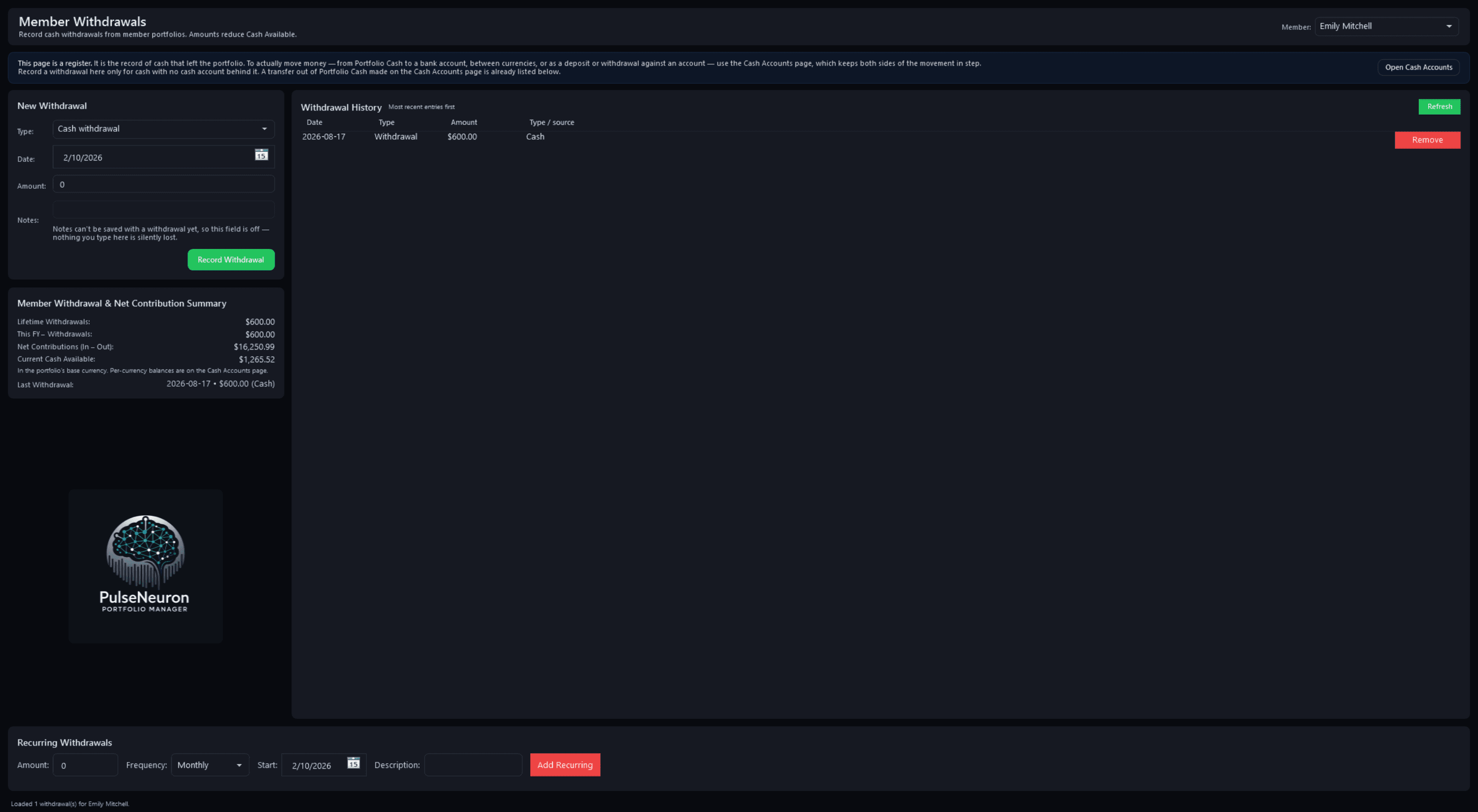
WithdrawalsFree
Pulse Neuron 1.5.9 · Free · the demo household, captured 2 Oct 2026. The register of cash taken out of one member's portfolio, with a running summary of withdrawals and net contributions. Screens show a fictional demo household — the people, accounts, balances and trades are made up; share prices, dividends and splits are real market history. Bank, card and store names are sample labels; no affiliation is implied. Since 1.6.4 the demo's accounts, cards and lenders carry generic names; pictures captured before then may show the real names it used as sample labels.
The Household door
22 screenshotsHousehold. Spending, bills, debts, net worth and tax time. Every page free.
Who is in this household
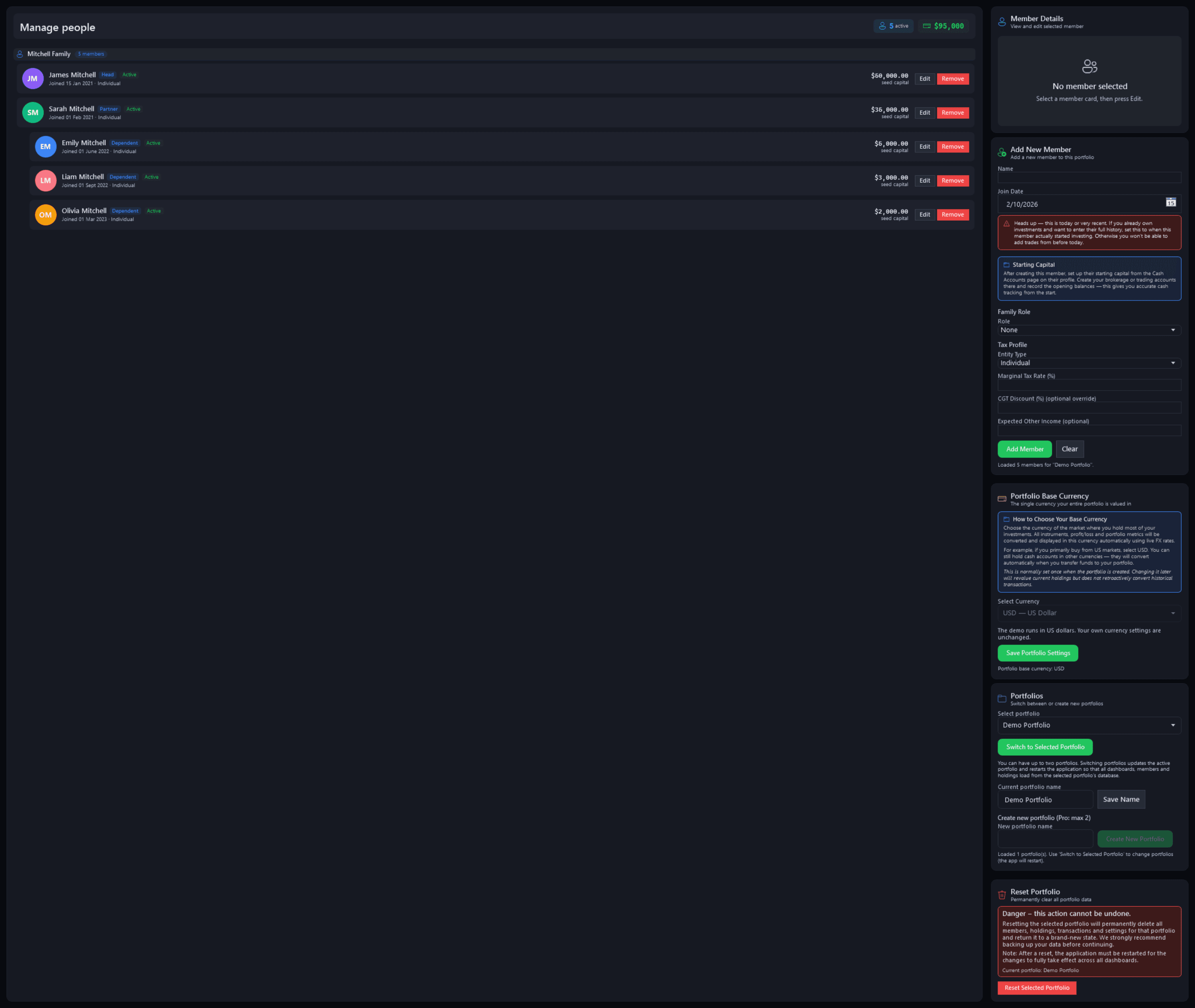
Manage peopleFree
Pulse Neuron 1.5.9 · Free · the demo household, captured 2 Oct 2026. Everyone in the household with their role, join date and seed capital, beside the forms to add a member and manage portfolios. Unlimited members on every plan. Screens show a fictional demo household — the people, accounts, balances and trades are made up; share prices, dividends and splits are real market history. Bank, card and store names are sample labels; no affiliation is implied. Since 1.6.4 the demo's accounts, cards and lenders carry generic names; pictures captured before then may show the real names it used as sample labels.
The whole picture
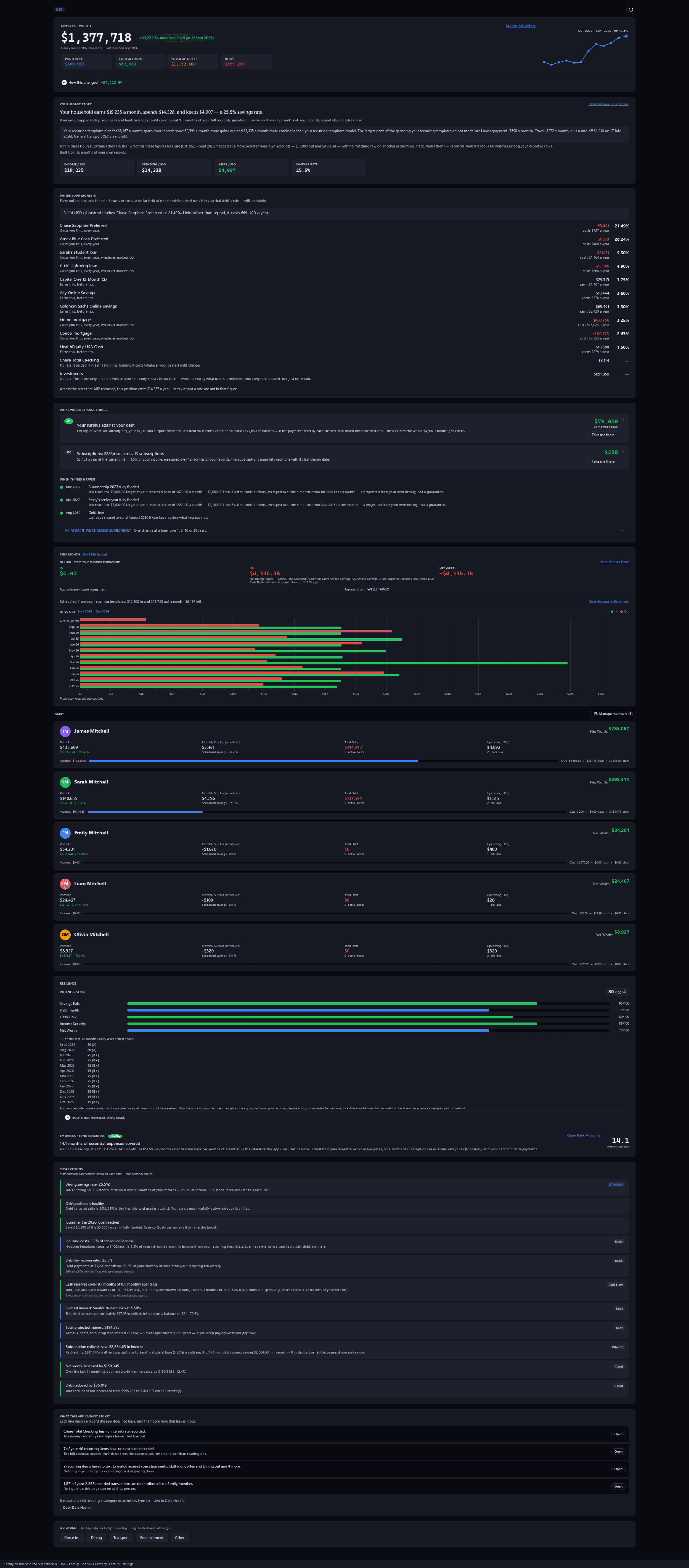
Family DashboardFree
Pulse Neuron 1.5.9 · Free · the demo household, captured 2 Oct 2026. Family net worth from both sides, the measured Money Story, every account and debt on one rate axis, each member, a wellness score and dated observations. Screens show a fictional demo household — the people, accounts, balances and trades are made up; share prices, dividends and splits are real market history. Bank, card and store names are sample labels; no affiliation is implied. Since 1.6.4 the demo's accounts, cards and lenders carry generic names; pictures captured before then may show the real names it used as sample labels.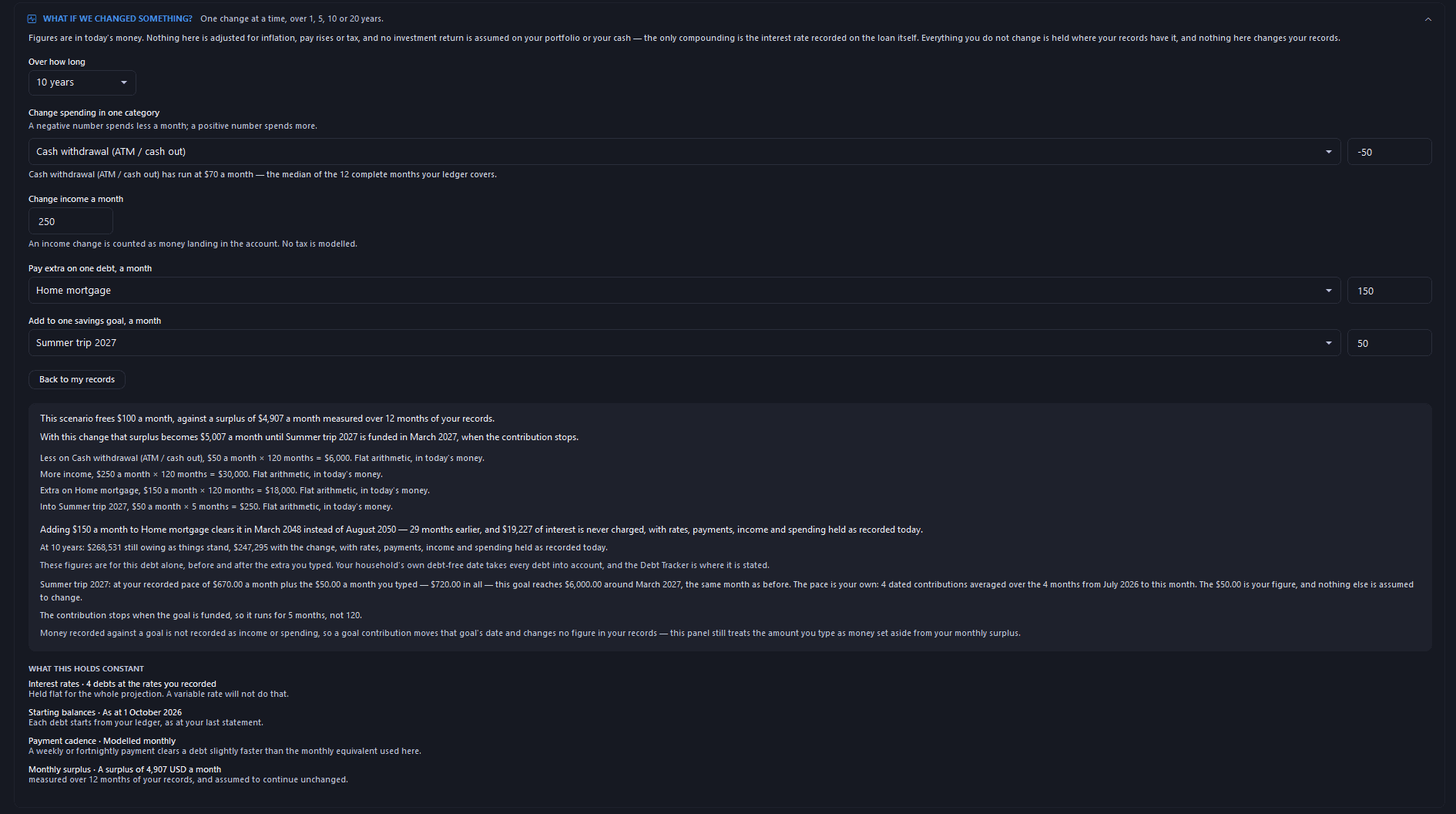
Family Dashboard — what if we changed something?Free
Pulse Neuron 1.5.9 · Free · the demo household, captured 2 Oct 2026. Changes tried together over 10 years, in today's money, with no investment return assumed: here the home mortgage clears 29 months earlier. Since 1.6.1, its line reads “One change or several together”. Screens show a fictional demo household — the people, accounts, balances and trades are made up; share prices, dividends and splits are real market history. Bank, card and store names are sample labels; no affiliation is implied. Since 1.6.4 the demo's accounts, cards and lenders carry generic names; pictures captured before then may show the real names it used as sample labels.Since 1.6.1, its line reads “One change or several together”.
Money in and out
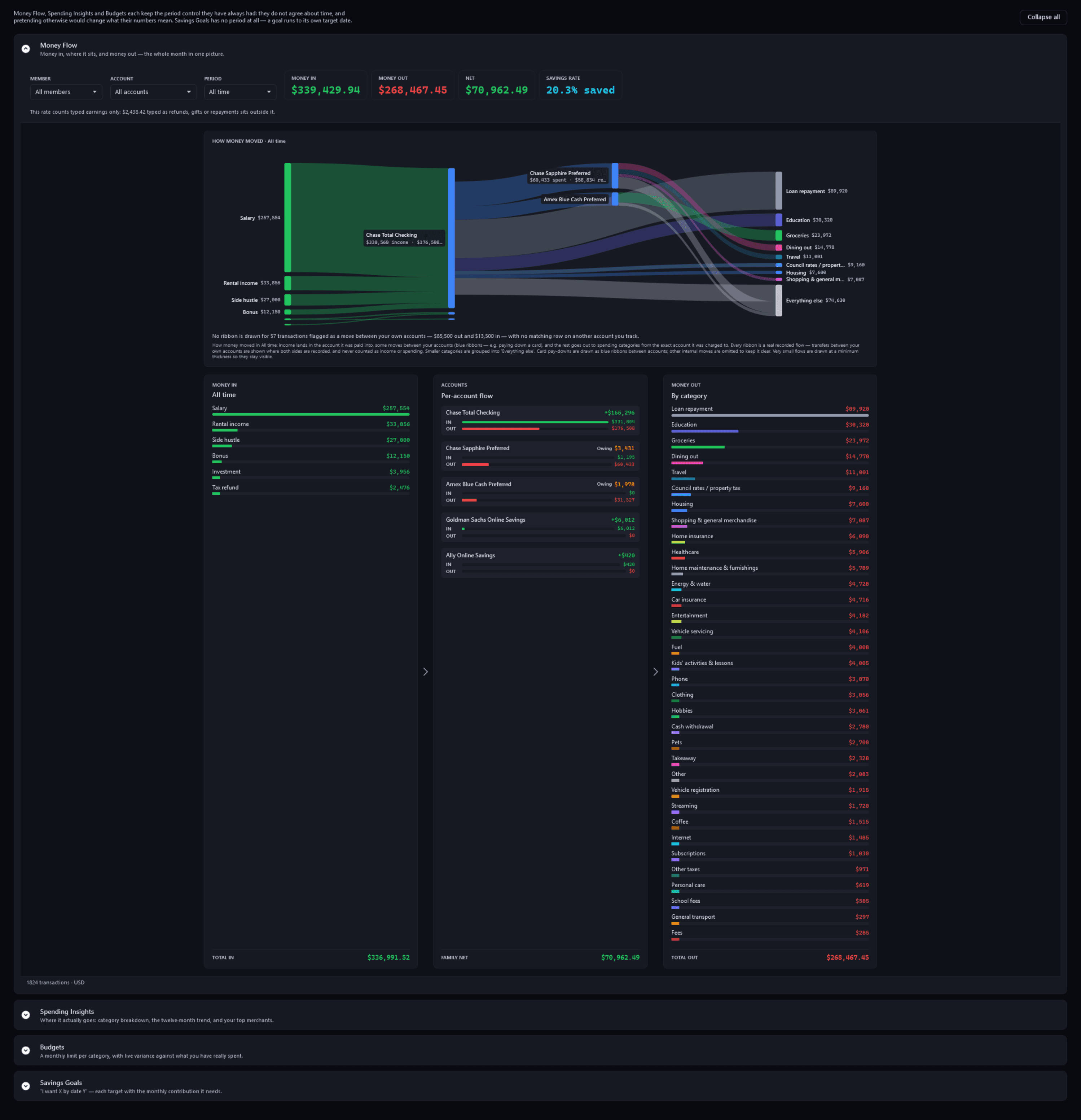
Spending — Money FlowFree
Pulse Neuron 1.5.9 · Free · the demo household, captured 2 Oct 2026. Money In → Accounts → Money Out, for any period from this month back to all time. Screens show a fictional demo household — the people, accounts, balances and trades are made up; share prices, dividends and splits are real market history. Bank, card and store names are sample labels; no affiliation is implied. Since 1.6.4 the demo's accounts, cards and lenders carry generic names; pictures captured before then may show the real names it used as sample labels.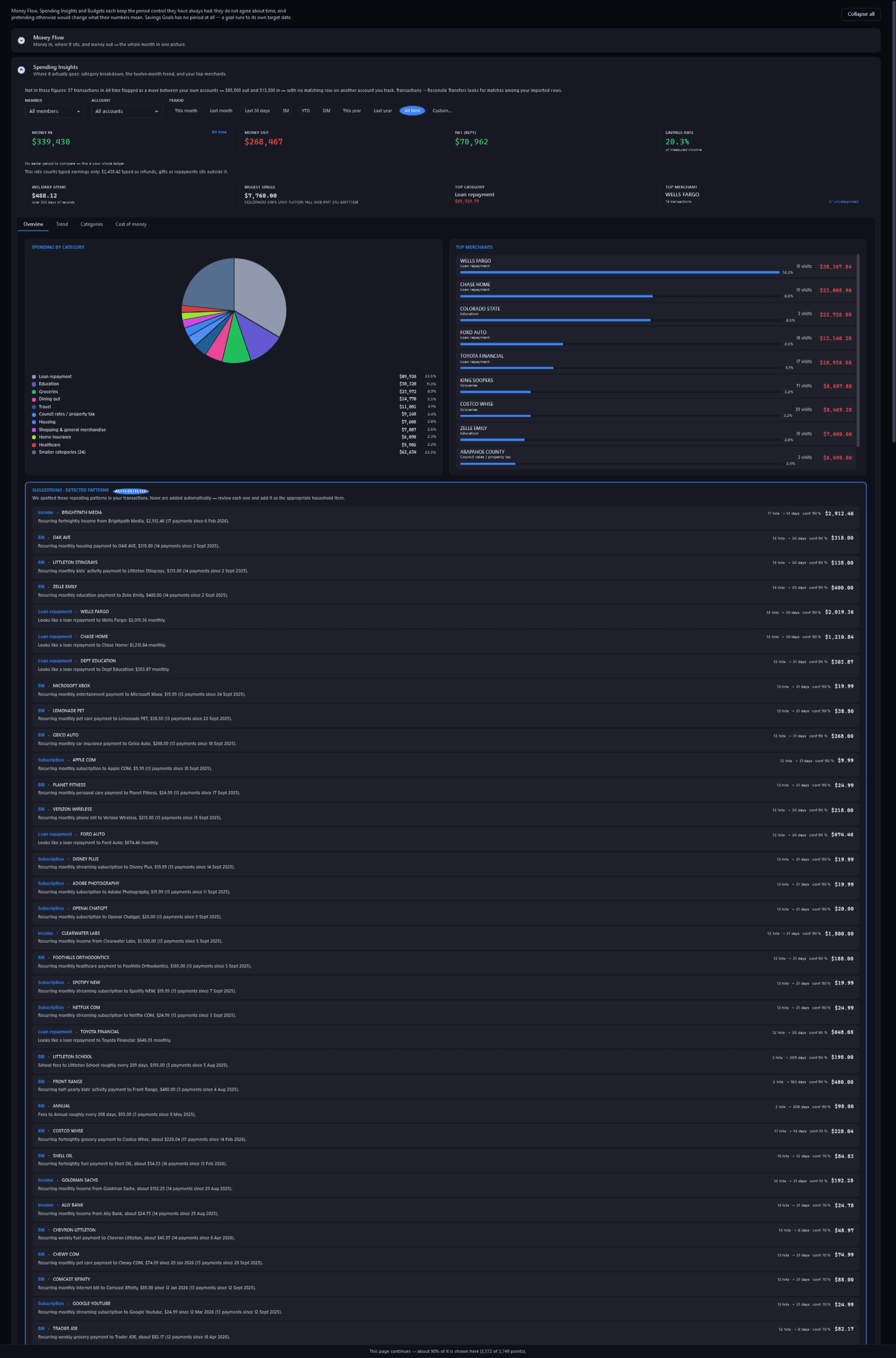
Spending — Spending InsightsFree
Pulse Neuron 1.5.9 · Free · the demo household, captured 2 Oct 2026. Spending by category and merchant for any period, with the repeating patterns the app found for you to review. Screens show a fictional demo household — the people, accounts, balances and trades are made up; share prices, dividends and splits are real market history. Bank, card and store names are sample labels; no affiliation is implied. Since 1.6.4 the demo's accounts, cards and lenders carry generic names; pictures captured before then may show the real names it used as sample labels.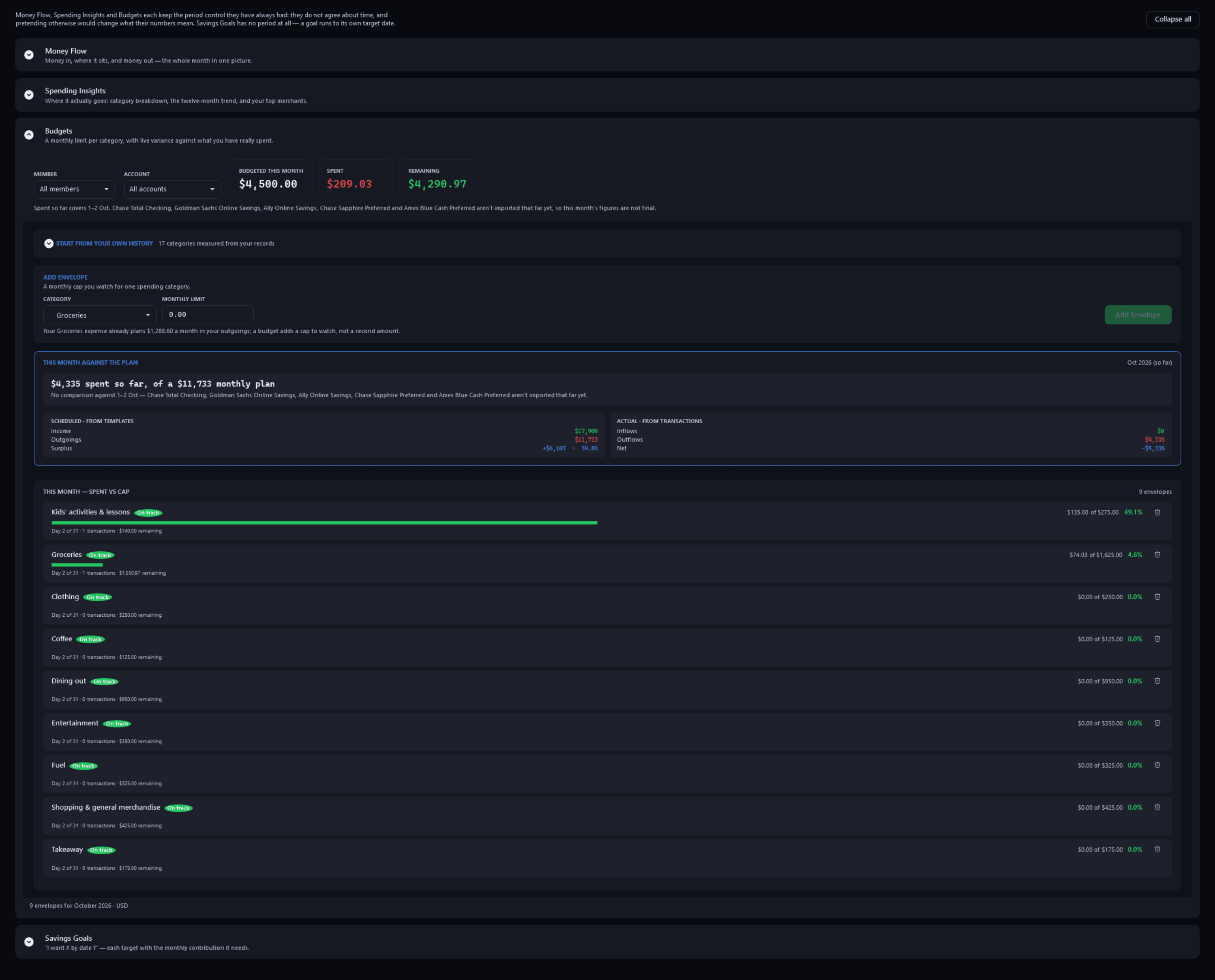
Spending — BudgetsFree
Pulse Neuron 1.5.9 · Free · the demo household, captured 2 Oct 2026. Monthly caps per category counted live from your transactions, two days into October here, beside this month against the plan. Since 1.6.1, a count of one reads “1 transaction”. Screens show a fictional demo household — the people, accounts, balances and trades are made up; share prices, dividends and splits are real market history. Bank, card and store names are sample labels; no affiliation is implied. Since 1.6.4 the demo's accounts, cards and lenders carry generic names; pictures captured before then may show the real names it used as sample labels.Since 1.6.1, a count of one reads “1 transaction”.
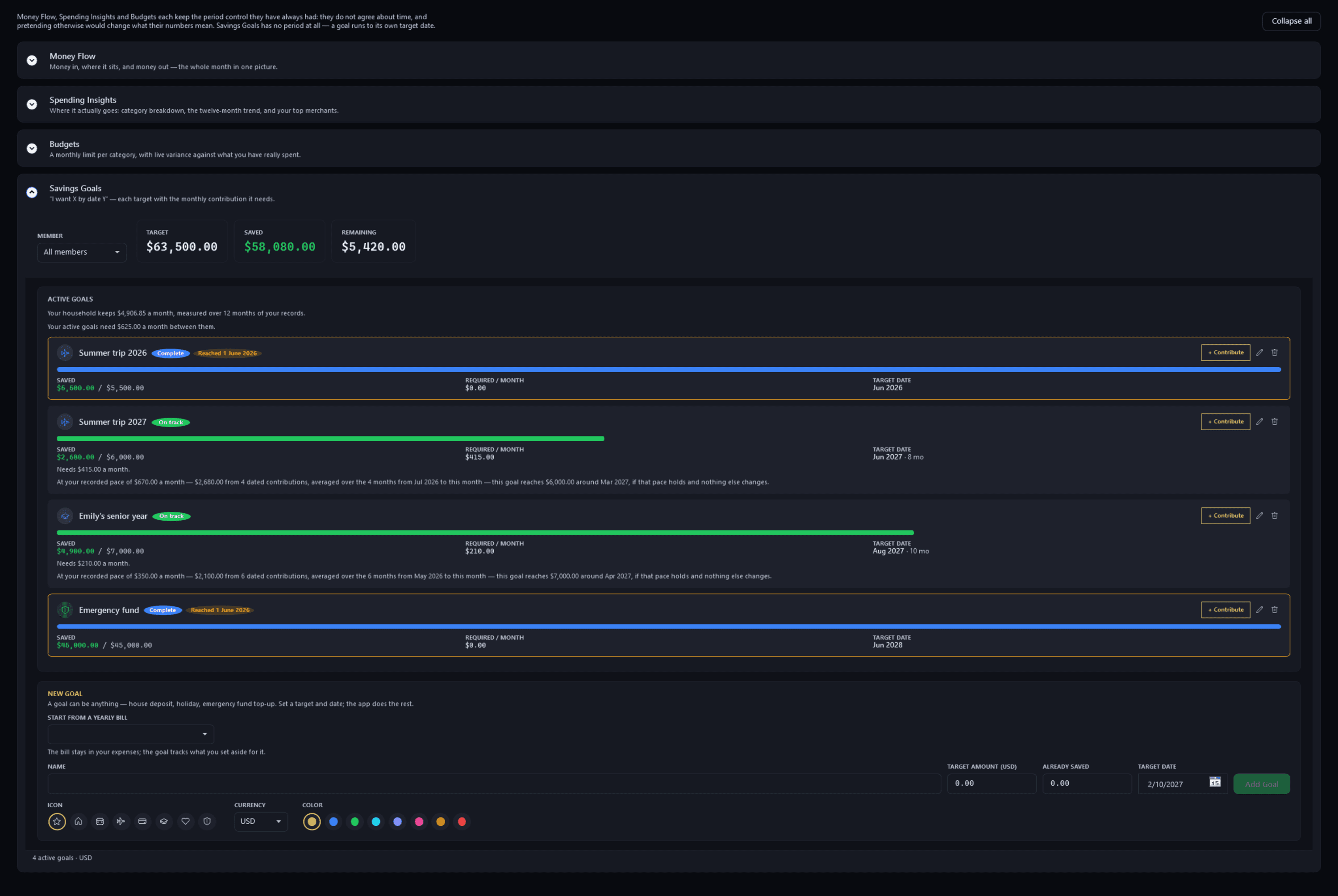
Spending — Savings GoalsFree
Pulse Neuron 1.5.9 · Free · the demo household, captured 2 Oct 2026. Each goal's progress, target date and the monthly contribution it needs, beside what your records show the household keeps. Screens show a fictional demo household — the people, accounts, balances and trades are made up; share prices, dividends and splits are real market history. Bank, card and store names are sample labels; no affiliation is implied. Since 1.6.4 the demo's accounts, cards and lenders carry generic names; pictures captured before then may show the real names it used as sample labels.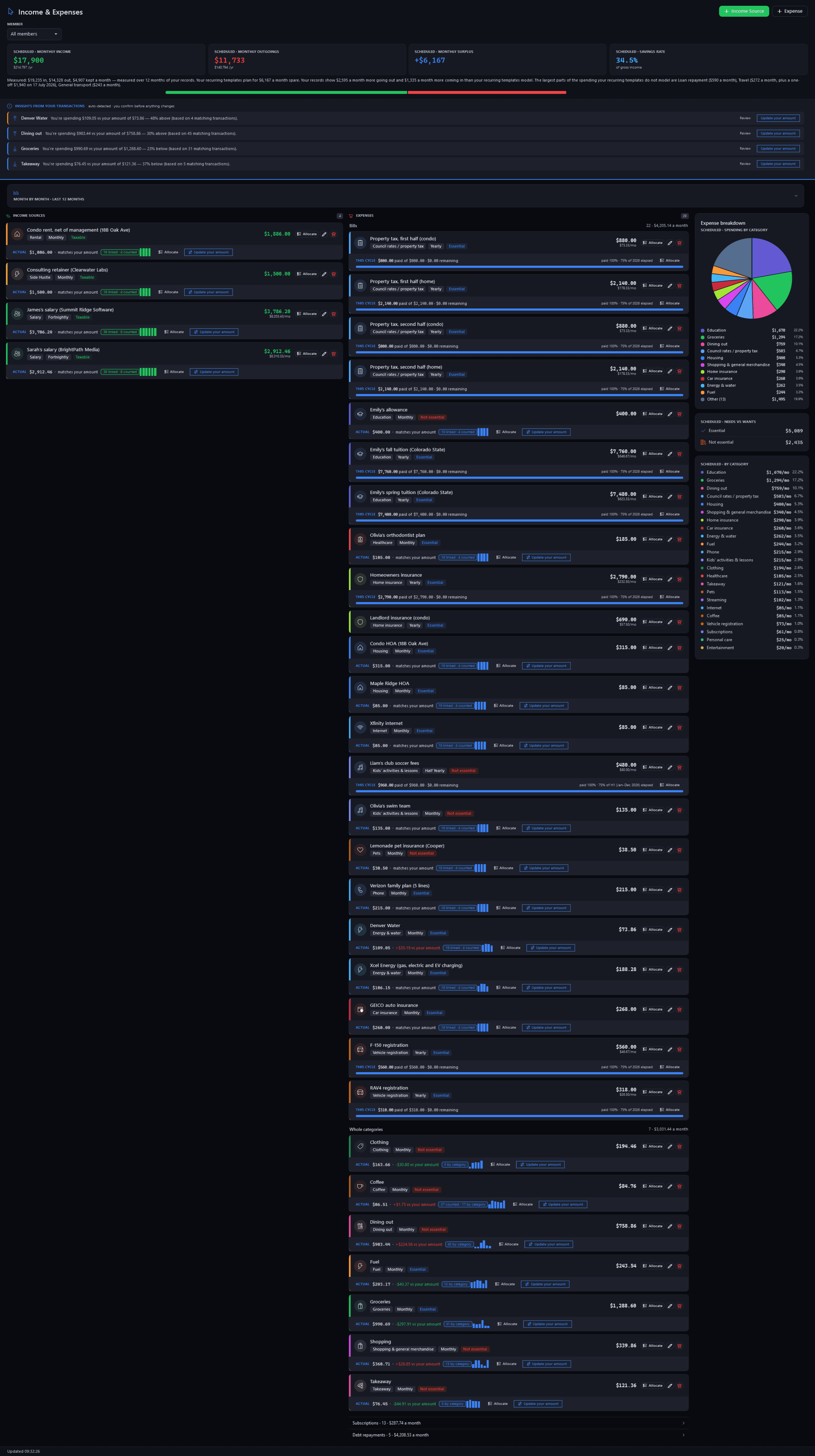
Income & ExpensesFree
Pulse Neuron 1.5.9 · Free · the demo household, captured 2 Oct 2026. Scheduled income and costs, each beside what the statements actually show, under the month measured from 12 months of records. Screens show a fictional demo household — the people, accounts, balances and trades are made up; share prices, dividends and splits are real market history. Bank, card and store names are sample labels; no affiliation is implied. Since 1.6.4 the demo's accounts, cards and lenders carry generic names; pictures captured before then may show the real names it used as sample labels.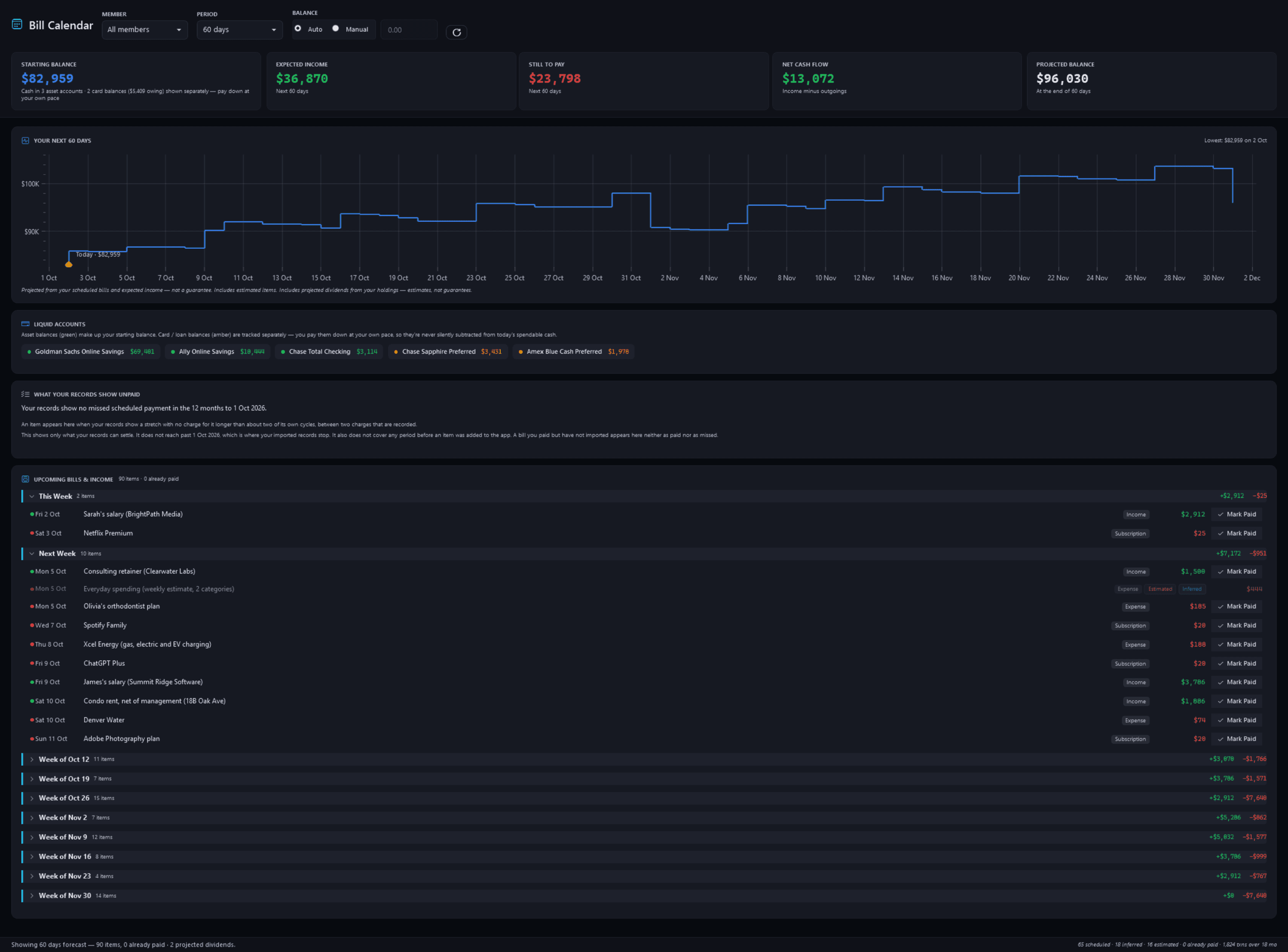
Bill CalendarFree
Pulse Neuron 1.5.9 · Free · the demo household, captured 2 Oct 2026. The next 60 days from an $82,959 starting balance: a running-balance chart, the accounts behind it, and each week's bills and income. Screens show a fictional demo household — the people, accounts, balances and trades are made up; share prices, dividends and splits are real market history. Bank, card and store names are sample labels; no affiliation is implied. Since 1.6.4 the demo's accounts, cards and lenders carry generic names; pictures captured before then may show the real names it used as sample labels.
Keeping the ledger honest
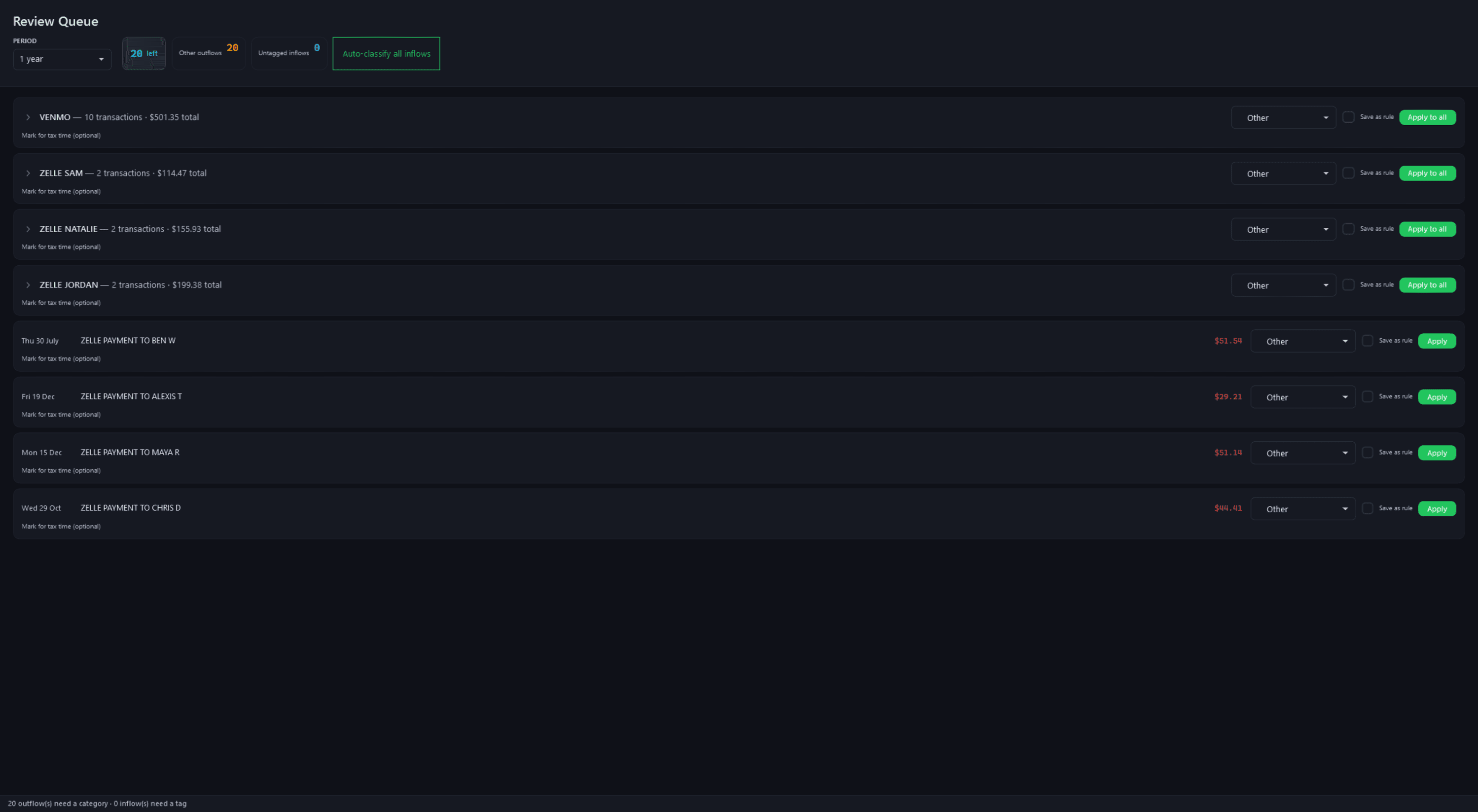
Review QueueFree
Pulse Neuron 1.5.9 · Free · the demo household, captured 2 Oct 2026. Uncategorised spending grouped by merchant, so one choice clears a whole group. Screens show a fictional demo household — the people, accounts, balances and trades are made up; share prices, dividends and splits are real market history. Bank, card and store names are sample labels; no affiliation is implied. Since 1.6.4 the demo's accounts, cards and lenders carry generic names; pictures captured before then may show the real names it used as sample labels.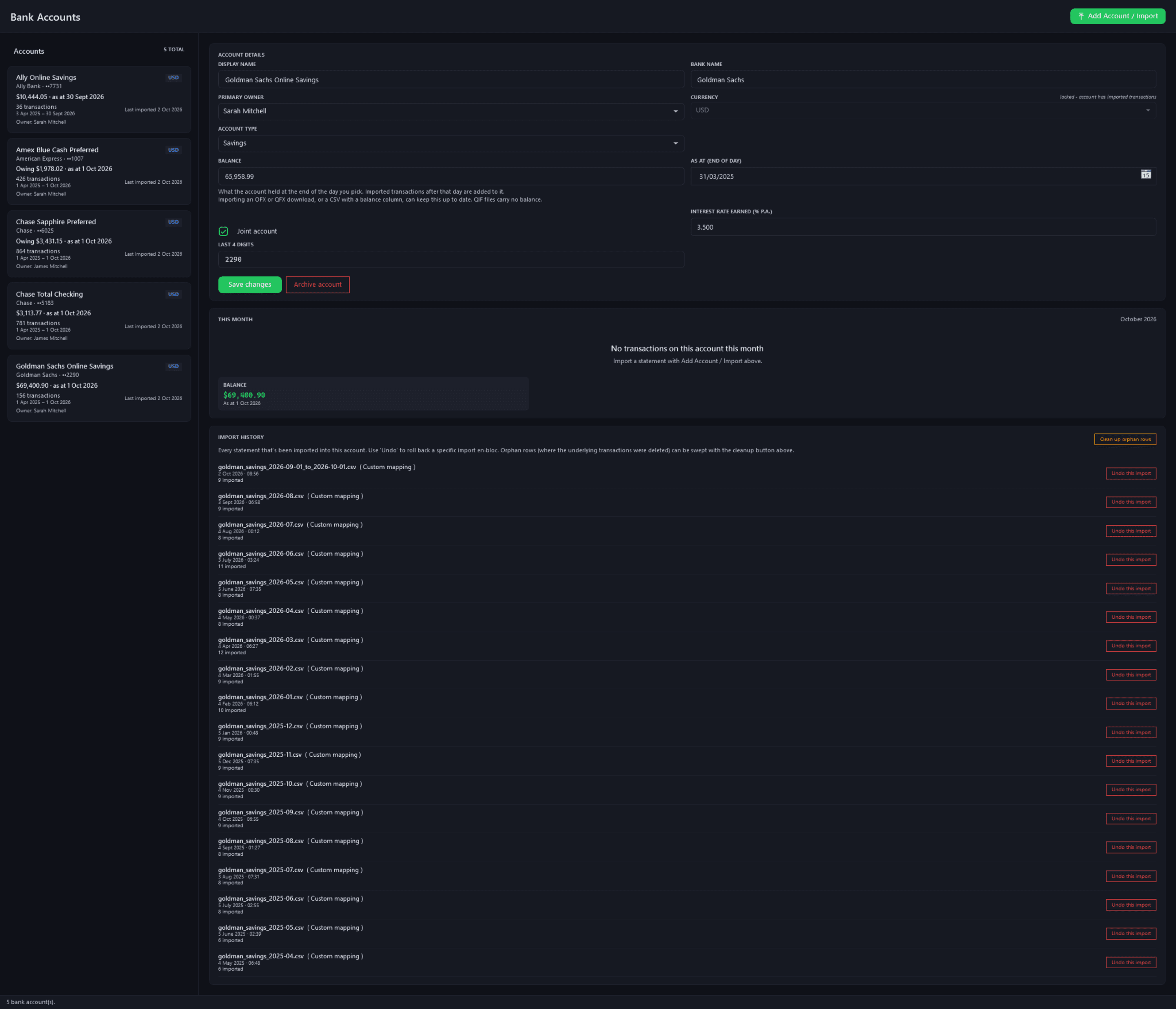
Bank AccountsFree
Pulse Neuron 1.5.9 · Free · the demo household, captured 2 Oct 2026. Five accounts and cards with the date each balance is good to, one open for editing, and every imported statement with its own undo. Screens show a fictional demo household — the people, accounts, balances and trades are made up; share prices, dividends and splits are real market history. Bank, card and store names are sample labels; no affiliation is implied. Since 1.6.4 the demo's accounts, cards and lenders carry generic names; pictures captured before then may show the real names it used as sample labels.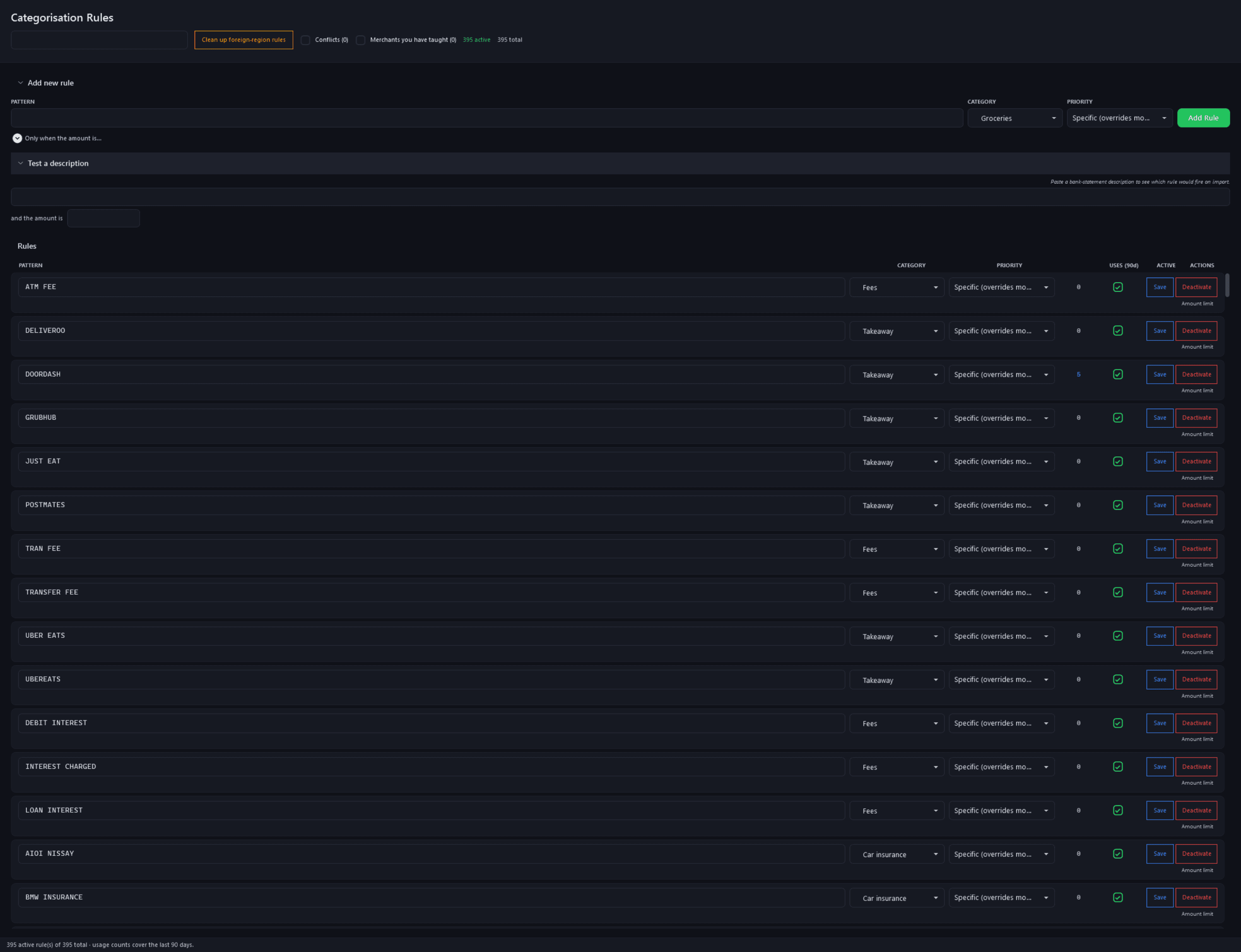
Categorisation RulesFree
Pulse Neuron 1.5.9 · Free · the demo household, captured 2 Oct 2026. Pattern-to-category rules with their priority and 90-day use count, and a box to test a description before you import. Screens show a fictional demo household — the people, accounts, balances and trades are made up; share prices, dividends and splits are real market history. Bank, card and store names are sample labels; no affiliation is implied. Since 1.6.4 the demo's accounts, cards and lenders carry generic names; pictures captured before then may show the real names it used as sample labels.
Tax time, the Review Queue and Pay down or invest?
Rendered from the app for its fictional demo family; merchant names are sample labels.
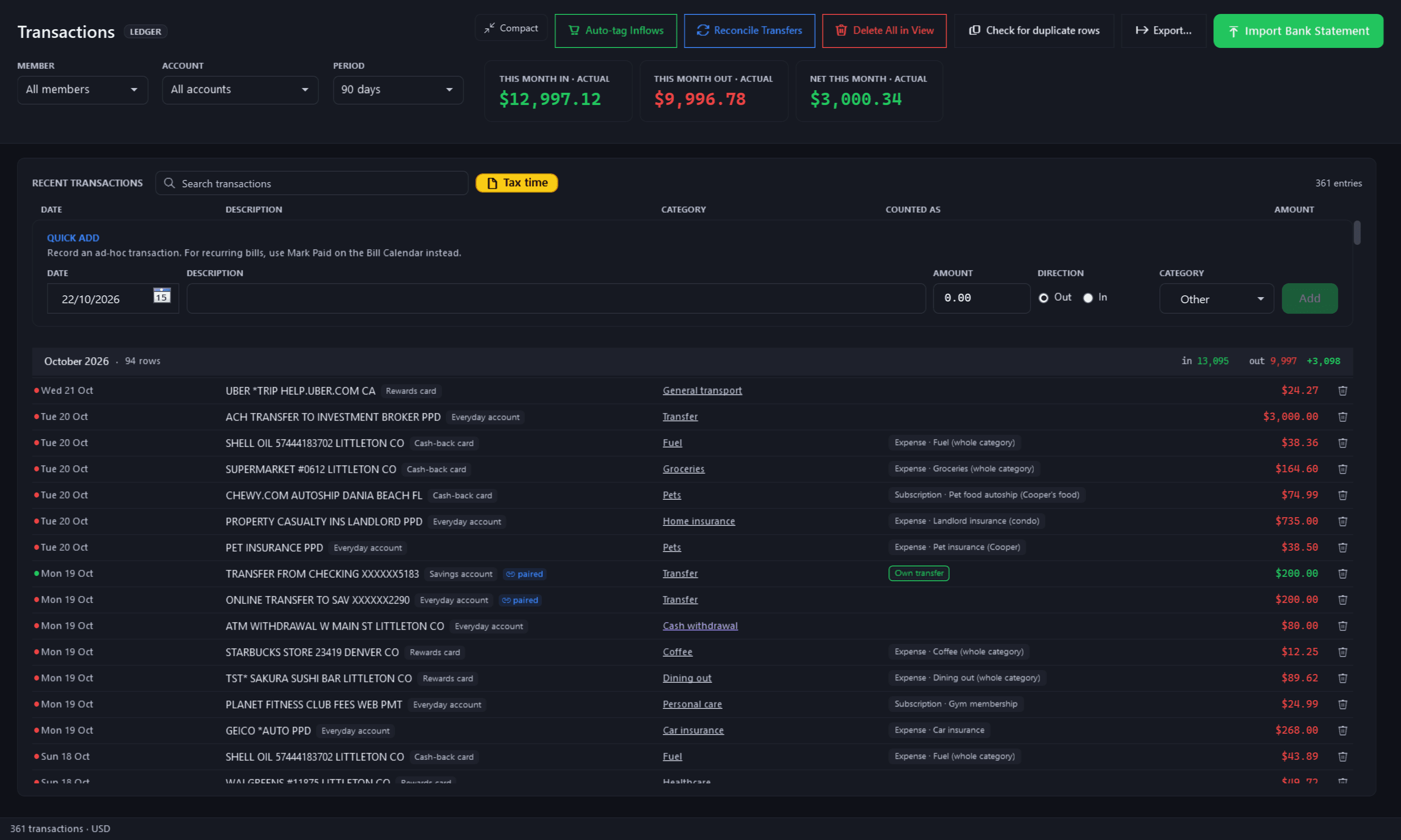
Transactions — the Tax time buttonFree
Pulse Neuron 1.6.4 · Free · rendered from the app for its fictional demo family, 22 Oct 2026. Your household ledger: statements imported and categorised from your rules, and the yellow Tax time button beside the search. Pictures new in 1.6.4 are rendered from the app itself, offscreen, for its fictional demo family: the people, accounts, payments and trades are made up; share prices are real market history. Merchant names are sample labels; no affiliation is implied.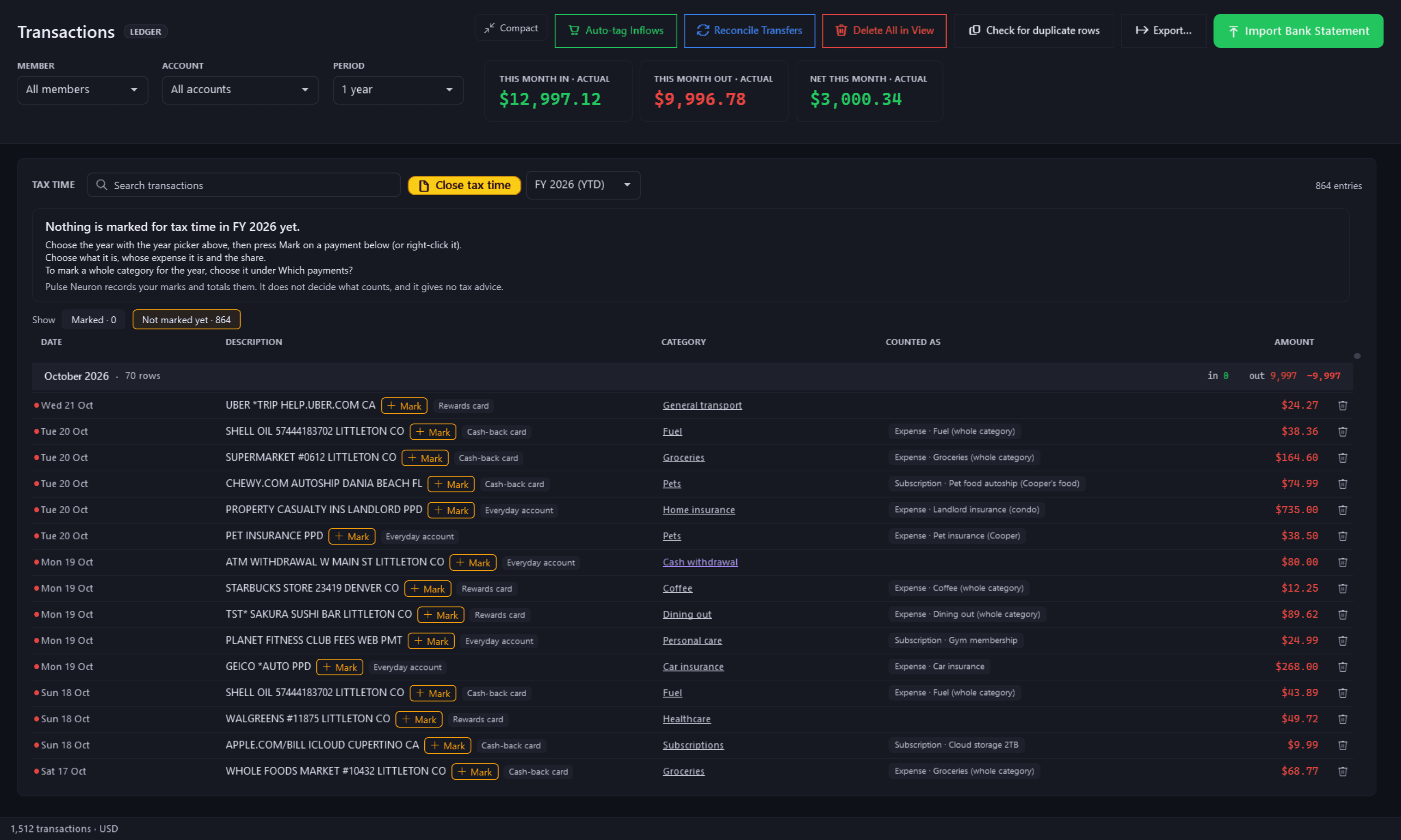
Tax time — not marked yetFree
Pulse Neuron 1.6.4 · Free · rendered from the app for its fictional demo family, 22 Oct 2026. Press Tax time and the year's money out is listed, each payment with a Mark button. Pulse Neuron records your marks; it does not decide what counts. Pictures new in 1.6.4 are rendered from the app itself, offscreen, for its fictional demo family: the people, accounts, payments and trades are made up; share prices are real market history. Merchant names are sample labels; no affiliation is implied.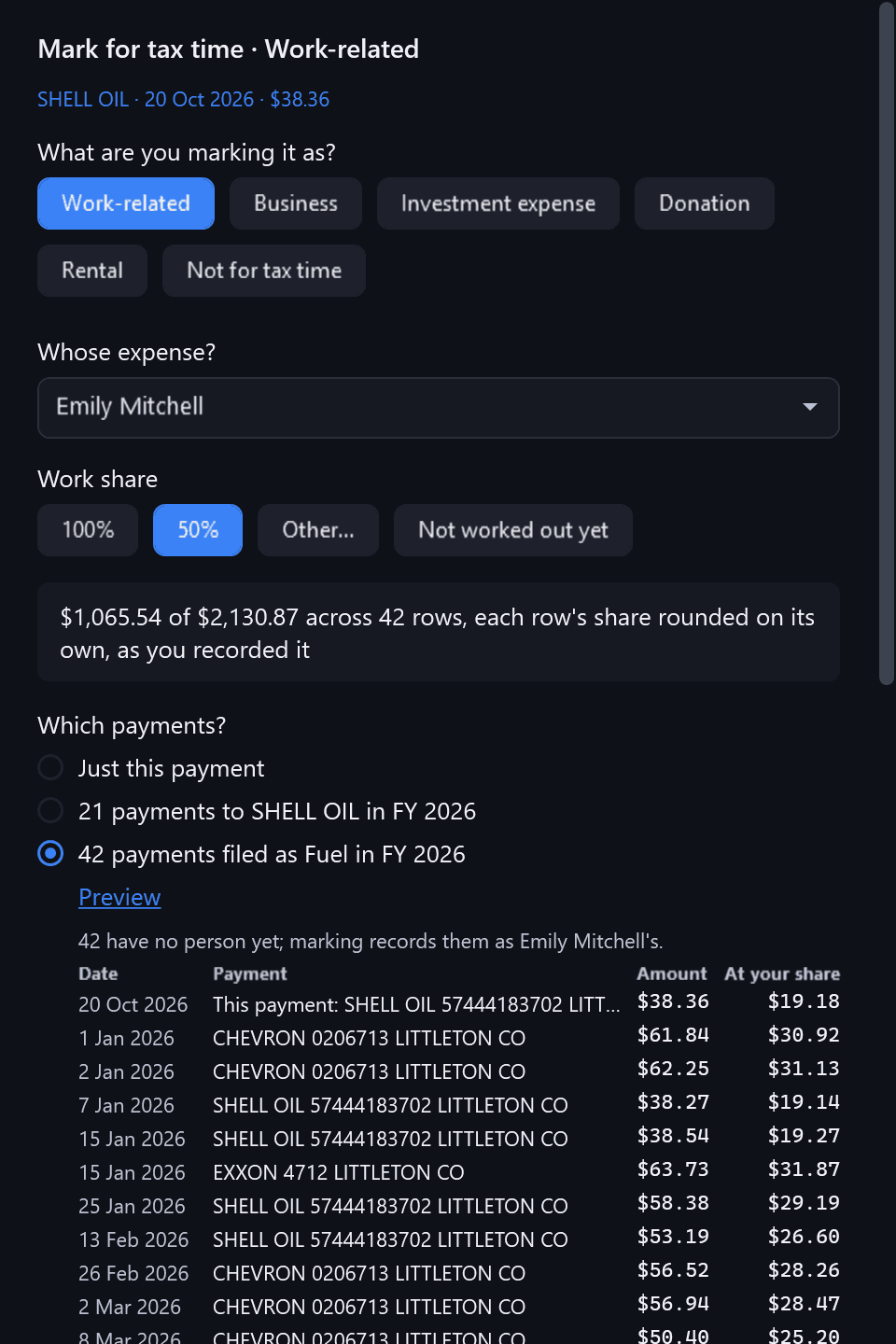
Mark for tax time — which payments?Free
Pulse Neuron 1.6.4 · Free · rendered from the app for its fictional demo family, 22 Oct 2026. What it is, whose expense and the work share; then this payment, the year's payments to that payee, or the year's payments in that category, previewed before anything is marked. Pictures new in 1.6.4 are rendered from the app itself, offscreen, for its fictional demo family: the people, accounts, payments and trades are made up; share prices are real market history. Merchant names are sample labels; no affiliation is implied.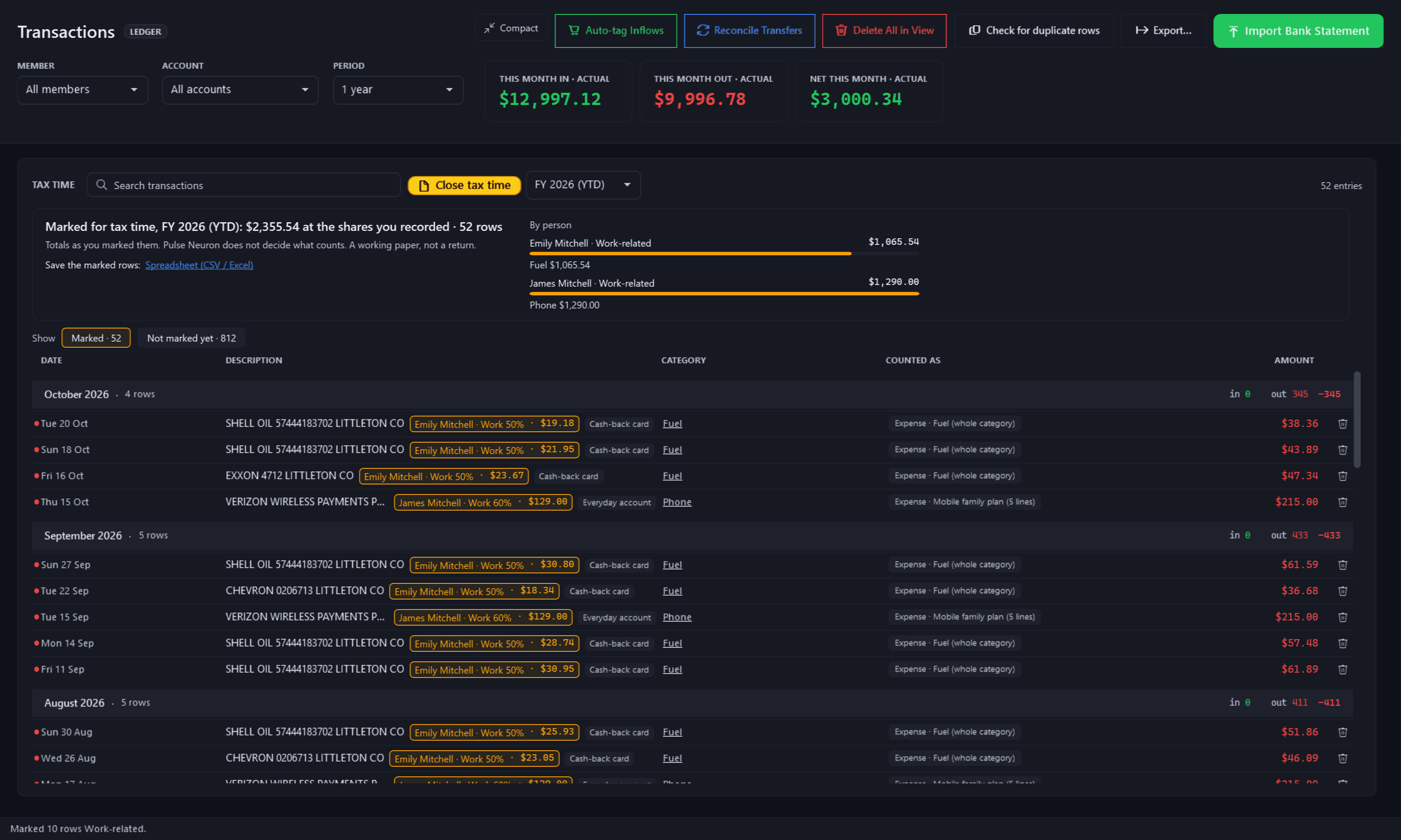
Tax time — marked, with each person's totalsFree
Pulse Neuron 1.6.4 · Free · rendered from the app for its fictional demo family, 22 Oct 2026. Totals by person and category at the shares you recorded, and the marked rows ready to save as a spreadsheet. A working paper, not a return. Pictures new in 1.6.4 are rendered from the app itself, offscreen, for its fictional demo family: the people, accounts, payments and trades are made up; share prices are real market history. Merchant names are sample labels; no affiliation is implied.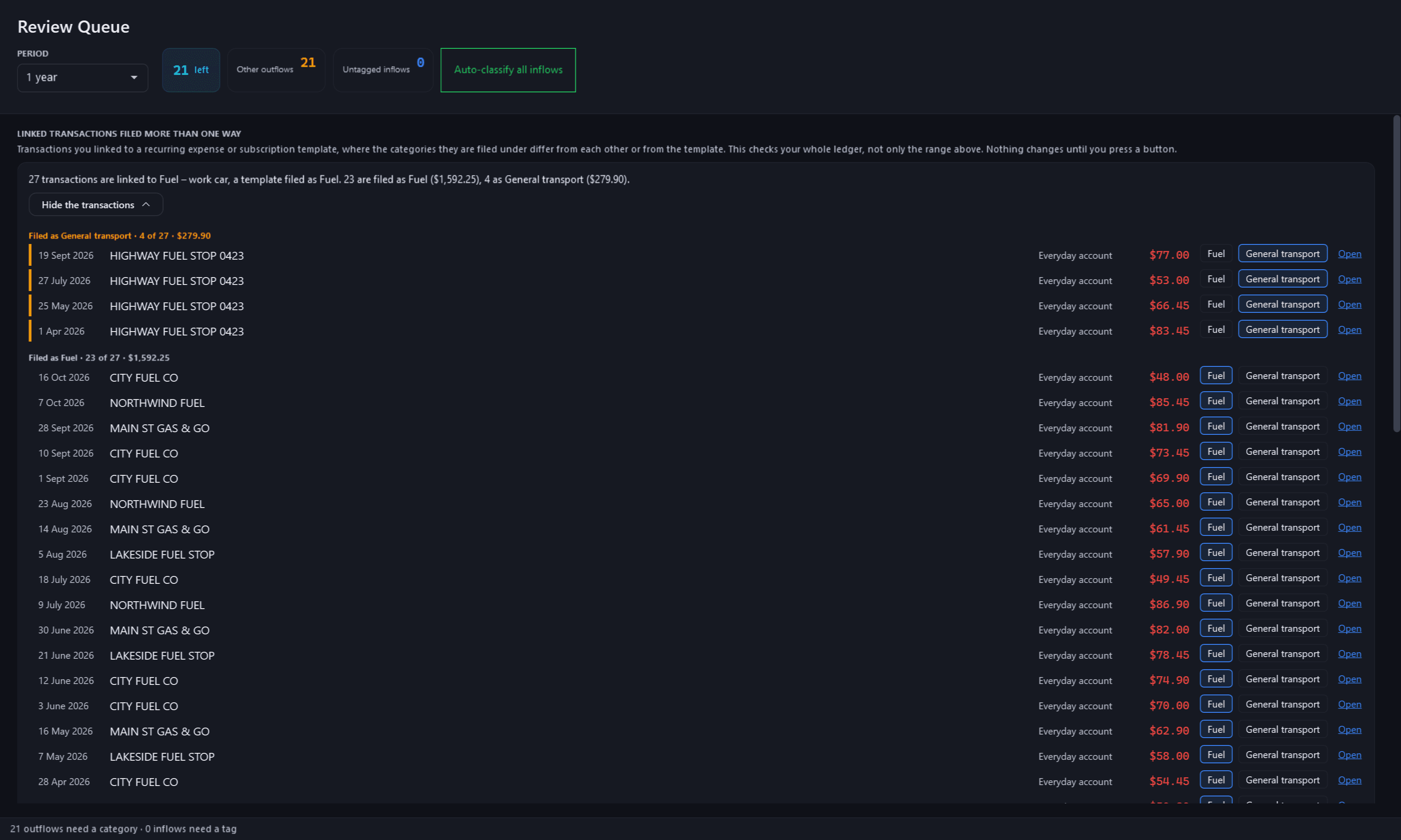
Review Queue — linked payments filed more than one wayFree
Pulse Neuron 1.6.4 · Free · rendered from the app for its fictional demo family, 22 Oct 2026. Payments linked to one template but filed more than one way, listed with the odd ones first; each row files on its own or opens on Transactions. The 27 payments were added to the demo for this picture. Pictures new in 1.6.4 are rendered from the app itself, offscreen, for its fictional demo family: the people, accounts, payments and trades are made up; share prices are real market history. Merchant names are sample labels; no affiliation is implied.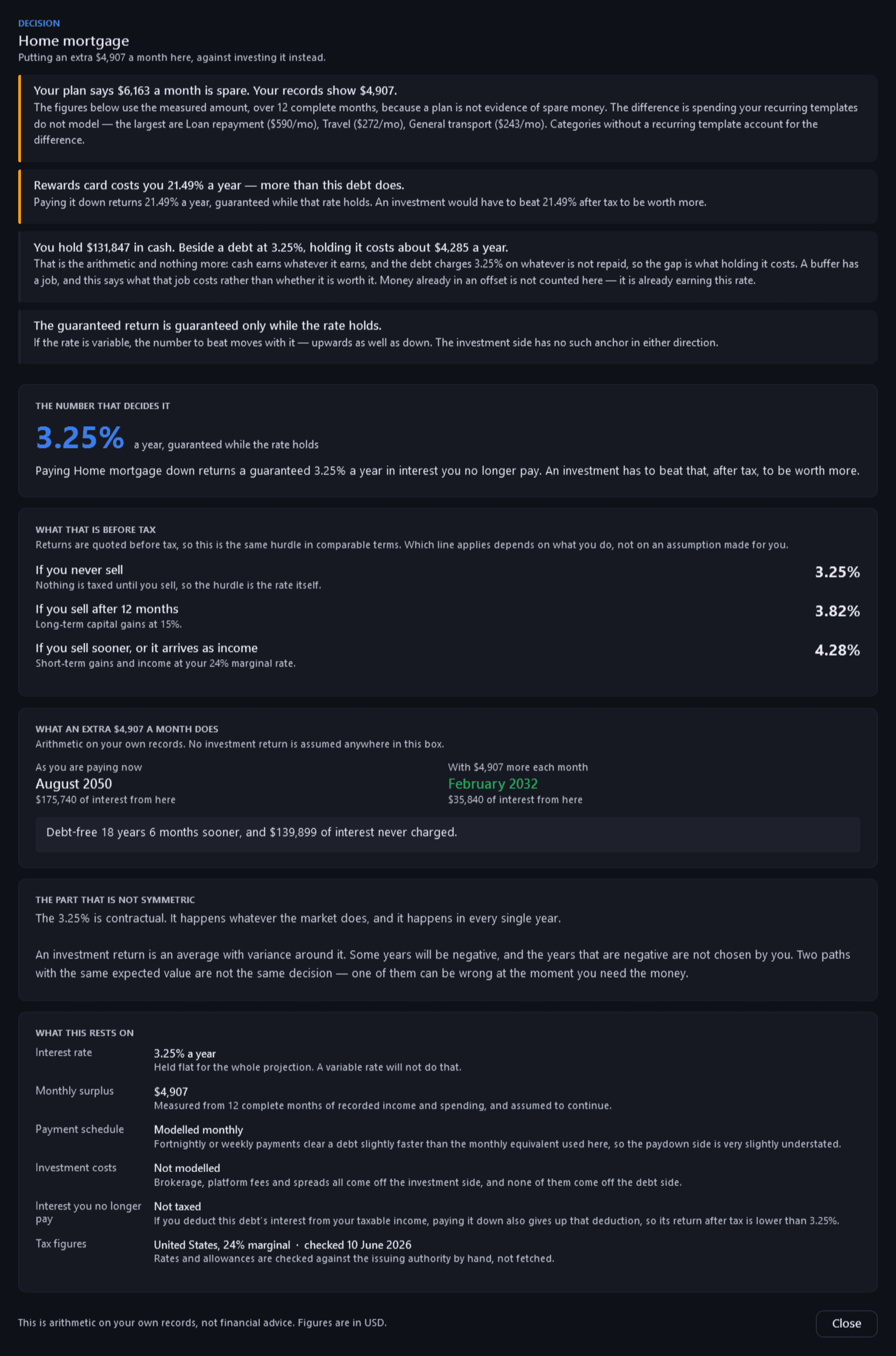
Pay down or invest?Free
Pulse Neuron 1.6.4 · Free · rendered from the app for its fictional demo family, 22 Oct 2026. The break-even for one debt, with every assumption named, including what changes if you deduct its interest. Arithmetic on your own records, never a winner. Pictures new in 1.6.4 are rendered from the app itself, offscreen, for its fictional demo family: the people, accounts, payments and trades are made up; share prices are real market history. Merchant names are sample labels; no affiliation is implied.
What you owe and own
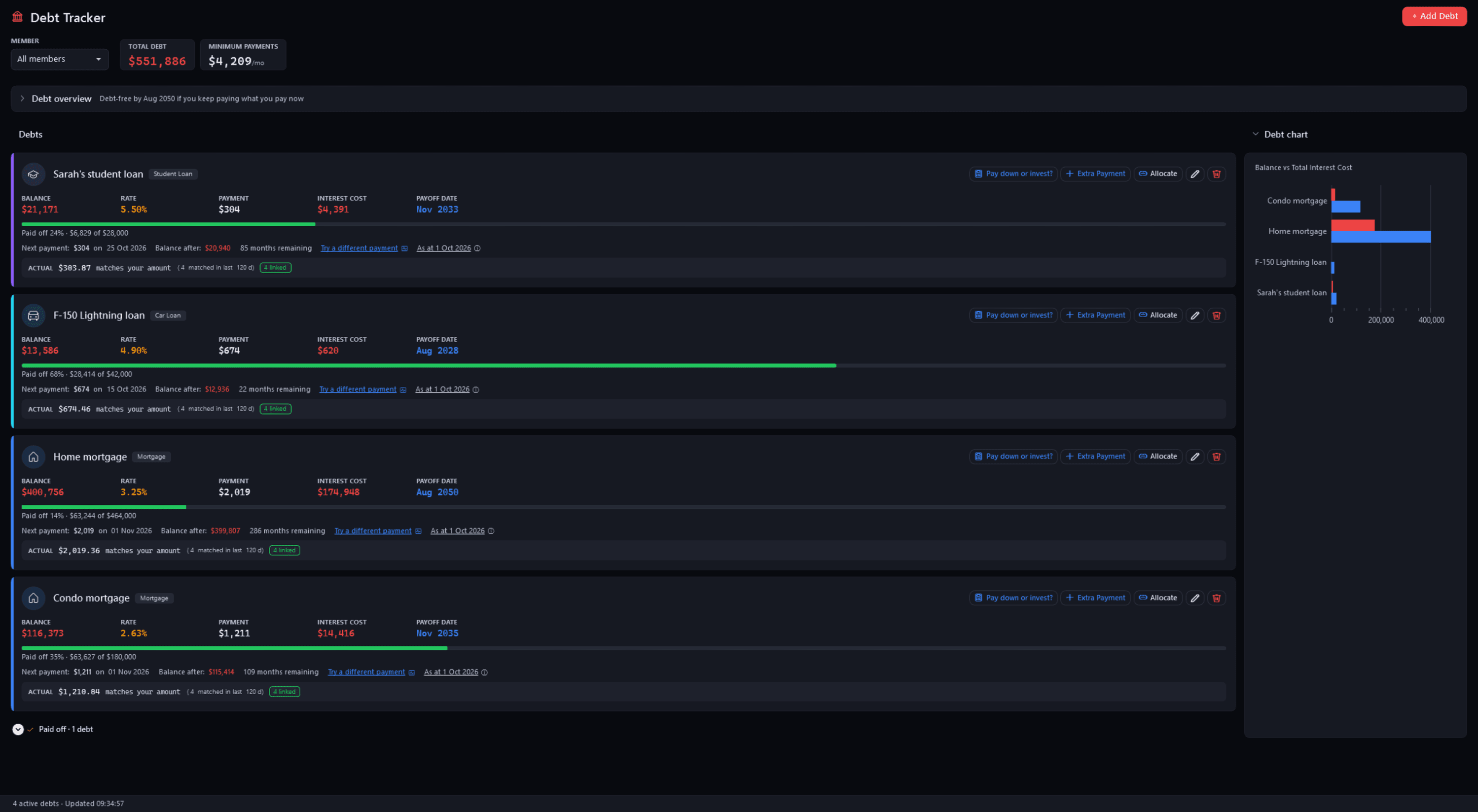
Debt TrackerFree
Pulse Neuron 1.5.9 · Free · the demo household, captured 2 Oct 2026. Each balance confirmed once from a statement, then paid down by the payments you import. Screens show a fictional demo household — the people, accounts, balances and trades are made up; share prices, dividends and splits are real market history. Bank, card and store names are sample labels; no affiliation is implied. Since 1.6.4 the demo's accounts, cards and lenders carry generic names; pictures captured before then may show the real names it used as sample labels.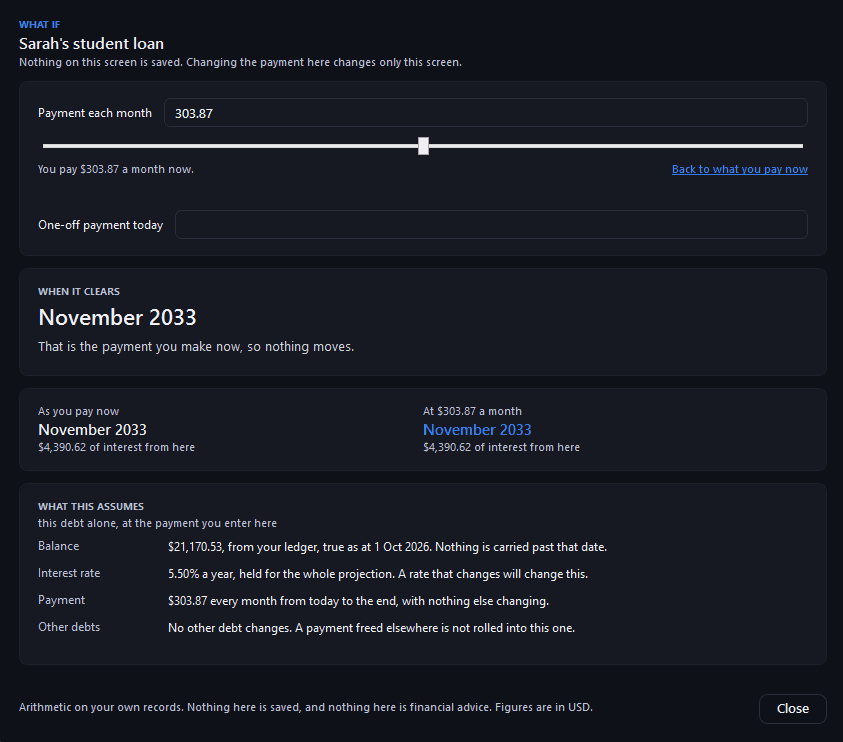
Debt Tracker — try a different paymentFree
Pulse Neuron 1.5.9 · Free · the demo household, captured 2 Oct 2026. A what-if on one debt's payment, opened at what is paid now: at Sarah's current payment her student loan clears in November 2033. Nothing typed here is saved. Screens show a fictional demo household — the people, accounts, balances and trades are made up; share prices, dividends and splits are real market history. Bank, card and store names are sample labels; no affiliation is implied. Since 1.6.4 the demo's accounts, cards and lenders carry generic names; pictures captured before then may show the real names it used as sample labels.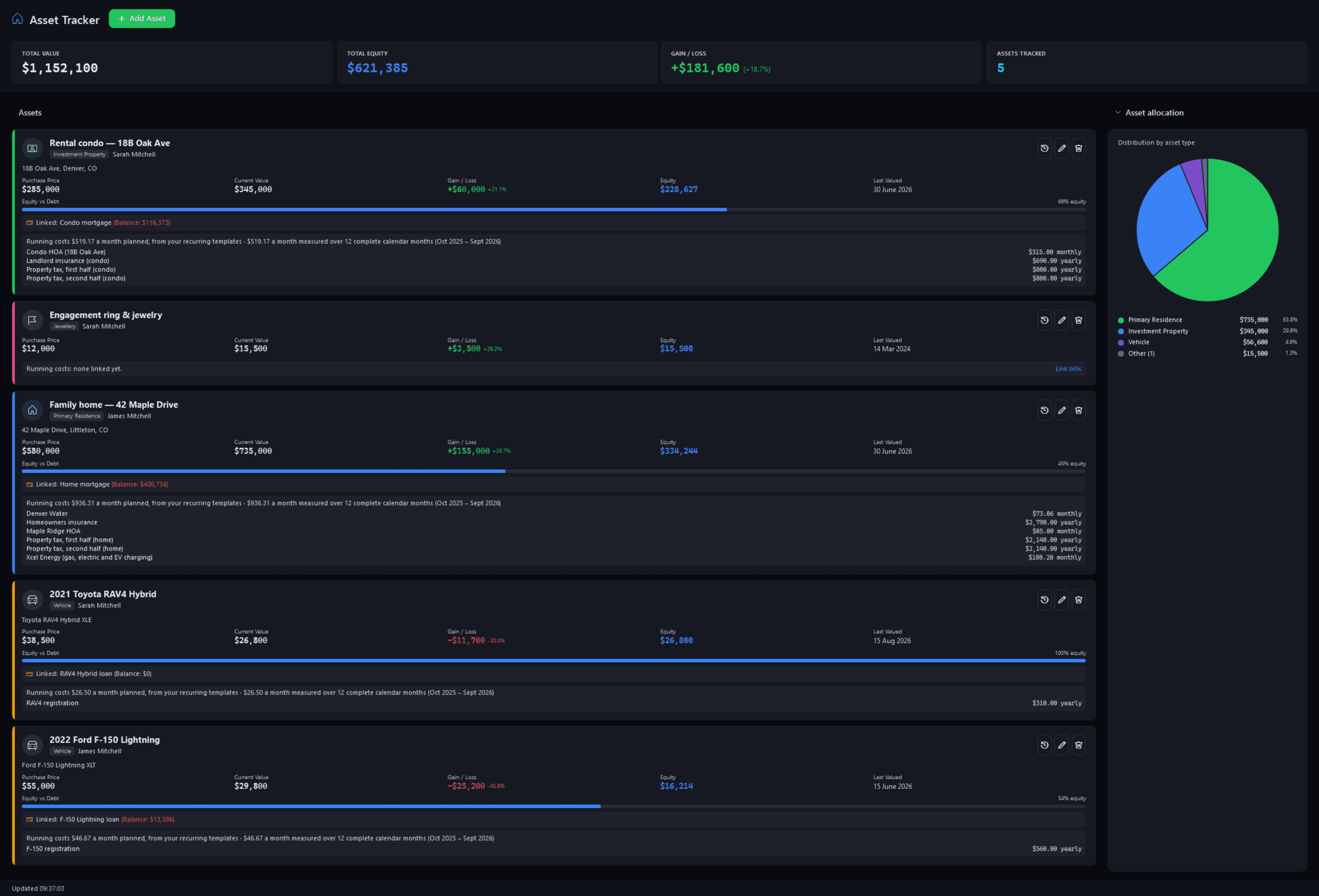
Asset TrackerFree
Pulse Neuron 1.5.9 · Free · the demo household, captured 2 Oct 2026. Two properties, two vehicles and a ring, each with its value, equity against any linked loan, and running costs planned beside measured. Screens show a fictional demo household — the people, accounts, balances and trades are made up; share prices, dividends and splits are real market history. Bank, card and store names are sample labels; no affiliation is implied. Since 1.6.4 the demo's accounts, cards and lenders carry generic names; pictures captured before then may show the real names it used as sample labels.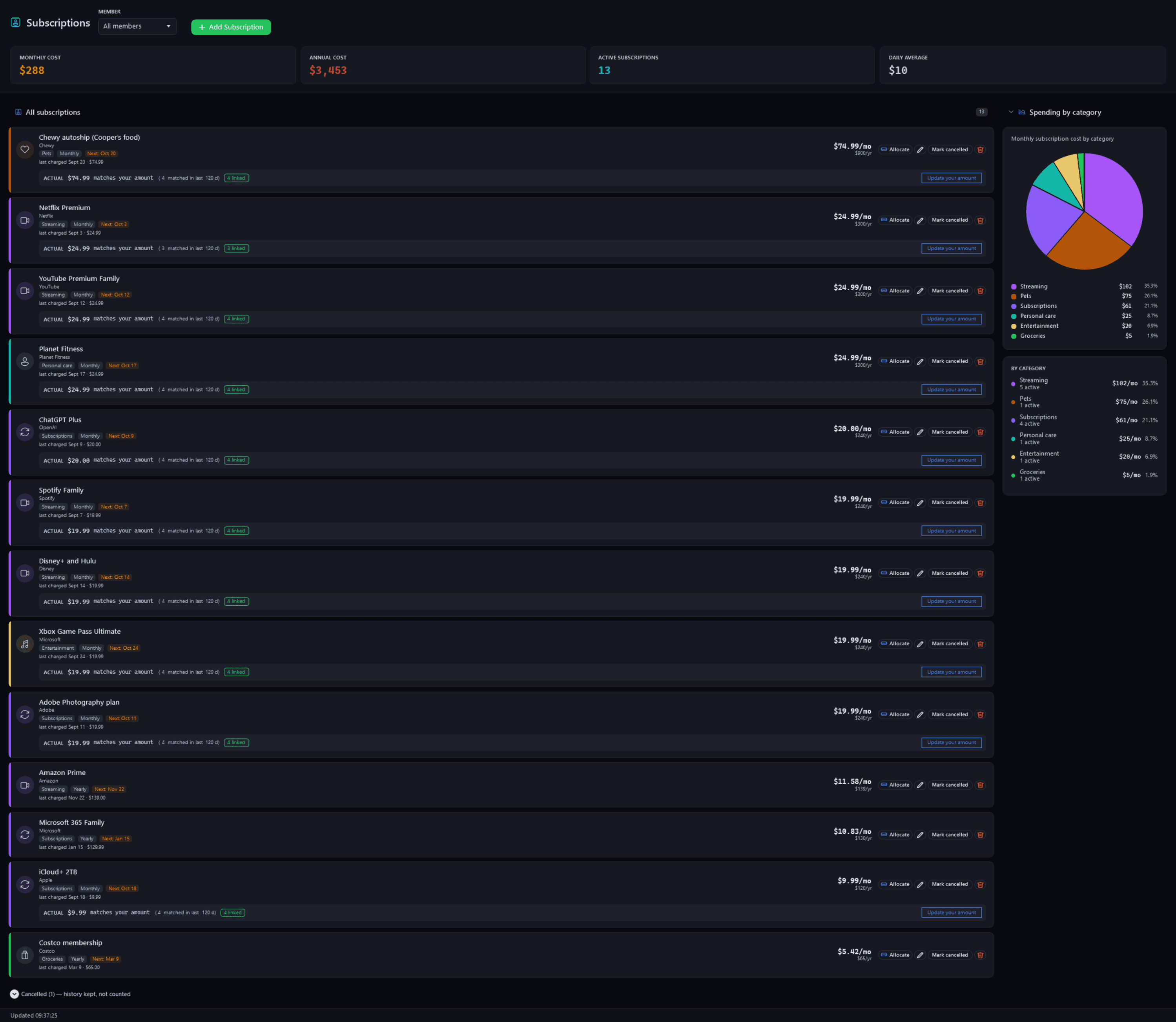
SubscriptionsFree
Pulse Neuron 1.5.9 · Free · the demo household, captured 2 Oct 2026. Every recurring charge beside what your statements actually charged, and what each category costs a month. Screens show a fictional demo household — the people, accounts, balances and trades are made up; share prices, dividends and splits are real market history. Bank, card and store names are sample labels; no affiliation is implied. Since 1.6.4 the demo's accounts, cards and lenders carry generic names; pictures captured before then may show the real names it used as sample labels.
The Manage door
5 screenshotsManage. Your data, and the pages that check it is right.
Your data
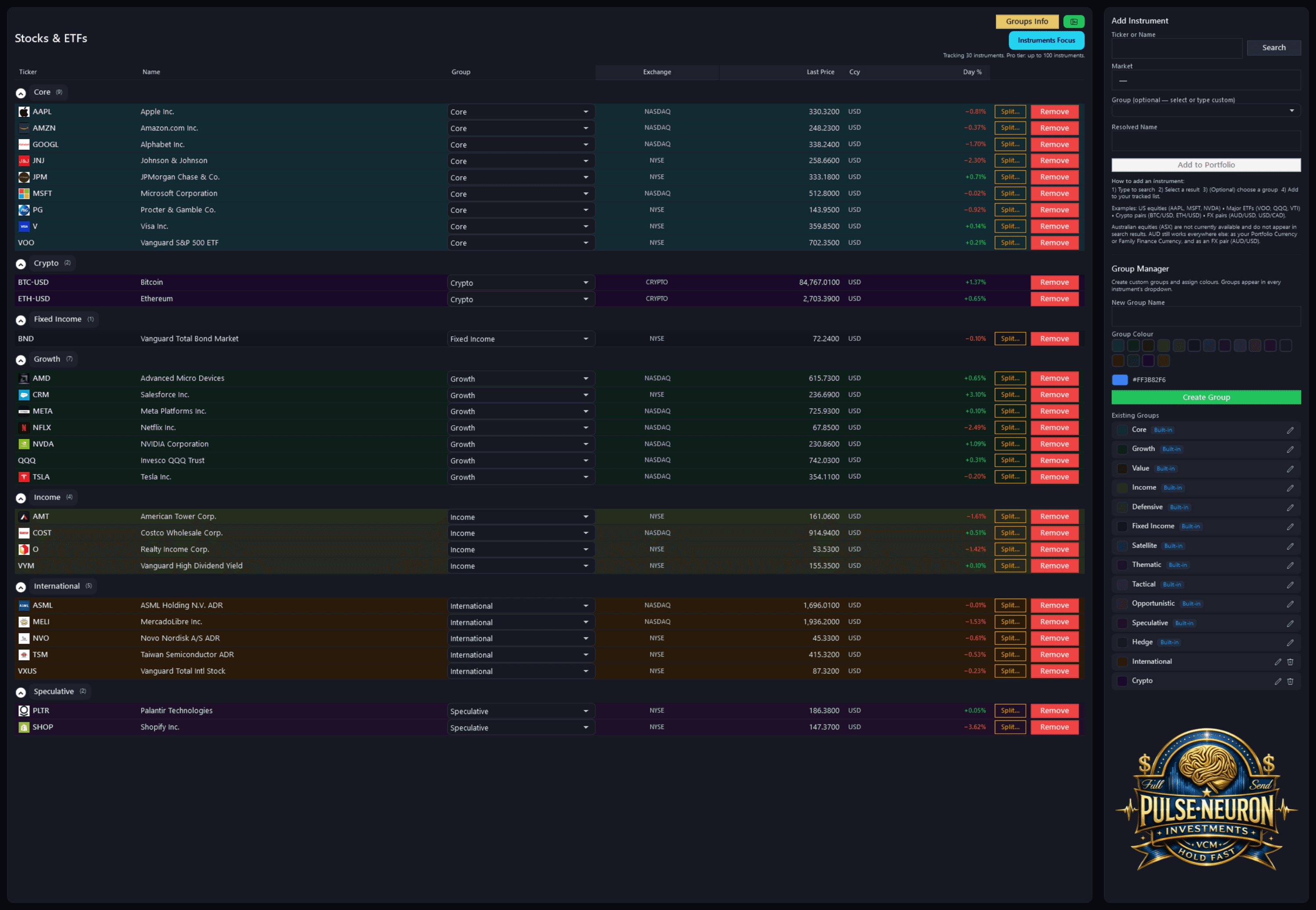
Stocks & ETFsFree + Pro
Pulse Neuron 1.5.9 · Free + Pro · the demo household, captured 2 Oct 2026. The instruments you track, grouped. Free tracks up to 15, five of them refreshed live each update; Pro tracks up to 100 and refreshes them all. Screens show a fictional demo household — the people, accounts, balances and trades are made up; share prices, dividends and splits are real market history. Bank, card and store names are sample labels; no affiliation is implied. Since 1.6.4 the demo's accounts, cards and lenders carry generic names; pictures captured before then may show the real names it used as sample labels.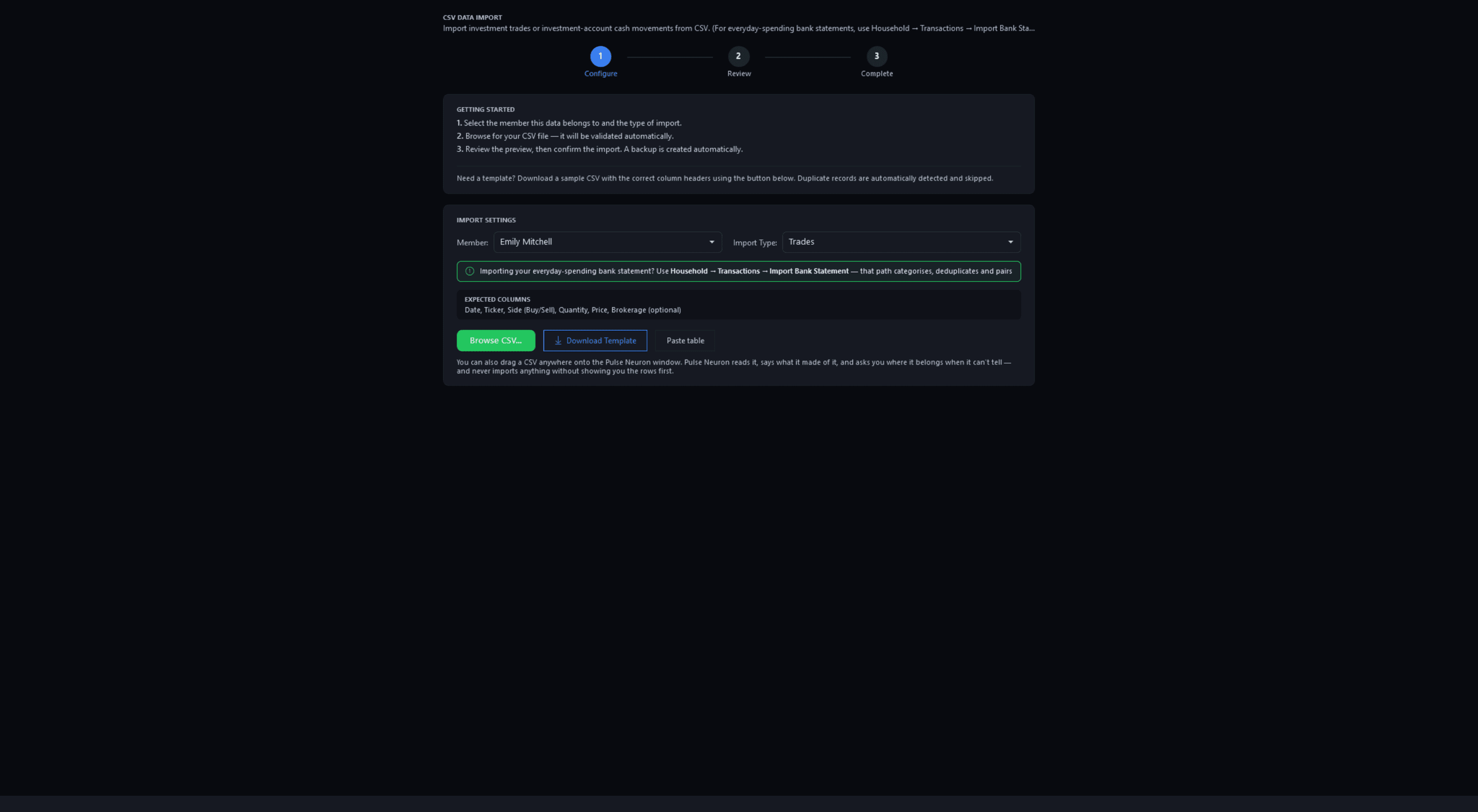
CSV ImportPro
Pulse Neuron 1.5.9 · Pro · the demo household, captured 2 Oct 2026. The CSV Import wizard on its first step: choose the member and the import type, then browse for a file, paste a table or download a template. Screens show a fictional demo household — the people, accounts, balances and trades are made up; share prices, dividends and splits are real market history. Bank, card and store names are sample labels; no affiliation is implied. Since 1.6.4 the demo's accounts, cards and lenders carry generic names; pictures captured before then may show the real names it used as sample labels.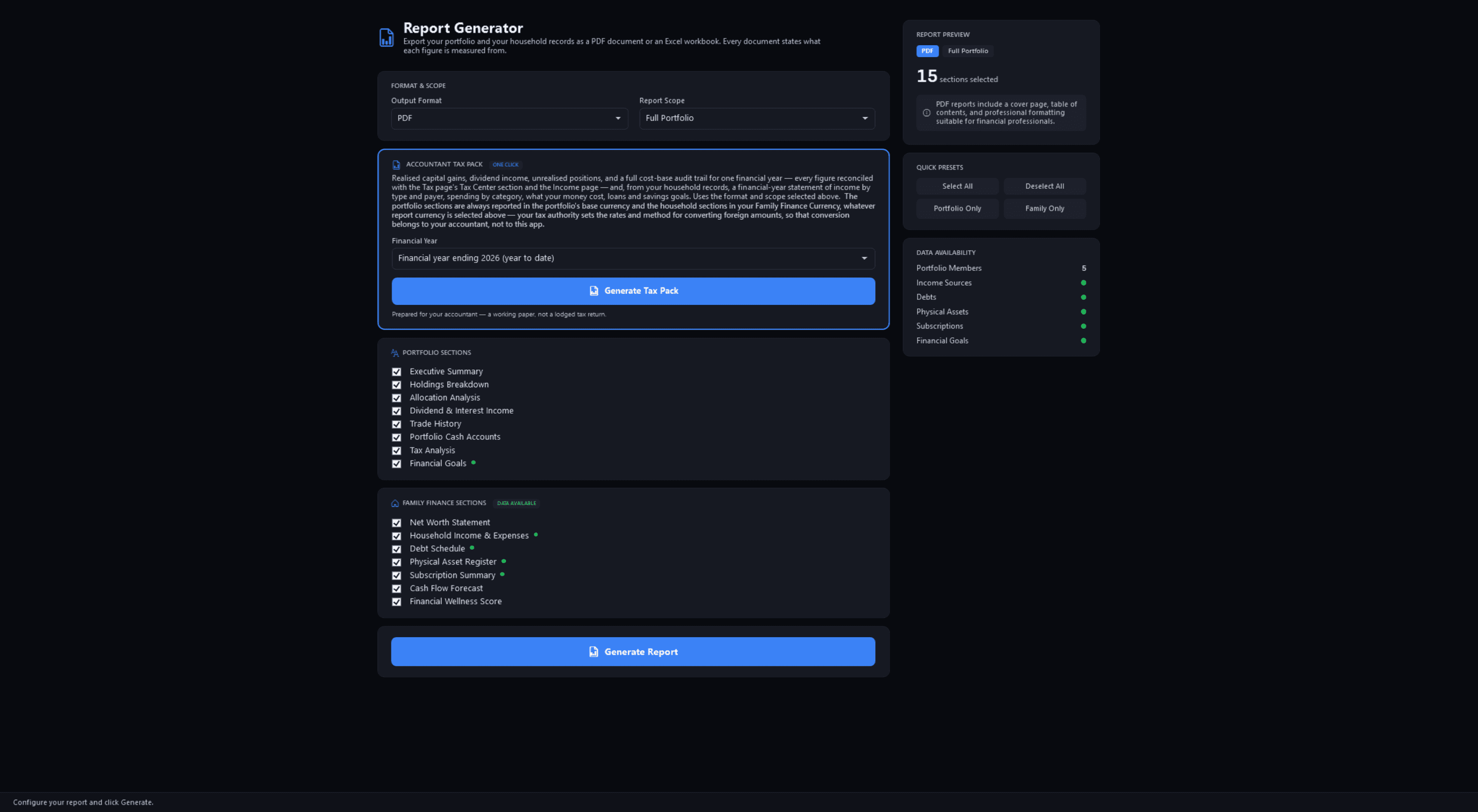
ReportsFree + Pro
Pulse Neuron 1.5.9 · Free + Pro · the demo household, captured 2 Oct 2026. Choose PDF or Excel, the scope and the sections. Household documents are free; the portfolio sections and the Accountant Tax Pack are Pro. Since 1.6.4, its preview note says only that PDF reports include a cover page and a table of contents. Screens show a fictional demo household — the people, accounts, balances and trades are made up; share prices, dividends and splits are real market history. Bank, card and store names are sample labels; no affiliation is implied. Since 1.6.4 the demo's accounts, cards and lenders carry generic names; pictures captured before then may show the real names it used as sample labels.Since 1.6.4, its preview note says only that PDF reports include a cover page and a table of contents.
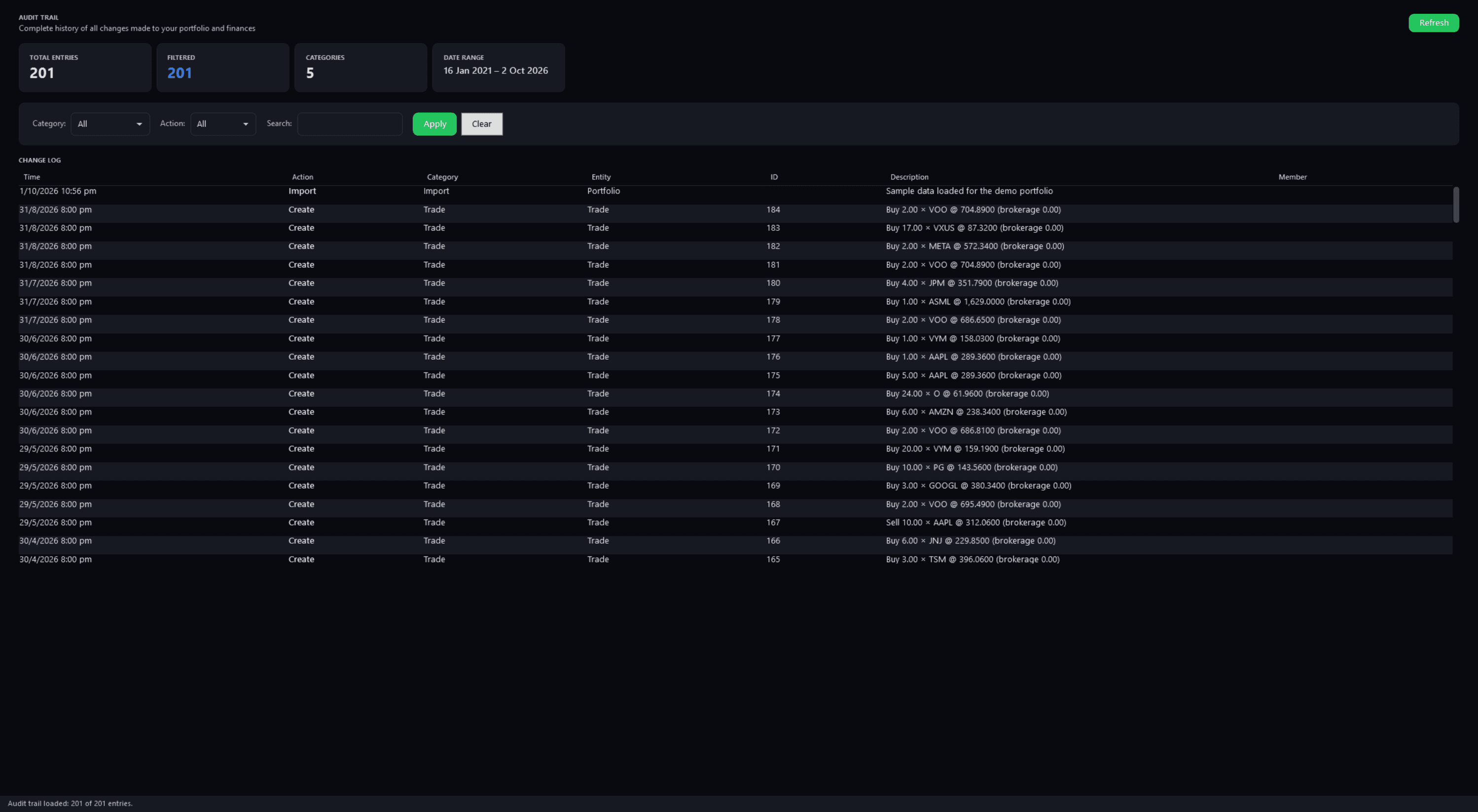
Audit TrailPro
Pulse Neuron 1.5.9 · Pro · the demo household, captured 2 Oct 2026. Every change dated and filterable, from the demo's sample import back through each trade, and read-only. Screens show a fictional demo household — the people, accounts, balances and trades are made up; share prices, dividends and splits are real market history. Bank, card and store names are sample labels; no affiliation is implied. Since 1.6.4 the demo's accounts, cards and lenders carry generic names; pictures captured before then may show the real names it used as sample labels.
Is it right?
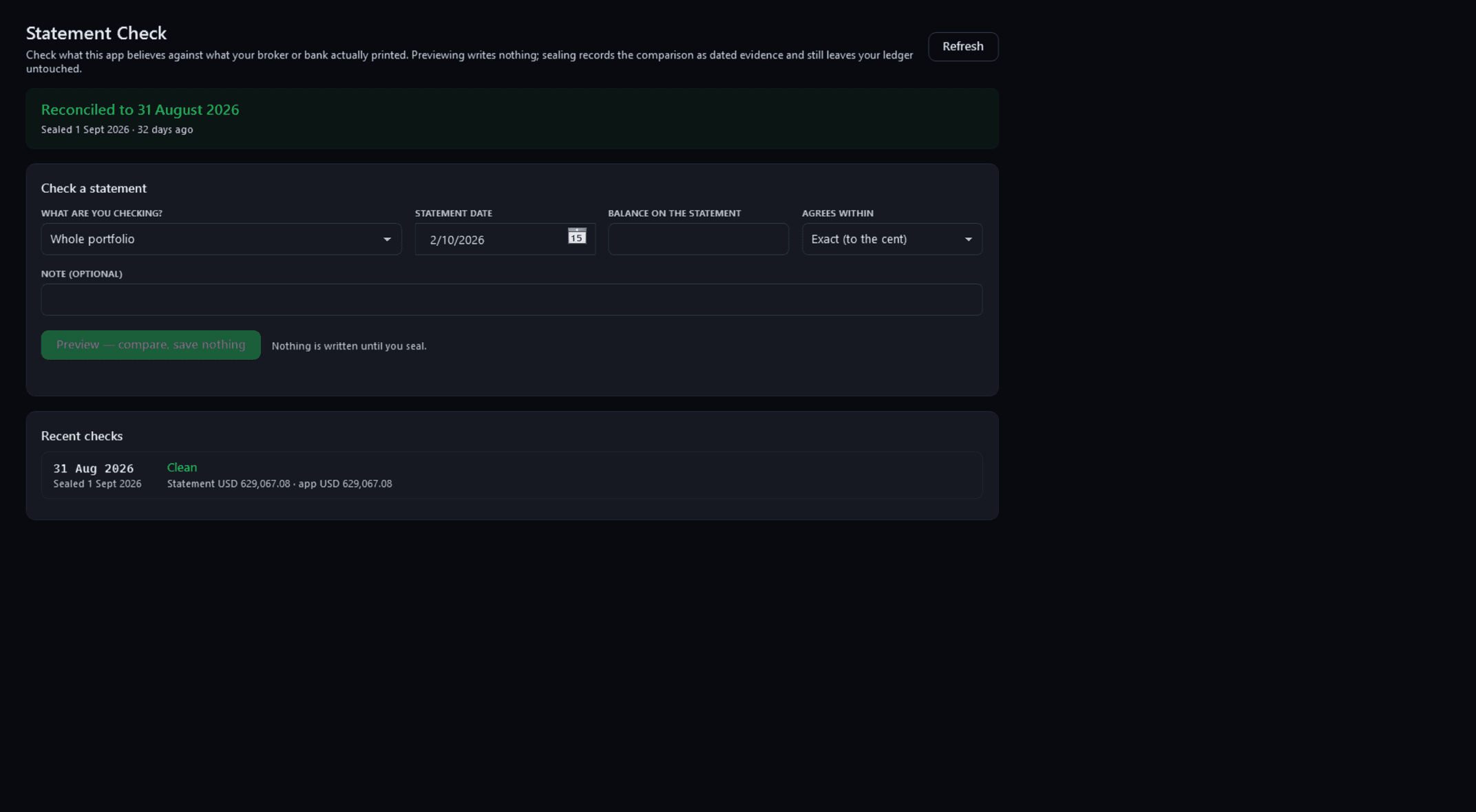
Statement CheckFree
Pulse Neuron 1.5.9 · Free · the demo household, captured 2 Oct 2026. The portfolio reconciled to 31 August 2026, the form to check a statement, and a sealed check where statement and app agree to the cent. Screens show a fictional demo household — the people, accounts, balances and trades are made up; share prices, dividends and splits are real market history. Bank, card and store names are sample labels; no affiliation is implied. Since 1.6.4 the demo's accounts, cards and lenders carry generic names; pictures captured before then may show the real names it used as sample labels.
Not behind one door
3 screenshotsAcross the app. Themes, Copy a picture, the Ctrl+K palette and split protection.
Across the app
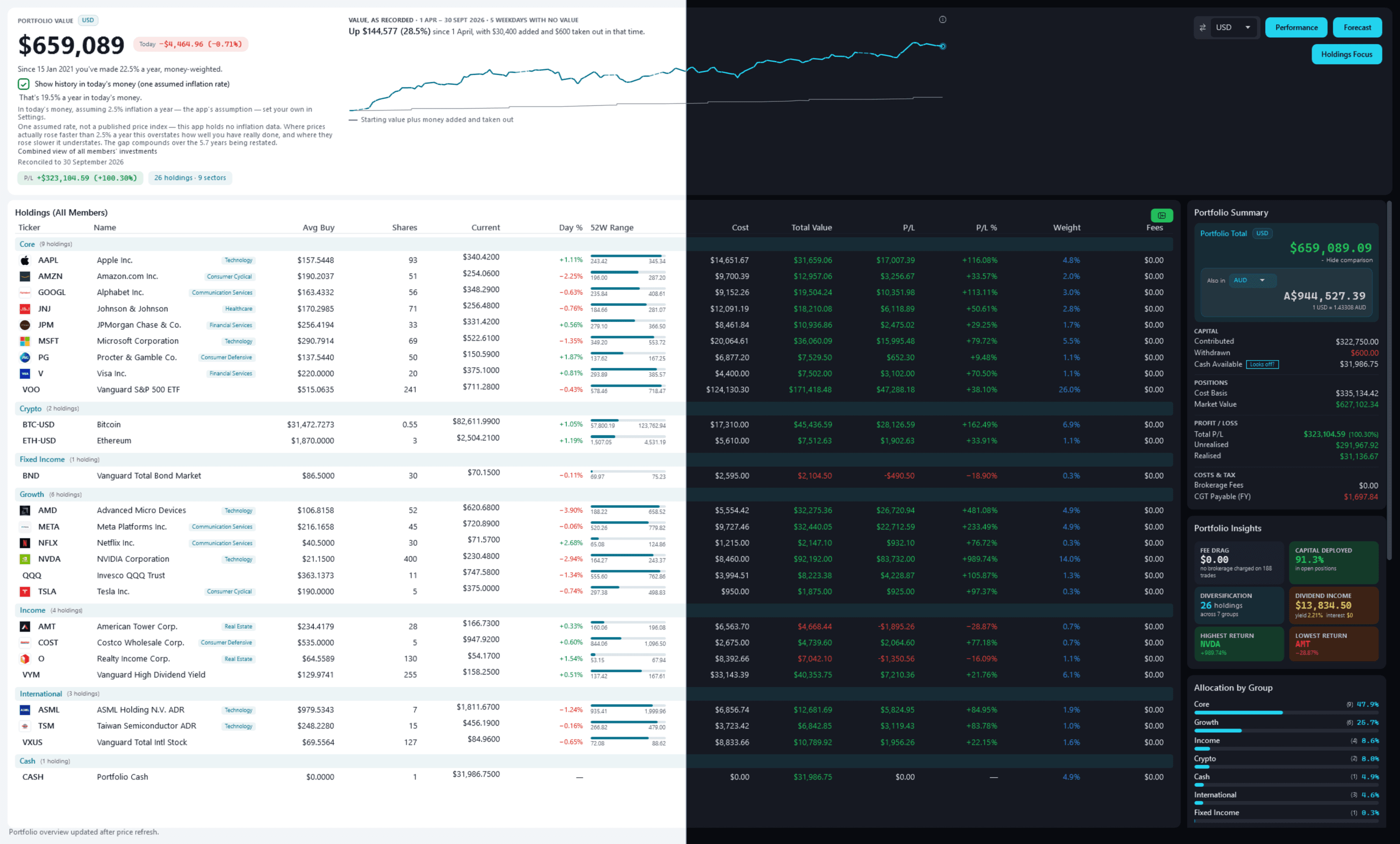
Light and darkFree
Pulse Neuron 1.6.0 · Free · the demo household, captured 9 Oct 2026. Light, dark or Match Windows. Switch with Ctrl+Shift+L, and the charts redraw in the new theme's colours. Screens show a fictional demo household — the people, accounts, balances and trades are made up; share prices, dividends and splits are real market history. Bank, card and store names are sample labels; no affiliation is implied. Since 1.6.4 the demo's accounts, cards and lenders carry generic names; pictures captured before then may show the real names it used as sample labels.
Copy a picture
Rendered from the app for a fictional family, with invented investments and example prices.
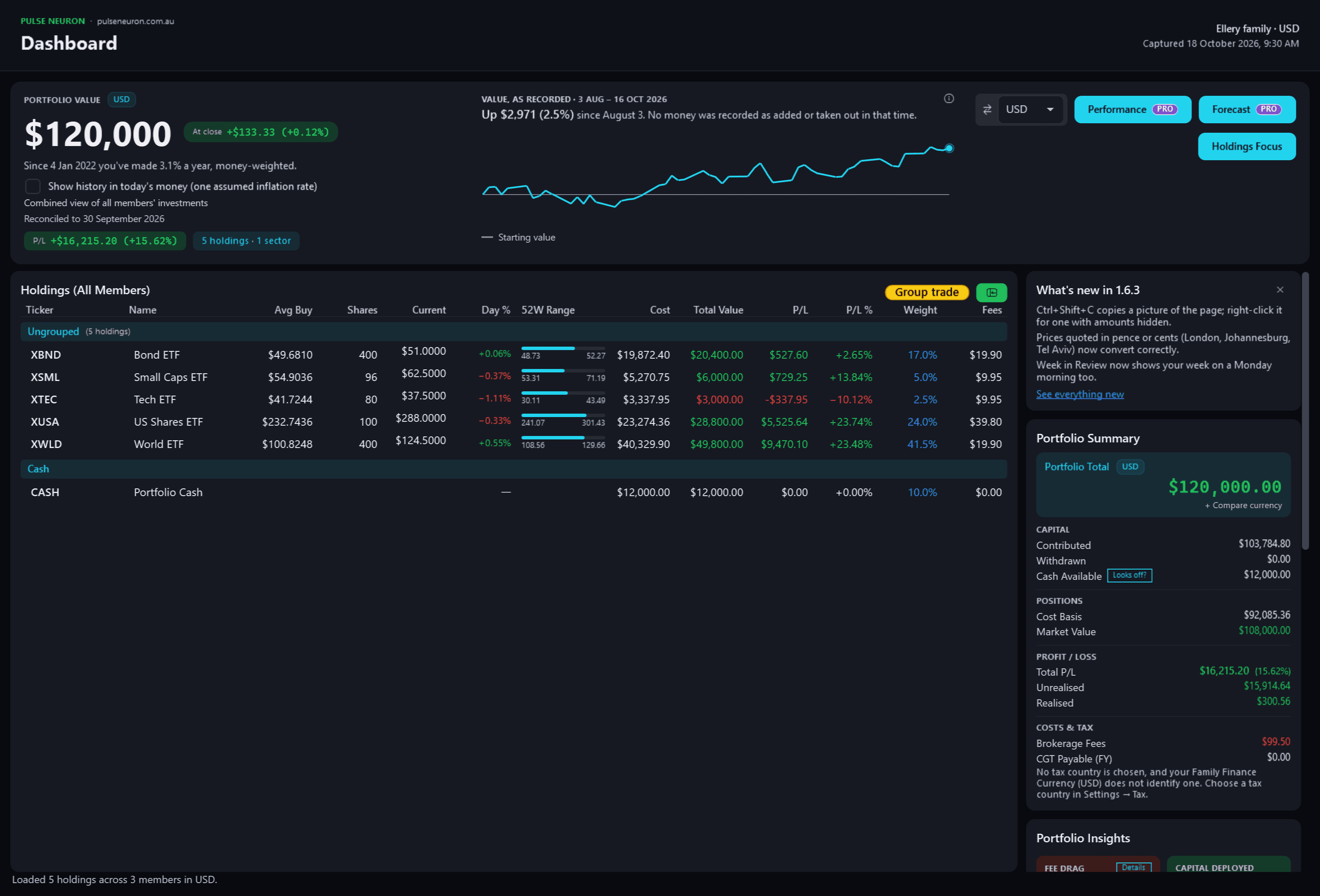
Copy a picture — the Portfolio DashboardFree
Pulse Neuron 1.6.3 · Free · rendered from the app for a fictional family, 18 Oct 2026. Ctrl+Shift+C copies the page as it looks, ready to paste: a caption band names the page, the portfolio and the time, with a small pulseneuron.com.au you can turn off. Pictures new in 1.6.3 are rendered from the app itself, offscreen, for a fictional family, with invented investments and example prices.
Try it with the demo household.
Microsoft Store · Windows 10 (2004+) or 11 · 64-bit