
Platform tour
See the whole app before you install it.
Four doors: Today, Invest, Household and Manage, with 45+ screens behind them.
Microsoft Store · Windows 10 (2004+) or 11 · 64-bit
Made for Windows PCs, from the Microsoft Store. Send this page to your computer.
Behind each door.
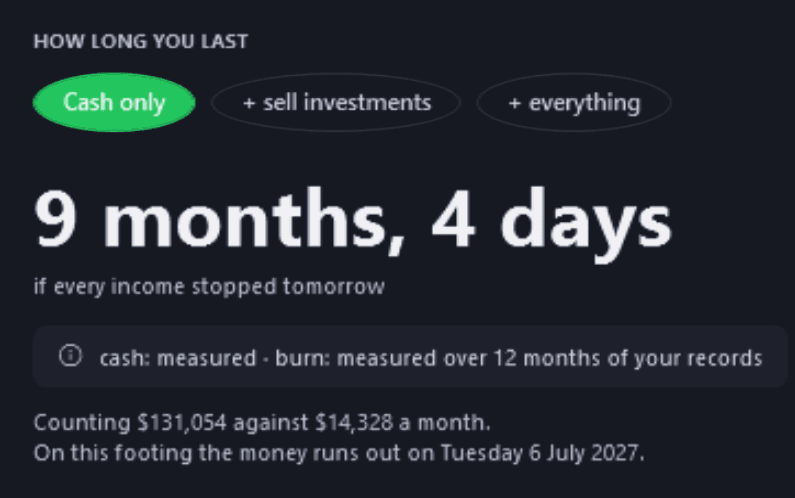
How long would the money last? Today answers before it asks you for anything.

Today Free
Every holding, every member. Group trade and Set up what you already own: free, like the dashboard.


Dashboard Free
Every page free, unlimited members, built from the statements your bank gives you.


Family Dashboard Free
Statement Check, Data Health and Glass Box check the app's own work, free.


Statement Check Free
Fictional demo household, real market prices. Bank, card and store names are sample labels; no affiliation implied.
Across the app.
- Ctrl+K reaches any page
- Copy a picture of any page; right-click for one with the amounts hidden
- Automatic backups, in Documents or a folder you choose
- Light and dark themes; new installs start dark


Value history, light and dark Free
Every screen, door by door
Today
Getting started
Getting Started
FreeA step-by-step setup guide across the top of the Today board — or open the demo household first and look around. Dismiss it once you are up and running.
Household setup
FreeA guided walk for the household side — bank accounts, a statement, income, expenses, debts and savings goals — where the import does most of the work and you add what statements cannot see. It opens from Getting Started and the Family Dashboard.
Today
Today
FreeHow long your money would last if every income stopped, with each input labelled measured or your estimate — then at most three cards about today, and your money-weighted return.
Morning Pulse
FreeA daily brief that remembers when you last looked: today's movers, and plain-English observations from fixed rules that run on your PC.
Week in Review
FreeA Sunday recap of your week and a close on the month just gone. Every figure is real and dated; nothing is projected.
Action Items
FreeOne prioritised list across bills, rebalancing, tax, insights and goals, filtered from Urgent to Wins.
Notifications
FreeEverything dated that is coming up: bills, expected dividends and price alerts, with opt-in Windows reminders (dividend ex-dates with Pro).
Invest
What you hold
Portfolio Dashboard
FreeEvery holding across every member in one table: value, today's move, profit and loss, 52-week range and weight, and a stamp saying when it was last checked against a statement. Beside the total, your value over time, with the money you added marked so a deposit is never mistaken for growth.
Set up what you already own
FreeAdd the investments you hold, what you paid, when you bought them and the cash at your broker, then check the total against your broker's before anything is saved. Several purchases, approximate dates, other currencies and a pasted or imported holdings file all work.
Group trade
FreeOne buy or sell of an investment for several members at once, from the Portfolio Dashboard: each member's units, the fee split by units or paid by one member, and each part recorded as that member's own trade, all or nothing, with Undo straight after. On Free it lists the first two members.
Holdings Breakdown
ProWho holds what: each member's cash, holdings, total and share of the portfolio, with sector exposure across everyone.
Allocation Analyzer
ProYour actual allocation against the targets you set, with the drift on every group and holding. Cash can take a target too, like a holding.
Ownership Overview
ProEach member's share of a shared portfolio, worked out from what their holdings are worth now, with the working shown.
Price Alerts & Watchlist
Free + ProAbove and below targets and daily-move alerts, checked when prices refresh, with no background polling. Free: up to 15 alerts; Pro: unlimited. On Free, watched symbols count toward the 15 instruments you can track, and that limit binds first.
Each member's dashboard
Member dashboards
Free + ProThe portfolio dashboard for one person, in their own colour: their holdings, trades and account summary, with their value over time. Free opens the first two members' dashboards; Pro opens every member's.
Holdings you set up
Free + ProOn each person's dashboard, every setup with its purchases and the money recorded as transferred in to buy each one, to change or remove; trades and deposits recorded any other way are not listed.
Member Performance
ProOne member's year-by-year returns — simple, Modified Dietz and money-weighted — with a benchmark comparison.
Member Forecast
ProOne member's projected growth under conservative, moderate and optimistic assumptions you set.
Cash Accounts
ProWhere real cash moves: Portfolio Cash in several currencies, bank accounts and term deposits, conversions at your broker's rate with the fee recorded, and one-step reconciliation to your broker's balance.
How it is doing
Portfolio Performance
ProYear-by-year returns three ways — simple, Modified Dietz and money-weighted (XIRR) — each labelled, with a benchmark comparison and a Year in Review you can save as a PDF.
Dividend Income
FreeWhat your holdings have actually paid, with interest kept apart from dividends and a breakdown by member, plus a 12-month forecast (24 and 36 months on Pro) and franking credits where they apply.
Dividend Calendar
ProProjected payments month by month, built from each holding's own payment history, each with a confidence rating. Check for new dividends runs in the background, shows its progress and tells you when it is done.
Risk Analytics
ProConcentration, diversification and correlation, realised volatility and drawdown from stored prices, and a look inside the most widely held ETFs.
Vital Signs
ProA quantitative dashboard — volatility, Sharpe and Sortino, Value-at-Risk, drawdown — with a Pulse Score and guardrails for single-holding and sector concentration, drawdown and an optional volatility target.
The Lab
ProSix analyses of what you have already done: trade quality, factor attribution (market beta, size, value and momentum), behavioural biases, market regime, the time machine, and crisis replay month by month through 2000, 2008, 2020 and 2022.
What to do next
Rebalance Execution
ProThe trades that would bring each holding toward its target, in Grow or Rebalance mode, each with its weight now, its target and its weight after the plan. A holding set to 0% is sold in full, and with a Cash target a card shows the cash after the plan.
Tax
Free + ProOne tax year three ways. Tax Center — realised gains, with a sale of parcels held for different times split into its long- and short-term parts, unrealised positions, a harvest list and capital-gains estimates — is free; the Tax Optimizer and What-If Sell are Pro. Tax Center and the Optimizer open on your country's current financial year. Estimates only.
Look Ahead
ProFive sections about what has not happened yet: investment goals, goal probability (a 10,000-path Monte Carlo), the portfolio forecast, the What-If Simulator and a stress test.
Cash in and out
Cash Ledger
FreeThe register of cash that came into the portfolio — contributions and dividends — per member.
Withdrawals
FreeThe register of cash taken out of the portfolio, per member. A withdrawal larger than the cash available is refused, with both figures named.
Household
Who is in this household
Manage people
FreeEveryone in the household, with each person's role, tax rate and colour. Unlimited members on every plan.
The whole picture
Family Dashboard
FreeNet worth counted from both rooms your money lives in, your Money Story (measured from your transactions once there are enough, and labelled when it is the plan), a wellness score — and a what-if that tries changes over 1, 5, 10 or 20 years.
Where your money is
FreeEvery account, card and debt on one rate axis, with the yearly effect of each. Your investments sit at the bottom carrying no rate, because theirs is the return nobody knows in advance.
Milestones
FreeRare, dated milestones — a debt cleared, a goal reached, a net-worth mark crossed — drawn from your recorded data.
Net Worth Timeline
FreeNet worth over time, stacked by what it is made of, with milestones along the way — rebuilt from your records every time you open it.
Money in and out
Spending
FreeFour sections, all free: Money Flow, Spending Insights (with Cost of money — what your banks and lenders charged you), Budgets and Savings Goals.
Income & Expenses
FreeYour regular income and costs, each planned amount shown beside what your statements actually show.
Bill Calendar
FreeA cash-flow forecast up to 12 months ahead, anchored on your real balances, with paid bills reconciled and low-balance warnings.
Keeping the ledger honest
Review Queue
FreeUncategorised spending and untagged income, grouped by merchant so one choice clears a whole group; and payments linked to a recurring expense or subscription but filed more than one way, listed so you can re-file each.
Transactions
FreeImport statements as CSV, OFX, QFX or QIF — categorised from your rules, linked to your bills and debts where they match, duplicates skipped. In Tax time you mark the payments that matter, with whose expense and the work share, and see each person's totals; the financial-year household statement, a free PDF, lists the marked rows.
Bank Accounts
FreeEveryday, savings, offset, cards and loans. Each balance states the date it is good to, and takes the bank's own figure when an imported statement's balance column agrees with its rows.
Categorisation Rules
FreePattern → category rules that tag future imports, plus the merchants the app has learned from your own choices.
What you owe and own
Debt Tracker
FreeA balance you confirm once from a statement, then paid down by the payments you import — with a what-if on any debt's payment.
Pay down or invest?
FreeOn any debt, the break-even: what an investment would have to earn to beat paying it down, with every assumption shown. A number, never a winner.
Debt payoff order
FreeThree payoff orders side by side — highest rate first, smallest balance first, largest payment for its balance first — worked out from your own balances. It does not rank them.
Asset Tracker
FreeProperty, vehicles and valuables with the loans against them, and the running costs each one carries, planned and measured.
Subscriptions
FreeEvery recurring charge beside what your statements actually charged, a price change named with its date, and what a cancelled one has charged since.
Manage
Your data
Stocks & ETFs
Free + ProThe stocks, ETFs, funds and crypto you track. Free tracks up to 15, five of them refreshed live each update; Pro tracks up to 100 and refreshes them all.
CSV Import
ProBulk-import investment trades and cash movements from a CSV, with a review step, duplicates skipped and an automatic backup first. Marked beta in the app.
Reports
Free + ProPDF and Excel documents. Household documents are free; the portfolio sections and the Accountant Tax Pack are Pro.
Audit Trail
ProA read-only, searchable history of every change: trades, cash movements, members and settings.
Is it right?
Data Health
FreeHow fresh, complete and safe your data is — price ages, where each exchange rate came from, coverage gaps, backups — read from your local database.
Statement Check
FreeWhat the app believes against what your broker or bank printed: the gap, the single causes that could explain it, and the comparison kept as dated evidence. It never edits your ledger.
Glass Box
FreeA live receipt of what the app has sent over the network, and an honest list of the connections it cannot see.
The app itself
Settings
FreeCurrencies, tax country and financial year, notifications and privacy switches, backups, appearance and start page.
About & Legal
FreeVersion, licensing and limits, privacy and the legal documents.
Across the app
Light, dark or Match Windows
FreeTwo themes, down to the title bar, or follow your Windows setting. Switch in place with Ctrl+Shift+L; you stay on the page you were on, and charts redraw in the new theme's colours.
Command palette
FreeCtrl+K reaches any page or action in a keystroke.
Copy a picture
FreeCtrl+Shift+C copies a picture of the page, ready to paste into a message or a document; the page's right-click menu copies one with every amount hidden, and copies nothing if an amount cannot be covered. Pictures carry a small pulseneuron.com.au, which you can turn off.
Seen enough? The household side is free, on every plan.
Microsoft Store · Windows 10 (2004+) or 11 · 64-bit