
Learn
Try it all on a demo household first.
A complete demo household ships with the app, every Pro page unlocked, in a database of its own.
Microsoft Store · Windows 10 (2004+) or 11 · 64-bit
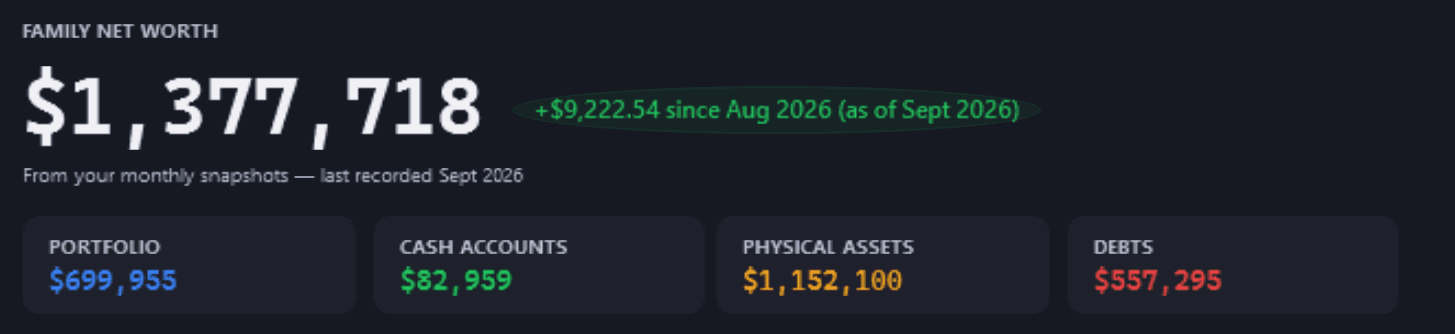

Open it, explore it, reset it.
Open it from Getting Started
Or from Settings or Ctrl+K. The app restarts into a sample database of its own.
Explore and break things
Every Pro page opens. Reset demo data puts the sample back.
Leave any time: your records are untouched
Exit demo returns you to your own records.
It ends after 7 days and starts fresh each time. Its people and money are made up; its prices are real.
Five things to try firstShow the detailsHide the details
- On the Family Dashboard, see every account and debt on one axis: the rate it earns or costs.Free
- On the Debt Tracker, choose Try a different payment on a loan, and see when it would clear.Free
- In the Lab, replay the demo portfolio through 2008 and 2020, built from monthly returns.Pro
- On Look Ahead, run the stress test's 20% market correction against the holdings in the portfolio.Pro
- Record a trade, watch the holding change, then reset the demo.Free
Already invest? Set up what you already ownShow the detailsHide the details
When you are ready for your own figures, a guided window records the investments you hold today, what you paid and when, and the cash at your broker. There is no starting amount to enter and no deposits to record first.
Open it, outside the demo
From Getting Started (“Already invest? Set up what you own”), the empty Dashboard, a person's page or Ctrl+K. Have your broker's holdings page or a recent statement to hand.
Choose whose investments these are
Each person's holdings are kept separately, so you set up everyone, one at a time.
Add each holding
The units you own now, what you paid in total, fees included, and when you bought it. Not sure of the exact date? A month or a year will do. Bought in several lots? Add each purchase. Or paste your broker's holdings table, or choose its CSV, TSV or TXT export.
Add the cash at your broker
The cash your broker shows today, with a line for each other currency you hold.
Check it, then save
Type your broker's total and the review says how close it is. Nothing is saved until you confirm, and Undo takes the save back.


VWRL · 120 units · £9,642.00 · bought 12 Jun 2019,
EUNL · 85 units · €6,120.50 · bought 2 Sep 2021; one bought in several lots reads
2 purchases.Rendered from the app for a fictional person, with example prices.
Good to know
- Free on every plan. On Free it may record more than 15 investments, up to 100, and 5 of them refresh live each update.
- Not available in the demo: leave the demo to set up your own portfolio.
- Options, bonds and short positions can't be set up. ASX data is not currently available; what the app cannot price can be recorded on Household → Asset Tracker.
Guides
Eight short guides to what the figures mean.
General information, not advice.
Start with the month you really hadShow the detailsHide the details
A plan says what should happen; a bank statement says what did. You can start here with no shares at all: import a statement, and the month's money in and money out are measured from what actually moved.
Measured and planned figures answer different questions, so the app keeps them apart and says which one you are looking at.


In the app
- FreeStatement import (CSV, OFX, QFX or QIF), and Spending: Money Flow, Spending Insights, Budgets and Savings Goals.
Every pot of money has a rateShow the detailsHide the details
A debt costs its rate every year, whatever markets do, so paying it down earns that rate back with certainty while the rate holds, as interest you no longer pay, which is not taxed; if you deduct the debt's interest from your taxable income, paying it down returns less after tax. A savings account earns its rate before tax. An investment portfolio is the one pot with no known rate: nobody knows its return in advance.
So “pay the mortgage down, or invest?” has no automatic winner. What can be worked out is the break-even: the return an investment would need to earn, after tax, to beat paying the debt down, which is the debt's own rate. Returns are usually quoted before tax, so the app also shows that hurdle before tax, using your tax settings, labelled by how the return arrives: never sold, sold later, or paid as income. Whether a portfolio can clear that bar is your judgement.


In the app
- FreeThe rate ladder on the Family Dashboard, and Pay down or invest? on any debt once at least three months of income and spending are recorded, for Australia, the US, the UK, Canada and Europe. Try the break-even on the home page
Runway: how long your money would lastShow the detailsHide the details
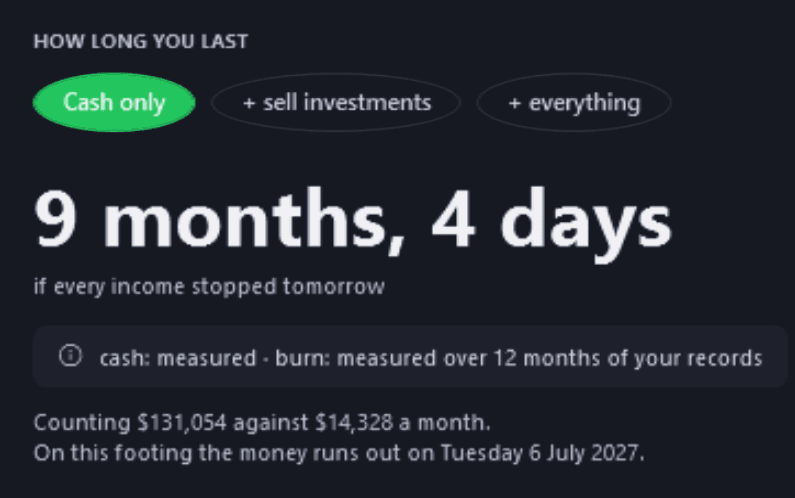
Runway turns a vague worry into one figure: if income stopped today, how long would the household's money cover its spending? It can count cash alone, cash plus investments after the estimated tax on selling them, or everything you own less what you owe.
A runway is only as good as its inputs, so each one says where it came from, and an estimate is labelled as one.
In the app
- FreeToday leads with your household runway, with every ingredient sourced.
Return: two honest answers to “how did I do?”Show the detailsHide the details
Once money moves in and out, a simple percentage can mislead: a large deposit shortly before a rise makes the year look better than the investments did.
Modified Dietz weights each deposit and withdrawal by the days it was invested, a standard approximation of a time-weighted return that largely removes the effect of when you added or took out cash. The money-weighted return (XIRR) is the yearly rate your own money earned on its exact dates, timing included. They answer different questions, so they can differ.

In the app
- ProPerformance shows Simple, Dietz and money-weighted returns for each financial year.
- FreeToday shows your money-weighted return so far.
Risk is more than the price movingShow the detailsHide the details
Volatility, how far a price swings, is only one layer of risk. Four matter together:
- Market: broad falls take most growth assets down at once.
- Concentration: one holding or sector quietly grows to dominate.
- Liquidity: needing cash at a moment when selling is costly.
- Behaviour: stress overriding a plan made in calm.
In the app
- ProRisk Analytics scores concentration, asset-class diversity, geographic spread and correlation, and says when one cannot be measured. Vital Signs checks the limits you set: single-holding and sector weight, drawdown, and an optional volatility target.
Diversification, and knowing why you own each thingShow the detailsHide the details
Spreading money across asset types, sectors and regions lowers the chance that one event decides your result. A common way to organise a portfolio is core and satellite: a broad core held for the long term, with smaller, targeted positions around it. Giving each holding a stated purpose makes it easier to explain what you own, and to notice when the mix drifts.
Each kind of asset offers something different and carries its own risks:
- Shares
- OffersA part of a company: growth, and sometimes dividends.
- RisksThe company can struggle, and markets fall.
- ETFs
- OffersMany holdings in one purchase, often at low cost.
- RisksThey still fall when their market falls.
- Bonds
- OffersSteadier value and regular interest.
- RisksRising interest rates and inflation.
- Cash and savings
- OffersMoney you can reach today, at a known value.
- RisksInflation wears away what it buys.
- Managed funds
- OffersA professional manager making the choices.
- RisksFees, and managers can trail their benchmark.
- Crypto
- OffersLarge price moves, in both directions.
- RisksExtreme swings and changing regulation.
In the app
- FreeTwelve ready-made groups, from Core to Hedge, plus groups you name yourself.
- ProThe Allocation Analyzer compares what you hold with the targets you set.
Behaviour: the quiet driver of resultsShow the detailsHide the details
Some of the costliest mistakes are habits rather than picks: reacting to short-term moves, adding to winners without noticing how large they have grown, reading income as growth, and letting records drift from what really happened.
A written plan, a regular review and records you trust make those habits easier to see.
In the app
- FreeWeek and Month in Review give a dated recap of what really changed, and Statement Check compares your records with your broker's statement.
- ProThe Lab's Behavioural Biases chapter looks for patterns in your own trades.
Planning: make the assumptions visible, then test themShow the detailsHide the details
Any projection rests on assumptions: what you add, what it earns, how long you wait. A useful plan shows them, so you can change one and see what moves. A projection is an estimate, not a promise.
History can test a plan too. Replaying today's holdings through past crises shows how they would have fared; it cannot say what the next fall will look like.
In the app
- FreeSavings Goals under Household → Spending; a different payment on any debt, to see when it clears; and one change or several together on the Family Dashboard, over 1, 5, 10 or 20 years.
- ProLook Ahead: goals, goal probability, a forecast over three rate scenarios, the What-If Simulator and the stress test. The Lab replays your portfolio through 2000, 2008, 2020 and 2022, from monthly returns.
Open the demo. Break things. Start clean.
Microsoft Store · Windows 10 (2004+) or 11 · 64-bit